How to set up comment-to-DM
Reply to a keyword in your comments with a public reply and a DM that carries the link, step by step in the builder, then test it from a second account.
Someone comments your keyword on a post or reel; HyperDM replies under the comment and sends them a DM with the link. It is the fastest automation to pay off, and the one the setup page leads with. Its Goal → Create → Review path lets you write and preview an example before connecting Instagram. The instructions below cover the full builder; Getting started covers setup and its draft-preserving connect-first exit.
Preview a customer example during setup
- On Create, fill in Keyword, Link to send and Message.
- Type an Example customer comment and click Preview. The example uses your current edits; a saved draft with no post selected, or an unbound next-post draft, can show its response on a hypothetical example post. It does not choose or bind a real post.
- Open Test trigger rules only when you want to test exclusions. Simulate a comment from the account owner checks a hypothetical owner comment: select it and click Preview. Working as intended: account-owner comments are ignored. is the expected result. Try as a customer keeps your input and reruns it as a customer example. The disclosure also offers Test comment surface, and selected/outside-post choices when real posts are already selected.
- Click Save draft & continue for Review, where you connect Instagram, choose the real post and deliberately turn the reply on. A passed example sends nothing and does not replace the real second-account test below.
Before you start
- Instagram is connected — Connect Instagram.
- You are an owner, admin or agent on the workspace.
- You know which post (or posts) the keyword should work on, and what link the DM should carry.
Open the builder
- Go to Automations in the sidebar (under Automate).
- A workspace that has built nothing yet shows six starter cards. Click Comment → DM. Otherwise click New automation and pick the trigger in the next step.
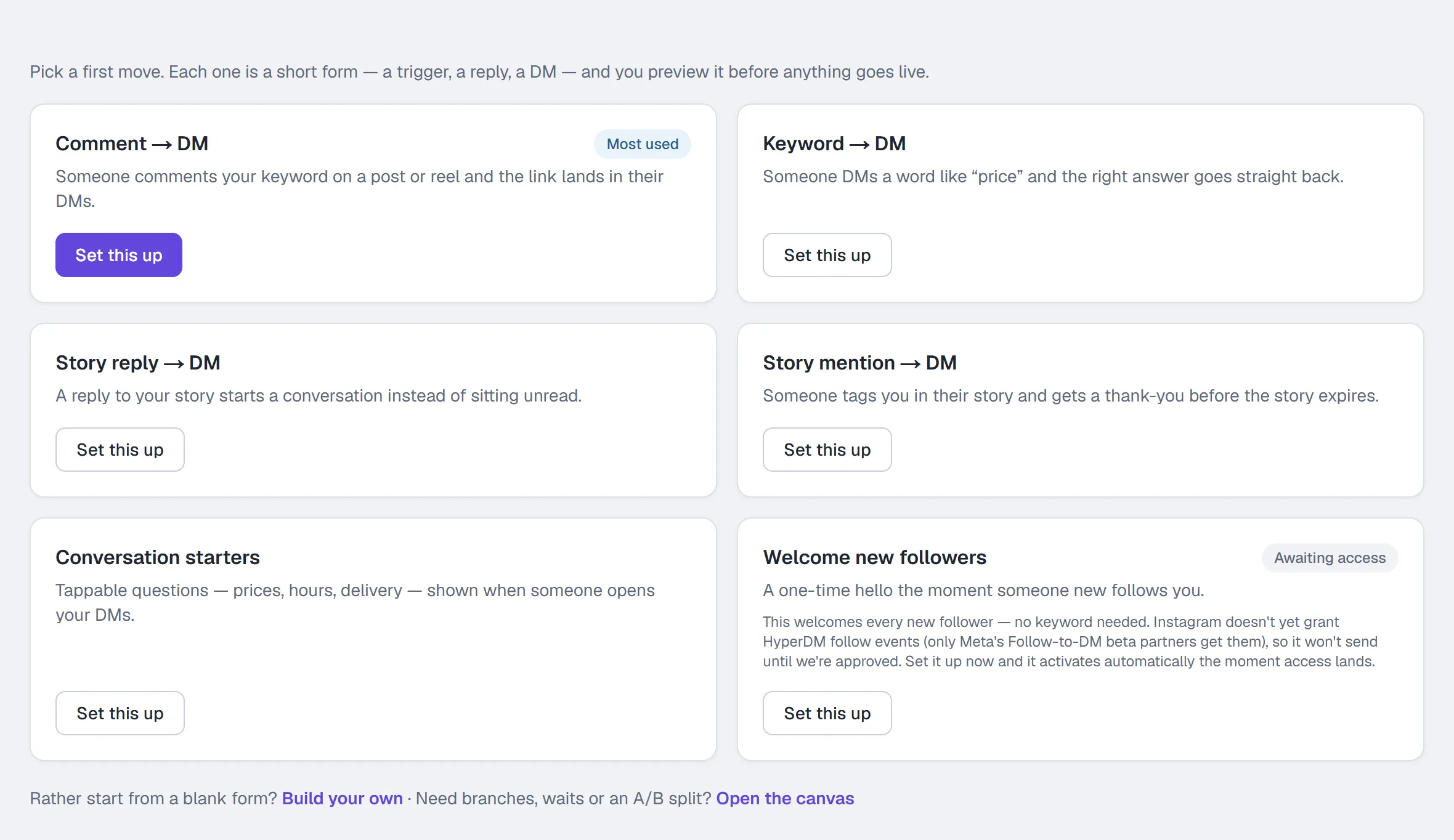
You can also get here from Growth tools → Comment-to-DM → Configure; it opens the same builder with the comment trigger already selected.
Fill in the form
The builder has three numbered sections — Trigger, Conversation and Follow-up — with a preview beside them. Optionally, type a sentence in the Describe it box at the top and click Draft it for me: it shows the changes it would make, and Use these changes fills them in for you to edit as normal.
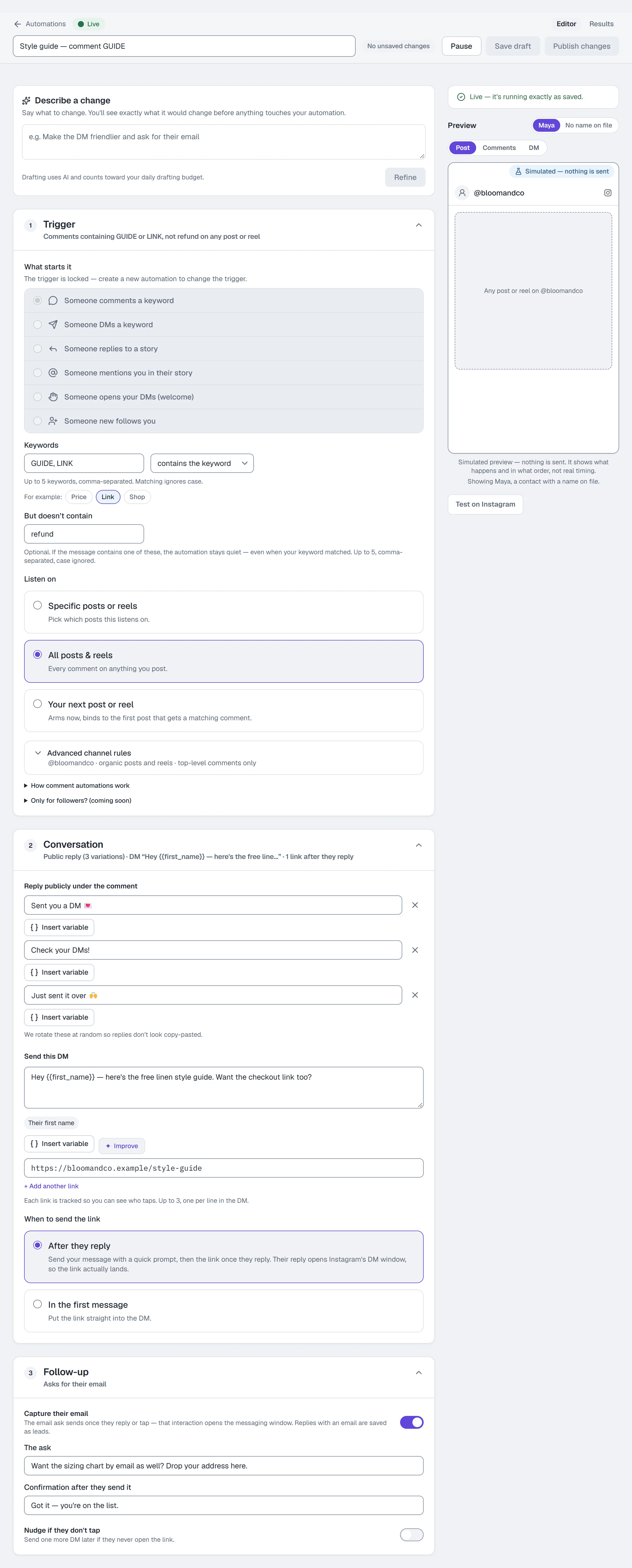
1 — Trigger
- Under What starts it, choose Someone comments a keyword.
- Enter up to 5 keywords, comma-separated, e.g.
GUIDE, LINK. Matching ignores case. The Price, Link and Shop chips fill the box with one tap. - Choose the match mode: contains the keyword or is exactly the keyword.
- Optionally click + Exclude words and add but doesn't contain words, e.g.
refund. A comment containing one of these is skipped even when the keyword matched. - Under Listen on, choose which posts this applies to:
- Specific posts or reels — your newest posts and reels show as thumbnails; click each one to use. Show all opens every post — pick there, then click Done.
- All posts & reels — every comment on anything you post.
- Your next post or reel — arms now and binds to the first post that gets a matching comment.
Started from Automate this post on Home (Home: your dashboard)? Specific posts or reels is already chosen, with that post picked.
- Advanced channel rules, below it, shows only when ads or a connected Facebook Page give you a choice; the line beneath it says what it is set to. Leave it on organic posts and reels for comments on what you post yourself. If the post is boosted or runs as an ad, click it open and under Where can the comment happen? choose Instagram ads or Both — Comment-to-DM on Instagram ads walks that job end to end.
2 — Conversation
- Write the public reply, e.g.
Sent you a DM 💌. This is what appears under their comment on the post. - Click + Add a variation for up to 3 replies. HyperDM rotates them at random so they do not look copy-pasted. One reply is fine; three is advice.
- Write the DM, e.g.
Hey {{first_name}} — here's the free style guide.Use Insert variable for First name, Last name, Username and any custom field. - Add up to 3 links, one per line. Each link is tracked, so you can see who taps — unless your workspace sends links exactly as typed (Settings → Workspace → Links, where it's offered). A link with a variable in it goes out as written and isn't counted.
- Under When to send the link, keep After they reply for a new automation: HyperDM sends your message with a quick prompt, and the link once they reply. Their reply opens Instagram's DM window, so the link actually lands. In the first message puts the link straight into the DM.
If an opening DM or link has an uncertain outcome, check that person's conversation in Inbox. HyperDM holds an uncertain send to avoid sending another copy; a known accepted message can recover after a temporary recording failure. Contact support before sending a replacement while the outcome remains unknown. A failed optional email ask does not undo an accepted link or count as capturing the person's email. If an email ask has an uncertain outcome, the person's later messages can still continue through your flows or agent. HyperDM keeps that ask held to avoid sending it twice. If a known earlier ask recovers after a recording failure, the person's later email reply can be saved on that same turn without asking them to send it again.
Check the DM tab of the preview: it plays the conversation in order — your DM, the prompt, the link after they reply — for a sample contact, and sends nothing.
3 — Follow-up (optional)
- Capture their email — asks for an email and saves it onto the contact. Write the ask and the Confirmation after they send it.
- Nudge if they don't tap — sends one more DM later if they never open the link. Set Wait N hours. Needs a link in the DM above.
Only for followers is a note marked coming soon in the Trigger section and cannot be switched on yet. To gate on following, build it as a flow with a Follow gate step — see Send the link only to followers below.
Save and publish
- Name the automation in the box at the top.
- Click Publish. Save draft keeps it without running it. If something is unfinished, Publish takes you to it — the list beside the preview shows what's left.
Send the link only to followers, with a flow
The form can't check whether someone follows you. A flow can, with a Follow gate step — and a flow's comment trigger can reply under the comment too.
- Go to Automate → Flow builder, choose Start from a template and pick Follower-gated link. (Or choose Start from scratch on Instagram, or use Open as flow in a comment automation's row menu (⋯) in Automations.)
- Click the Trigger. Check that Trigger type is Comment-to-DM, type your Comment keyword(s), and under Applies to choose All future posts & Reels or A specific post.
- Under Reply publicly under the comment, write the reply that appears under their comment, e.g.
Sent! Check your DMs (or Message Requests) ✨. Click + Add variation for up to 3 — one is picked at random for each comment. Leave it empty for no public reply. - Keep the first step short. It is the DM — the comment's one private reply — so it holds one text block and its button. In the template, that first step is the Follow gate, asking them to follow you and tap ✅ Following.
- Put your link in the step after the gate's Following exit, and send Not yet (and the gate's timeout) to a polite "follow me and comment again" message. The template has both.
- Read Design checks, then click Set live.
The public reply is posted only after that first DM is delivered, and at most once per comment. If the DM isn't confirmed delivered, nothing is posted under the comment — so it never points someone at a DM that isn't there. Most people commenting on a follow-gated campaign don't follow you yet, so the DM often lands in their Message Requests: say so in the reply, as the example does.
A live automation on the same keyword wins the comment, and the flow never runs — pause the automation once the flow is live. More in Flow builder.
Test it on Instagram
- From a second Instagram account — not the connected one — comment the keyword on one of the posts the automation listens on. The Test on Instagram button on the form spells this out for the trigger you chose.
- Within a few seconds the public reply appears under the comment and the DM lands in that account's inbox — and in your Inbox in HyperDM. With a flow, the DM comes first and the public reply follows once that DM is delivered.
Three Instagram limits to know while testing:
- A comment from the connected account itself is never answered. Instagram will not deliver a private reply to the account that owns the post, and HyperDM skips those on purpose — otherwise the echo of its own public reply would re-trigger the automation. This is the single most common reason a first test looks broken.
- Only comments made after the automation went live are processed.
- Instagram allows a private reply to a comment only within 7 days of the comment.
- On collab posts, comment events go to the original author's account, so a collaborator's automation will not see them.
A DM to someone who has never messaged you can land in their Requests folder.
After it is live
The row on the Automations list shows a Live badge and, under its name, its trigger, when it last fired and its funnel (clicked → emails); the runs are the Runs column. When two live automations share a keyword, the higher one wins: set the order with Move up / Move down in the row's ⋯ menu, in the Priority sort. Delete, in the same menu, stops it immediately and it stays restorable for 30 days under Recently deleted.
Common problems
It did not fire. Check, in order: was the comment posted from a second account (your own never works); is it Live; does the comment actually contain the keyword; is a but doesn't contain word in it; is a higher-priority automation catching it first; is it bound to that post; was the comment made after it went live. If you built this reply in setup, the Test it on Instagram screen answers all of these for you — it lists every comment that has arrived since the reply went live and what we made of each. More in Troubleshooting.
I boosted the post and the boosted comments get no reply. Instagram keeps the comments on the boosted version separate. Set Listen on to All posts & reels, then open Advanced channel rules and set Where can the comment happen? to Both.
I want to change the trigger. The trigger is locked on edit. Create a new automation.
Full reference for every field: Automations.
More in Instagram automations
- Set up keyword triggersAnswer a DM that contains a keyword with the right reply and link, straight from the builder, with the matching rules and the priority order explained.Read
- Set up intent recognitionSend a saved DM when a message is worded close to a description you write, instead of a keyword, and test it from a second account before you rely on it.Read
- Set up story reply automationsTurn a reply to your story, or a mention in someone else's, into a DM with the link — two triggers, built the same way and tested from a second account.Read
Try HyperDM for free
50 free conversations a month, no card. Connect Instagram and follow the guide you just read.