How to set up intent recognition
Send a saved DM when a message is worded close to a description you write, instead of a keyword, and test it from a second account before you rely on it.

A DM automation can compare each message with a short description you write, and send your DM when a message is worded close to it. It is the option for a question people ask in a few similar ways without a keyword you can count on.
Before you start
- Instagram is connected — Connect Instagram.
- You are an owner, admin or agent on the workspace.
- Only the Someone DMs a keyword trigger offers this. Comment and story triggers match on keywords only.
Build it
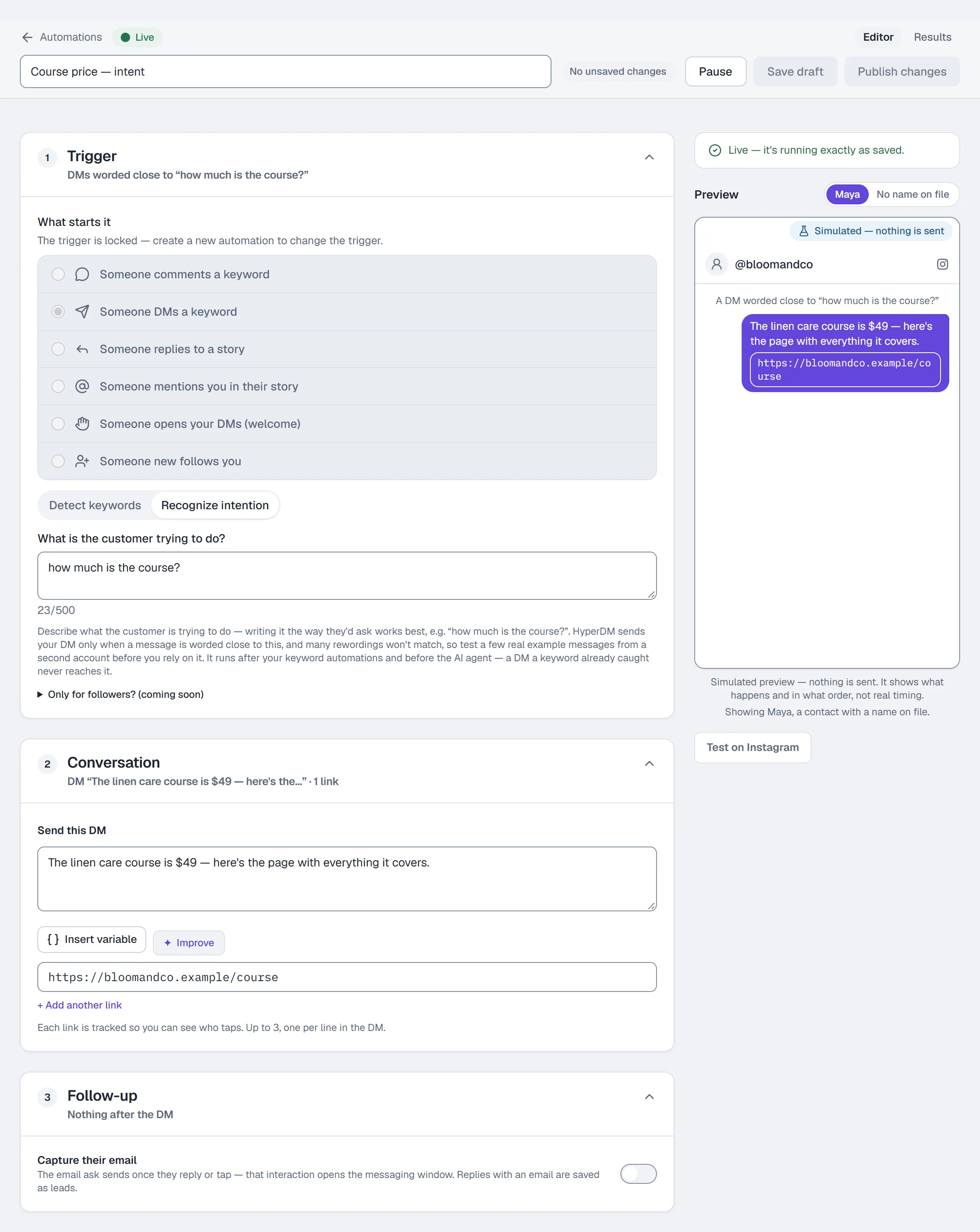
- Go to Automations and click New automation.
- In Trigger, under What starts it, choose Someone DMs a keyword.
- Click Recognize intention instead of Detect keywords.
- Describe what the customer is trying to do. Writing it the way a customer would ask works best — e.g.
how much is the course?. Up to 500 characters. - Under Send this DM, write the reply and add up to 3 links (tracked by default). The reply is always the DM you wrote here: intent recognition decides whether to send it, never what it says.
- Name the automation and click Publish.
If you see Example messages and Test messages instead of one description box, your workspace has the experimental V2 builder. Review 4–10 customer messages (or use Suggest examples), then enter a distinct Should match and Should not match message and click Check both. Both must pass before Publish. Try a message checks the current routing without sending a DM.
Test it before you rely on it
- From a second Instagram account, DM a few real example messages — written the way your customers actually write.
- Check which ones get your reply in your Inbox.
- Reword the description and repeat until the messages you care about match.
What to expect
It catches messages worded close to your description, and even a close rewording can miss. In our own test, how much does the course cost? matched how much is the course?, but whats the price of the course and how much is it? did not. Very short questions and shorthand usually won't match.
When nothing matches, no automated reply is sent — unless you have turned on the AI agent, which answers instead. For a question that must always get a reply, use a keyword trigger: a keyword anywhere in the message still matches.
Where it runs
It runs after your keyword automations and before the AI agent. A DM a keyword already caught never reaches it, and a DM it does not catch falls through to the agent if the agent is on.
Common problems
A message I expected to match got no reply. Reword the description closer to how that message was written, or add a keyword automation for it. Test again from the second account.
Two intent automations compete for the same question. The higher one in the Automations list wins. Make the descriptions more distinct, or merge them.
I upgraded to V2 and my old automation still behaves the same. Older automations keep their matcher until you choose Review and upgrade matcher on that automation.
Full reference: Automations.
More in Instagram automations
- Set up comment-to-DMReply to a keyword in your comments with a public reply and a DM that carries the link, step by step in the builder, then test it from a second account.Read
- Set up keyword triggersAnswer a DM that contains a keyword with the right reply and link, straight from the builder, with the matching rules and the priority order explained.Read
- Set up story reply automationsTurn a reply to your story, or a mention in someone else's, into a DM with the link — two triggers, built the same way and tested from a second account.Read
Try HyperDM for free
50 free conversations a month, no card. Connect Instagram and follow the guide you just read.