How to set up story reply automations
Turn a reply to your story, or a mention in someone else's, into a DM with the link — two triggers, built the same way and tested from a second account.

Two different things happen around stories, and HyperDM has a trigger for each:
- Someone replies to a story — they answer your story. You can filter on a keyword.
- Someone mentions you in their story — they tag you in theirs. There is no message text, so every mention gets the same reply.
They never fire each other's automations. Build one of each if you want both.
Before you start
- Instagram is connected — Connect Instagram.
- You are an owner, admin or agent on the workspace.
Reply to story replies
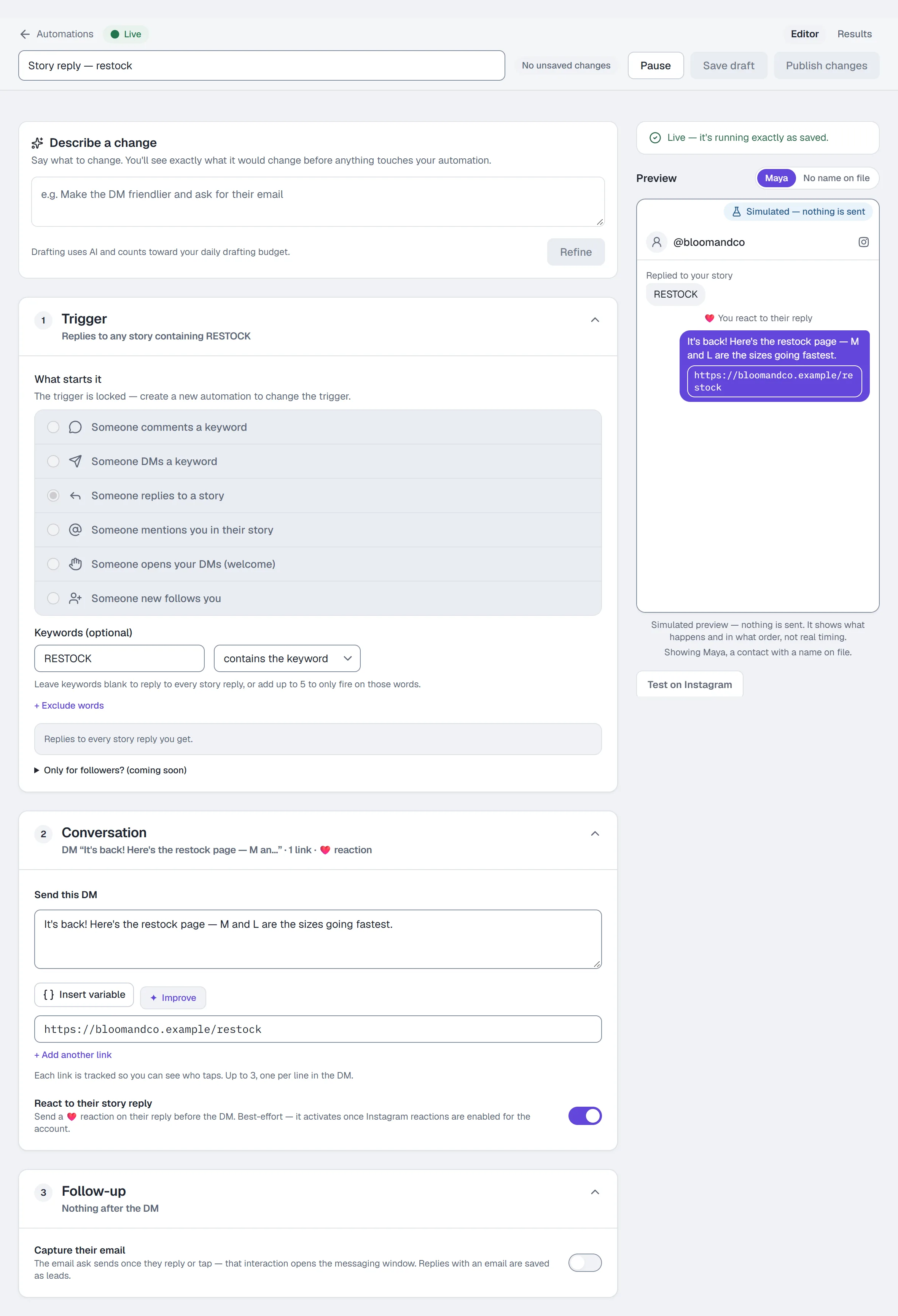
- Go to Automations and click the Story reply → DM starter card, or New automation → Someone replies to a story.
- Leave the keywords blank to reply to every story reply, or add up to 5 to fire only on those words, e.g.
RESTOCK. Matching ignores case. but doesn't contain works the same way as on other triggers. - The automation listens on every story you post. There is no per-story choice right now: Instagram stopped returning the list of active stories to apps connected the way HyperDM is, so the picker is not shown rather than shown empty.
- Under Send this DM, write the reply and add up to 3 links (tracked by default).
- Optionally switch on React to their story reply — a ❤️ on their reply before the DM. It is best effort and activates once Instagram reactions are enabled for the account.
- Name it and click Publish.
If you built a story automation earlier that is set to specific stories, it cannot fire — open it and press Listen on every story to switch it over.
Reply to story mentions
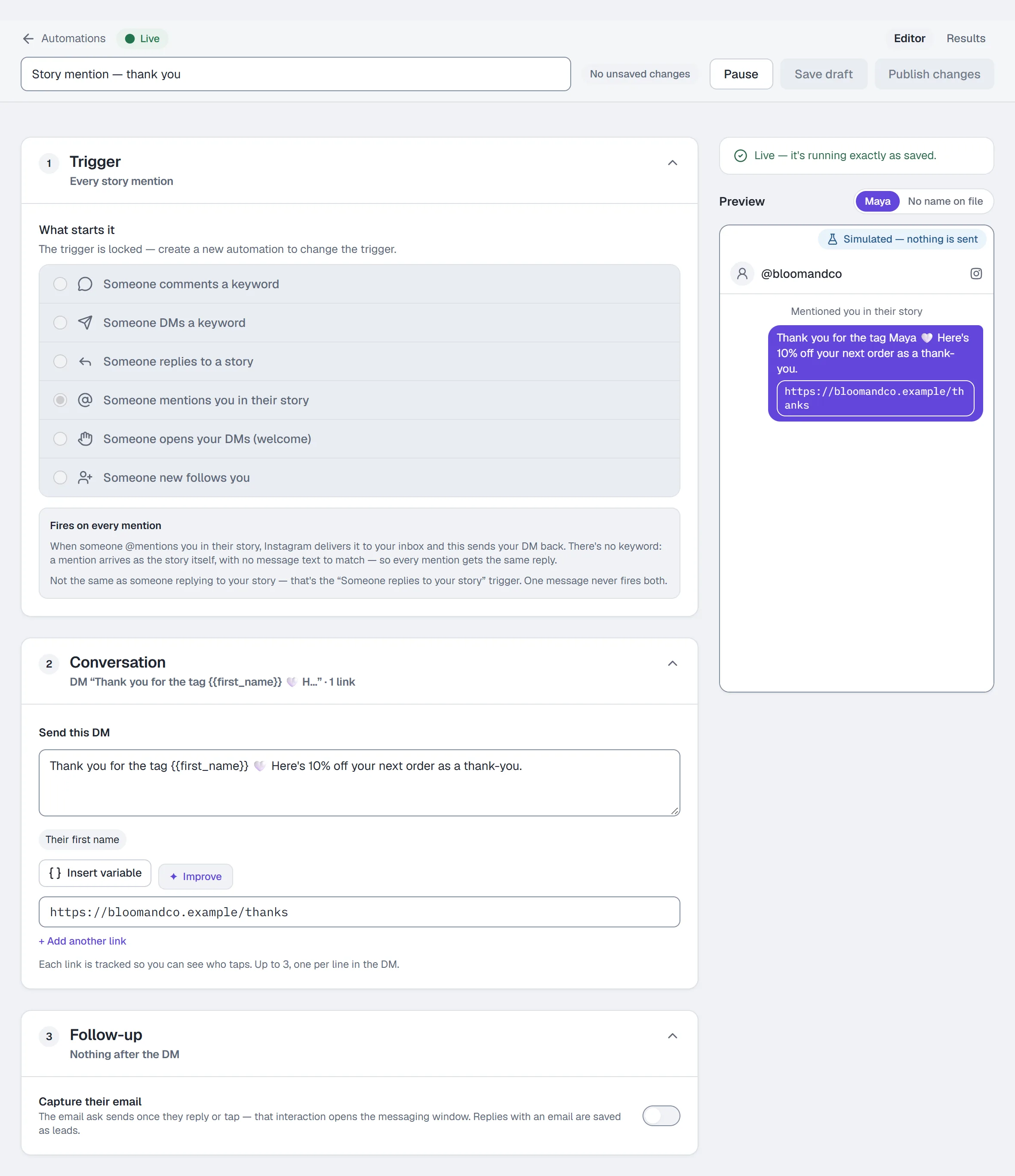
- Click the Story mention → DM starter card, or New automation → Someone mentions you in their story.
- There is nothing to configure in the Trigger section: a short note explains that every mention gets the same reply. Saving a story-mention automation with keywords is refused, because a mention carries no text to match.
- Under Send this DM, write the thank-you and add a link if you want one.
- Name it and click Publish.
Story mention needs no beta and no keyword — it is routable today.
Test it on Instagram
From a different Instagram account:
- Story reply — reply to one of your active stories. Any reply, if you set no keyword; otherwise a reply containing the keyword.
- Story mention — post a story and tag your account in it, with the @ sticker or an @mention in the text. Instagram delivers it to you as a DM.
The reply lands in your Inbox in real time. There is no simulated send.
Common problems
My story reply automation never fires. It must be Live, the story must still be active, and if you set a keyword the reply must contain it. An automation set to specific stories cannot fire — press Listen on every story.
I saw "Waiting on Instagram access" on the story-mention form. That notice belongs to the new-follower trigger only; story mentions have worked the whole time. If you shelved one because of it, set it live.
I want a "next story" option. There is not one: a story dies in 24 hours, so arming against one would target something that expires before you notice.
Full reference: Automations.
More in Instagram automations
- Set up comment-to-DMReply to a keyword in your comments with a public reply and a DM that carries the link, step by step in the builder, then test it from a second account.Read
- Set up keyword triggersAnswer a DM that contains a keyword with the right reply and link, straight from the builder, with the matching rules and the priority order explained.Read
- Set up intent recognitionSend a saved DM when a message is worded close to a description you write, instead of a keyword, and test it from a second account before you rely on it.Read
Try HyperDM for free
50 free conversations a month, no card. Connect Instagram and follow the guide you just read.