Home: your dashboard
Your home screen: draft an automation with AI, quick actions, your latest posts and which have an automation, your numbers, usage, Recents and Quickstarts.
Sidebar: Daily → Home (the address is still /dashboard). The screen you land on. Start something new from the top — describe an automation, or pick a quick action — and check, further down, how busy you are, how close you are to your plan limit, and whether anything is waiting on you.
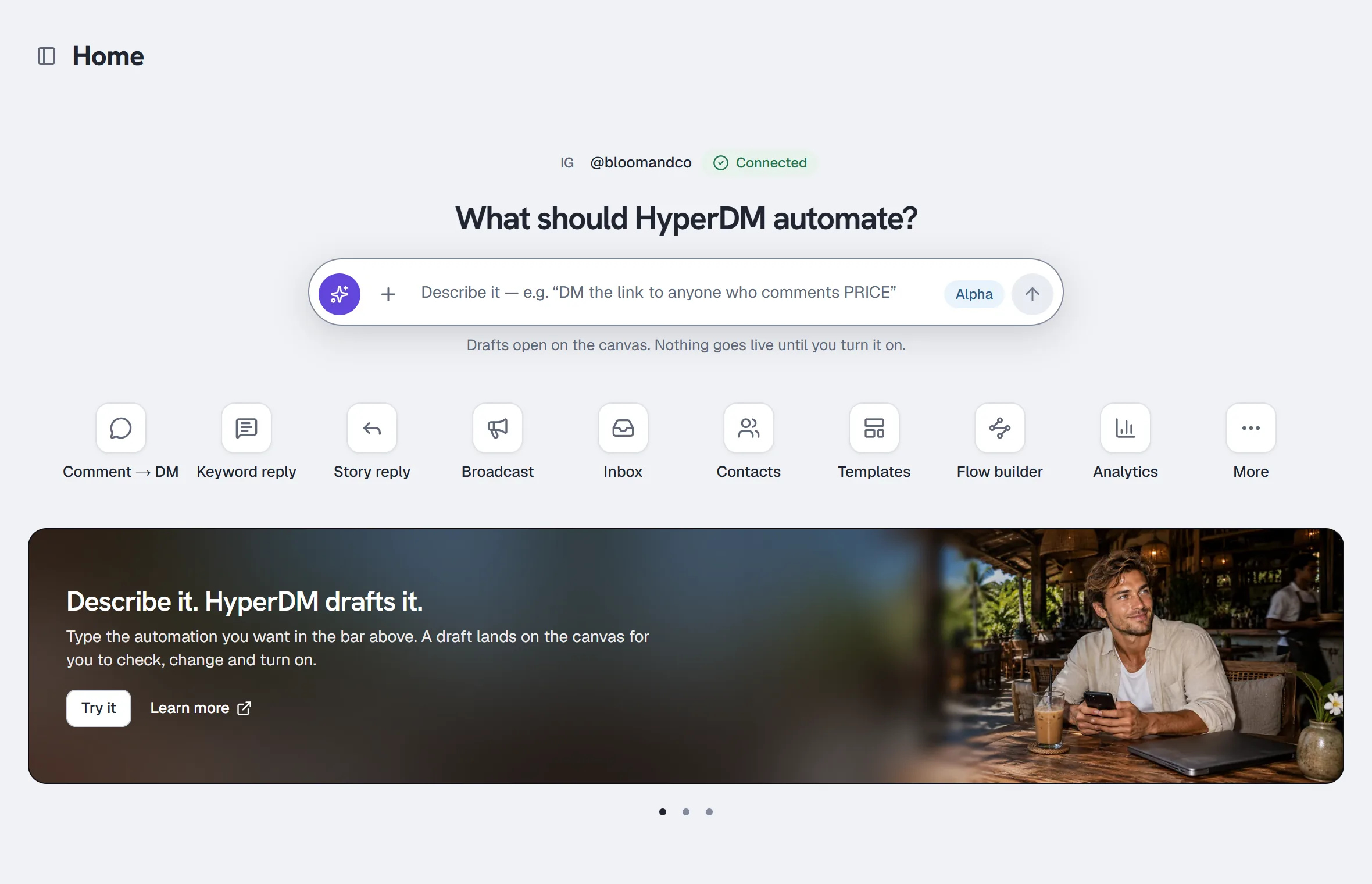
What is on the page
The header row
Home, with the sidebar toggle beside it on a computer (the same as Collapse at the bottom of the sidebar, or ⌘B / Ctrl+B).
The bar at the very top of every page that has the sidebar — not only Home — also has:
- Jump to…, in the middle: a search of the pages in your sidebar and a few actions (Draft an automation with AI, New automation, New broadcast, where your role has them). Press ⌘K on a Mac or Ctrl K elsewhere on any of those pages, type, then ↑/↓ and Enter. The flow builder and setup have no sidebar, so the shortcut isn't there. It searches pages and actions, not your contacts or messages. Draft an automation with AI jumps to the prompt bar on Home, and anywhere else opens a new flow with its Create with AI bar ready. On a phone it isn't shown — use the tabs at the bottom.
- Feedback, next to Help, which opens the feedback form. On a phone it is Help → Send feedback. Help also has the help centre and the help assistant.
Connected account
Over the big question, one line names the Instagram account HyperDM is running on: a small profile picture, the @handle (cut short with "…" when it is long) and a green Connected chip. It appears in every state, including a brand-new workspace, so you always know which account is live. If Instagram is not connected the line is absent.
What should HyperDM automate?
The prompt bar drafts an automation from a sentence — the same Create with AI as the flow builder's bar, with the same limits and plan rules. It shows only if your role can change automations; otherwise the heading reads "Here’s what’s happening in your DMs".
- Type what you want in the bar — the trigger and what should happen, like "When someone comments PRICE on my reel, DM them the link". Or press + (Start from an example) and pick one of the three examples to put it in the box, or Browse templates to jump to Quickstarts.
- Press Enter, or the round arrow (Draft it with AI). Shift+Enter starts a new line.
- The flow builder opens on a new canvas and drafts it there; the request appears in its AI bar.
- Review the draft, change anything, then Use it. Nothing goes live until you turn it on.
The bar needs at least eight characters ("Say a little more — the trigger and what should happen."). If your plan has no room for another flow, the drafting budget is used up, or the draft fails, the flow builder says so in its own bar — where you can try again. The Alpha badge means the feature is new and still improving. There is no microphone: HyperDM records voice notes for messages, but does not turn speech into text.
Setup card (where offered)
Where the three-stage setup page (Goal, Create, Review) is offered, a workspace that left setup unfinished gets one card near the top, under the prompt bar and the connected account — above You’re all set on a brand-new workspace, and above the quick actions and the stat tiles otherwise. Its title is the next step:
- Choose what to set up first — no goal picked yet.
- Finish your draft — the reply (or the AI's facts and preview) isn't finished.
- Connect account — Instagram isn't connected and working yet. Connecting doesn't turn anything on.
- Review and turn on — check what will run, then turn it on; nothing runs until you do.
- Test your live reply — it's live and hasn't delivered yet. Testing is optional.
Under the title, Then lists up to three steps after this one, with testing marked optional. Continue setup opens the setup page on the right stage. Not now hides the card for everyone in the workspace; your draft stays, and the card comes back the next time someone leaves setup with Finish later, Keep draft & explore or Test later & open dashboard — or when the owner leaves with Explore first once a goal is chosen (a teammate's Explore first changes nothing).
There is no card once setup is done (your setup reply has delivered, or AI replies are on), after the owner chose Explore first before picking a goal, for someone whose role can't do the next step (the AI steps need an owner or admin), or in a workspace that never opened the three-stage setup page.
Quick actions
A row of shortcuts under the prompt bar, each an icon with its name; on a phone the row scrolls sideways.
| Tile | Opens |
|---|---|
| Comment → DM, Keyword reply, Story reply | The automation builder, already set to that trigger |
| Broadcast | A new broadcast |
| Send an automation | Starts one of your automations for a list of contacts (see Broadcasts) — shown only where it is switched on for your workspace, on Growth and up |
| Inbox, Contacts, Analytics | Those pages |
| Templates | Quickstarts, further down this page |
| Flow builder | A new flow on the canvas (in More when Send an automation is in the row) |
| More | Story mention, Conversation starters, All automations (your automations list), the AI agent, Growth tools and the Media library |
What you get depends on your role: the trigger tiles, Templates, Flow builder, All automations, Growth tools and the Media library need a role that can change automations, and Broadcast and Send an automation one that can send broadcasts. A shortcut that would only open a page saying "your role can't do this" is not shown. If HyperDM can't check your role for a moment, none of those shortcuts show and Quickstarts says so — refresh to try again. Welcome new followers isn't a tile yet — it waits on Instagram's follower access.
Your latest posts
Under the quick actions: your ten newest Instagram posts and reels, side by side, and a line saying how many of them have no comment automation yet. It shows when Instagram is connected and your role can change automations. On a phone, swipe the row sideways; on a computer, use the arrows at its edges.
Each post has a chip on its picture and one button:
| Chip | What it means | Button |
|---|---|---|
| Live | An automation or flow that's on answers comments here — one picked for this post, or one on every post ("Via … · every post") | Open automation or Open flow |
| Not live | An automation picked for this post is saved but has never been turned on | Finish setup |
| Turned off | An automation picked for this post ran before and is switched off now | Open automation or Open flow |
| No automation | Nothing answers comments on this post yet | Automate this post |
To automate a post from Home:
- Find the post with No automation and click Automate this post.
- The automation builder opens on Someone comments a keyword, with Listen on set to Specific posts or reels and that post already picked.
- Fill in the keywords and the DM as usual (Set up comment-to-DM), then turn it on. Back on Home, click Refresh: the post now says Live.
An automation for Instagram ads only doesn't count for your posts, and Your next post or reel counts once it has picked its post. The arrow in a picture's top corner opens the post on Instagram in a new tab. More posts, at the end of the row, shows ten more; All automations → opens your automations list. Coming back to Home within a minute shows the same posts without asking Instagram again; Refresh always checks now.
If Instagram can't be reached the row says so with Try again — or, when you pressed Refresh, keeps the posts it already showed and says they couldn't be refreshed. If Instagram needs reconnecting it offers Reconnect Instagram. If HyperDM can't check your automations for a moment, it shows no posts rather than marking any as No automation by mistake — click Try again.
What's new
A wide banner showing one of three slides at a time — drafting with AI, starting from a recipe, and letting the AI agent answer what your automations don't — each a photo with the words on its left, Try it and Learn more (the help centre, in a new tab). Where Home is narrower (a phone, a small window, or the sidebar taking the room) each slide is a card instead, the photo on top and the words under it. The slides fade from one to the next every few seconds. They stop while your pointer is over them or you are using the keyboard inside them, and the small pause button in the banner's corner (Pause slides) stops them until you leave Home; with reduced motion turned on in your device settings they never move on their own. To move by hand, use the dots under the banner (with a dot selected, the ← and → keys move too), or swipe sideways on a phone. Try it is missing where your role couldn't use it.
The stat tiles
Three or four tiles, depending on whether you have revenue — three in a row, or four as two rows of two (never three and a lone fourth):
| Tile | What it counts | Window |
|---|---|---|
| Conversations | Conversations this billing period | this month |
| Contacts | Every contact in the workspace | all time |
| Automation runs | Total fires across your automations, with N live beneath | all time |
| Revenue | Paid orders attributed to your workspace | last 14 days |
Revenue only appears once there is at least one real paid order. A $0.00 tile would read as "we tried to sell and failed" rather than "commerce isn't set up yet", so the honest empty state is no tile. If your store takes more than one currency, the tile's subtitle says so (+2 more currencies) — the headline figure is one currency's total, not everything you made.
Deleted automations are excluded from Automation runs: they are in the trash and cannot fire. If this month's conversation count could not be read, its tile says Not available rather than showing a zero.
Recent conversations
The six most recent threads, as a table with three columns: Contact (the name or @handle, with the channel — Instagram, WhatsApp, SMS — named under it), Last message (cut short when it is long) and Status:
- HyperDM AI — the agent is handling this thread.
- Needs human — you took over, so the agent is standing down.
The rows themselves are not clickable — Open the Inbox → above the table (or the Inbox in the sidebar) takes you there to reply.
Refer & earn prompt
Once your first paid order lands, a dismissible "Love HyperDM?" card appears in the right column, after Usage this month and Needs attention — Refer & earn → opens Settings → Refer & earn, and Dismiss hides the card for good on that browser.
Small-creator discount
Where the offer is on, a card at the very bottom of the page says whether your Instagram qualifies for 50% off for 3 months (see Plans and billing). It loads after the rest of the page, at the bottom, so nothing moves when it appears.
Usage
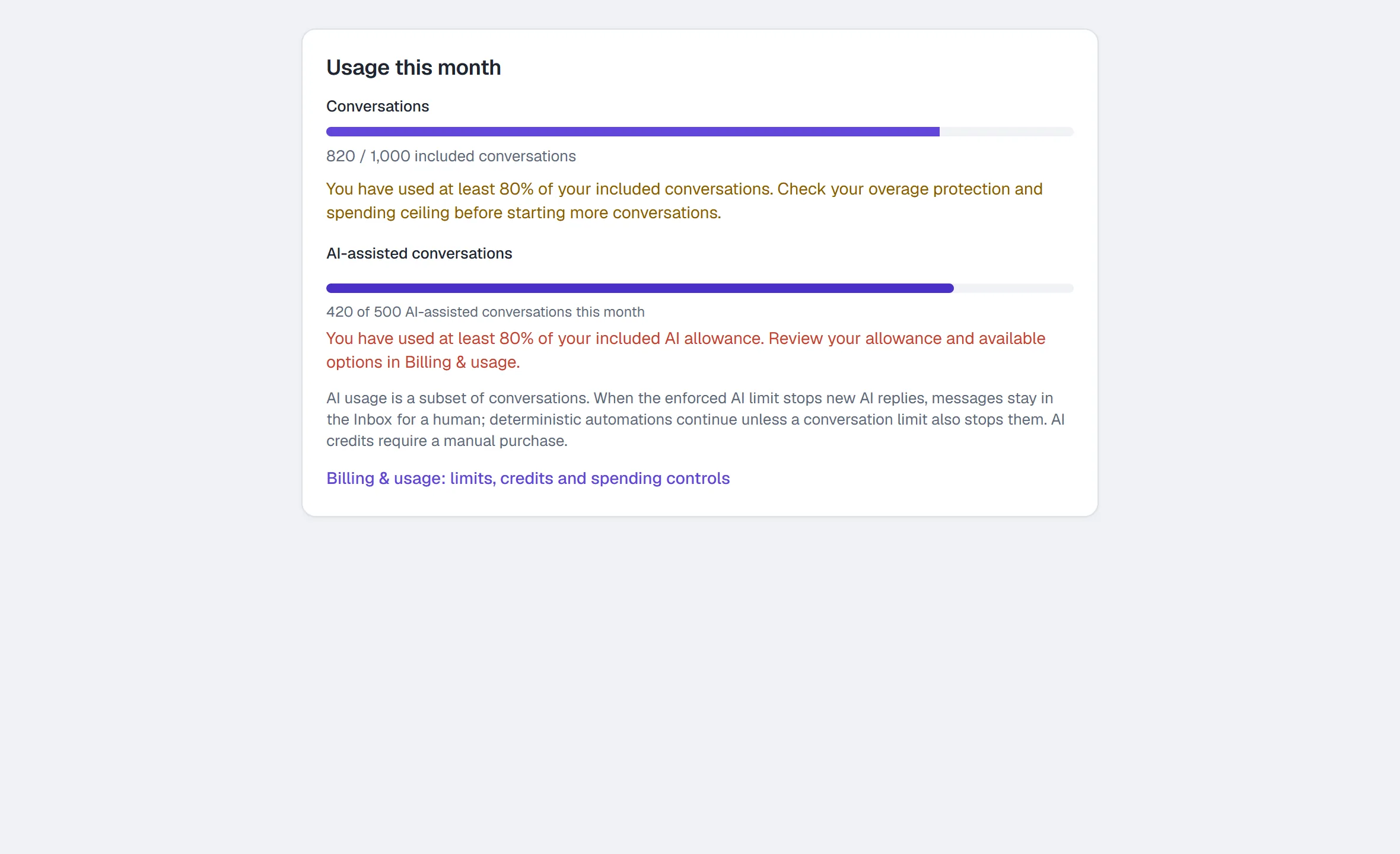
Usage this month shows separate Conversations and AI-assisted conversations. AI-assisted conversations are a subset of your conversations, not an extra charge for each message. For an agency-billed workspace, the conversation and AI bars use the shared agency pool. On Free there is no separate AI allowance; its conversation cap applies to both.
Each paid allowance warns at 80%. Using up an included allowance is different from an enforced stop: conversation overages, overage protection and spending ceilings determine whether new conversations can continue. On Free there is no overage to protect against: at 80% the card says new automated conversations stop at your allowance until the next month starts (UTC) or you upgrade — or, while billing is paused, until billing resumes; on your agency's Free plan, until your agency is on a paid plan — and that nothing past it is billed. When the AI allowance stops new AI replies, messages remain in the Inbox for a human. Deterministic automations continue unless a conversation limit also stops them. AI credits are bought manually, never automatically. A failed usage read says temporarily unavailable, rather than displaying zero. The card also appears on a fresh workspace.
- Open Daily → Home and find the Usage this month card: on a wide screen it is to the right of the stat tiles; on a narrower one it comes after Recent conversations. On a brand-new workspace it sits beside (or under) the You’re all set card.
- Check each bar separately, including any warning or stop notice.
- Open Billing & usage: limits, credits and spending controls for the actual stop point, spending ceiling and, where available, overage protection (paid plans only — Free has none) and Buy AI credits.
See Plans and billing for prices and eligibility.
Needs attention
Conversations you've taken over (the AI is standing down for that contact) — up to five, each with a Took over chip and a link straight into the Inbox; any beyond five are in the Inbox itself. When nothing is flagged, the card tells you the truth about who is answering, with a chip that names the state — All good, Replies off, Paused, Limit reached or Unavailable:
- If AI replies are on: "Nothing needs you right now — HyperDM is answering the DMs your automations don't catch."
- If AI replies are off: "Nothing flagged. AI replies are off, so anything your automations don't catch is waiting for you in the Inbox."
That distinction matters. The second sentence is the one most new workspaces are actually in, because the AI master switch ships off.
While this month's AI-assisted conversations are used up, the AI agent is paused for new conversations, so with AI replies on (and nothing flagged) the card says that instead of the first sentence: "The AI agent is paused for new conversations — this month's AI-assisted conversations are used up. DMs only it would answer wait in the Inbox; Settings → Billing & usage says when it resumes." Your automations keep replying meanwhile. The card says this only while your conversations themselves can still start: if a conversation limit has stopped replies, automations pause too — the banner at the top of the page says so, and this card doesn't show the paused line. It never appears on Free, whose AI-assisted conversations are simply its conversations. See AI-assisted conversations.
Recents and Quickstarts
Two tabs near the bottom of the page.
- Recents — the automations, flows and broadcasts edited most recently (up to ten), newest first, each with its kind, its status (Live, Not live, Scheduled, Sending, Sent, Failed or Canceled) and when it was last edited. Select one to open it (a sent broadcast opens its results). Broadcasts are listed only for a role that can send them. If the list can't be loaded it says so, and the tabs open on it — it never pretends there is nothing. If only part of it loads, what did load is listed with a line saying the rest couldn't be.
- Quickstarts — eight official templates from the template library, popular ones first. Select one to open a new flow with that template installed, ready to review, swap your words into and turn on. A role that can't change automations sees the cards without the links, and why.
The page opens on Recents when there is anything in it, and on Quickstarts otherwise. Each tab has a search box that filters as you type.
The empty states
Two, and they say different things:
- No workspace yet — "Welcome to HyperDM. Connect your Instagram account to start turning DMs and comments into conversations — this page fills in as they come."
- Workspace exists, but nothing has happened yet — "You’re all set." What it says underneath depends on whether Instagram is connected: if it isn't, it explains that your DMs will appear here once you connect, and the button is Connect Instagram. If it is, it tells you everything will appear here in real time and nothing has arrived yet, and the button is Create an automation — because you have already done the connecting, and an automation is the fastest way to cause a first DM. That button, like the prompt bar, is there only for a role that can change automations; any other role gets no button here. Either way the quick actions, What's new, Usage this month and Quickstarts are there too.
Common questions
Why is my Revenue tile missing? There is no paid order in the last 14 days, or commerce isn't set up. See Products.
Why doesn't the conversation count match Analytics? It does — they read the same source. The Home tile and the Analytics Conversations tile are both "this month". The Analytics charts use the range you pick at the top of that page, which is a different window.
Can I change what's on Home? No. The layout is fixed. The quick actions you see depend on your role (see below).
A card appeared in the corner saying "Hit a snag? Tell us". That’s the one-time welcome nudge, shown on your first visit to Home in your first week. It is there to say that Feedback goes to the HyperDM team — setup is a few steps (connect Instagram, set up a reply, test it), and if Instagram won’t connect or a test reply doesn’t arrive, that is the way to tell us. Any reply comes by email. Send feedback opens the form; Got it, the × or Escape close it. It is shown once per account and never comes back. Feedback is always available afterwards from Feedback next to Help in the header (or Help → Send feedback).
When a conversation limit has stopped replies, Needs attention also says new automated replies are paused. It never claims the AI is answering while that stop is active. If the limits cannot be read, Needs attention says reply status is unavailable. Successfully read usage meters remain visible, but the page does not claim replies are running or stopped without that evidence.
More in Getting started
- Getting startedFrom sign-up to your first sent link, one screen at a time: write the reply, connect Instagram, choose a post, turn it on and test it — or set up the AI.Read
- Connect InstagramConnect your Instagram professional account to HyperDM from the setup page or from Settings, then check that the Instagram card says Connected.Read
- Switch to a professional accountCheck whether your Instagram is a Business or Creator account, and switch a personal one in the app or on instagram.com so it can connect.Read
Try HyperDM for free
50 free conversations a month, no card. Connect Instagram and follow the guide you just read.