Plans and billing
Every plan and what it includes, each gate, overage protection, a monthly ceiling, AI credits, what stopped your replies, and how to upgrade, pause or cancel.
Home's Usage this month card shows conversations and AI-assisted conversations separately, including agency pool usage. Each bar warns at 80% of its included allowance. The AI warning also appears here in Billing & usage. An allowance warning alone does not mean replies stopped: read the current stop notice and your overage protection/spending controls. AI credits are purchased manually; HyperDM does not automatically buy AI credit packs.
HyperDM is priced per conversation, not per contact: you're billed on conversations answered, never on reach, followers or the contact list. A viral post that brings a thousand lurkers does not inflate your invoice, because nobody who never gets an automated DM is counted — but every commenter your automation DMs is one conversation, whether or not they reply.
A conversation starts when HyperDM delivers an automated reply to one customer in one campaign — an automation, a flow, or an open chat with your AI — however many messages follow. Further replies in that active conversation are included. It can count again when HyperDM delivers the next automated reply after more than 5 quiet days since the last delivered automated reply, in a new calendar month (UTC), or for a different campaign. Running another campaign doesn't close the first one's active conversation, and a scheduled flow step's own delay doesn't open a second conversation in a campaign already counted that month. Never per message, never per contact — see Core concepts.
Billing lives at Settings → Billing & usage, and is owner only.
The plans
| Plan | Per month | Annual (per month) | Included conversations |
|---|---|---|---|
| Free | $0 | $0 | 50 |
| Starter | $19 | $16 | 500 |
| Growth | $49 | $41 | 2,000 |
| Pro | $99 | $83 | 6,000 |
| Agency | $599 | $499 | 12,000 (pooled) |
Annual is billed yearly at 12× the annual column — $192 for Starter, $492 for Growth, $996 for Pro. That is up to 2 months cheaper than paying monthly: you save $36 a year on Starter, $96 on Growth and $192 on Pro.
Free — your first channel, free
- AI agent on every conversation
- 1 DM channel at a time — Instagram (WhatsApp, TikTok & Telegram coming soon)
- Connect your Shopify catalog to ground answers
- Compliance gate + audit log — on every plan
- Analytics — key metrics vs last period, automation results & a 7-day activity log
- Instagram menu: 3 items (20 on paid)
- 1 knowledge source of your own (unlimited on paid)
- 5 flows, and the full visual builder
- "Powered by HyperDM" badge on replies
Starter — small DTC stores
- 100 AI-assisted conversations / mo
- Every DM channel at once — Instagram now, WhatsApp, TikTok & Telegram coming soon
- No "Powered by HyperDM" badge
- Unlimited flows
- Rules engine — tag, field and date triggers
- Voice, video & document sends
- Product cards in-thread — the agent sends the buy link itself
- Unlimited knowledge sources
- Trends — DMs, clicks & inbound by day and by hour
- 30-day activity log
Growth — growing stores
- Everything in Starter
- 4× Starter's conversation volume
- 500 AI-assisted conversations / mo
- Broadcasts & sequences
- Saved segments
- AI comment replies under your posts
- Revenue attribution + order tracking
- Full analytics — reply speed, contact sources, busiest hours & retention
- 90-day activity log with CSV export, and folder totals
- Content performance — comments, keyword comments & trigger rate per post
- AI step & A/B splits inside flows
- 2 seats (you + 1 teammate)
Pro — scaling brands
- Everything in Growth
- 3× Growth's conversation volume
- 1,500 AI-assisted conversations / mo
- 10 seats (you + 9 teammates)
- Roles & permissions
- Geo analytics — see where your link taps come from
- 12 months of analytics history + a custom date range
- Audience insights — top commenters & superfans
- Priority support
Agency — agencies & multi-brand operators
- Everything in Pro
- Unlimited team seats (per workspace)
- 10 client workspaces, one bill ($29/mo per extra, max 25 — see Organization)
- Pooled conversations across clients
- 3,000 AI-assisted conversations, pooled
- Switch clients from one login
See Organization.
The creator discount (under 5,000 followers)
When it's offered, an Instagram account with fewer than 5,000 followers gets 50% off Starter, Growth or Pro, billed monthly, for 3 months: Starter $9.50, Growth $24.50, Pro $49.50 a month, then the normal price. Overage and AI credit packs are not discounted, and annual billing and Agency are not included. It is one discount per Instagram account, and only for a workspace that has never had a subscription or a free trial. On Growth you choose: the 14-day free trial or the discount, never both.
- Connect Instagram. If your account is personal, switch it to Creator first (free, takes 30 seconds — see How to switch to a professional account), then connect it, and we'll check your follower count.
- On Home, a card says You qualify: 50% off for 3 months with a button per plan. The upgrade picker shows a 50% off for 3 months button under Starter, Growth and Pro. If the card says We couldn't check your followers, click Try again.
- On Stripe's checkout page the discount is already applied — there is no code to type.
If the check fails when you click, you land back on Billing & usage with a note that nothing was bought, and you can try again or pick a plan at full price. Growing past 5,000 followers later never removes your discount. It only ends early if you connect a different Instagram account that has 5,000 or more followers, or switch to annual billing (the discount covers monthly plans; Change plan warns you first) — a disconnected or expired connection never removes it. A workspace that had a paid plan before, even one since cancelled, doesn't qualify.
The 14-day Growth trial
When it's offered, Growth comes with a 14-day free trial, card required — the Growth card on the pricing page and the upgrade picker's Start 14-day trial button say so. It is one trial per workspace, and only for a workspace with no subscription. Starter and Pro have no trial, and Free needs no card at all.
Starting it:
- Click Upgrade — in Settings → Billing & usage, or Upgrade plan at the bottom of the left sidebar. If the Growth card's button reads Start 14-day trial, clicking it starts the trial; if it reads Choose Growth, your workspace can't take one there. (The Growth card on the public pricing page always mentions the trial, because that page can't tell whose workspace is looking — the checkout still applies the rule above.)
- On Stripe's checkout page, add your card. Nothing is charged for Growth until the trial ends.
- You come back to Settings → Billing & usage, which says "Card saved — your 14-day Growth trial has started." Growth's limits and features, and the trial's end date on your plan, apply as soon as Stripe confirms the trial — if your plan still says Free, refresh the page.
While it runs, Billing & usage shows "Growth trial · ends {date}, then $49/mo ($492/yr if you chose annual billing) — first charge on {date}" where a paid plan shows its renewal date — the same day twice: the day the trial ends is the day Growth is first charged. Manage subscription works as on any paid plan. Where a paid plan states its overage price, the tab says instead that during your trial replies keep going past your included conversations unless Overage protection is on — it quotes no overage price for the trial itself — and that from your plan's first charge each conversation past your cap is $0.05, as on any paid plan. If you set a Monthly ceiling above your cap during the trial, the form says how far replies go rather than an overage amount. The 80% email says the same: what happens at your cap during the trial, and the $0.05 once the trial ends and Growth is first charged — a trial often ends partway through a month, and conversations past your cap from that day on are billed. Overage protection does what it always does: on, new conversations pause at your included conversations until the month resets. Pause billing isn't offered during a trial — there's nothing being charged yet to pause.
Before it ends, you get two reminders. About a week before the trial ends, Stripe — the payment company that bills HyperDM — emails the billing address on file a short reminder with a link to manage or cancel the subscription (it comes from Stripe on our behalf and may show our company name, CobraCorp). Then, two to four days before the trial ends, the workspace owner gets one email from us (at their sign-in address; the first owner, if the workspace has several) saying exactly when the trial ends — the date and the time, with its time zone — your first charge as of the day it's sent (Stripe's own figure that day, after any discount or account credit you have then; a credit or discount added before the trial ends would lower it, and the email says the amount is as of that day; if a discount or credit covers Growth's first month or year, it says that instead) and whether Growth then renews every month or every year. If your trial's end date changes and the new date is still more than two days away, you get the reminder again for the new date. It names the workspace, and its Manage billing button opens Settings → Billing & usage in whichever workspace you have open, so switch to that workspace first if you have more than one. Cancelling before that time means you are not charged; the steps are below. Our email skips a trial you have already cancelled (Stripe's may still arrive). Questions: the email says how to reach a person, and Help → Send feedback always does.
Stopping before it ends:
- Open Settings → Billing & usage. If the tab shows Cancel subscription, click it and follow the steps under Cancelling in Upgrade, downgrade, pause — the Stripe portal may not offer Cancel for your workspace then.
- Otherwise, or if the dialog says to use Manage subscription, click Manage subscription and cancel the subscription in the Stripe portal.
- Back on Billing & usage, the plan line reads "Growth trial · cancels on {date} — you keep Growth until then". On that date the workspace goes back to Free, and the Growth price is never charged.
Changing plan during the trial isn't possible — you can't switch plans until the trial ends. The plan picker says so and offers no switch; once the trial ends and Growth is first charged, you can change plan as below (Change plan). The trial is for Growth only — to stop it instead, cancel it as above.
When it ends without being cancelled, your card is charged Growth's full price that day ($49, or $492 on annual billing — not a part-month) and the plan carries on. From then on Growth renews on that same date each month (or each year), not on the 1st. Your conversations still count per calendar month in UTC and reset on the 1st, so after a trial the day your allowance resets and the day you're billed are different days — Billing & usage shows both. Cancelling later works like any subscription — see Cancelling below. A workspace that has had its trial doesn't get another one, even after cancelling and choosing Growth again.
What each gate actually does
The useful version — what stops working, and where:
| Feature | Needs | Where you meet the limit |
|---|---|---|
| Broadcasts and saved segments | Growth | Refused at save — below Growth you cannot save even a draft broadcast or create a segment (the sidebar row is never hidden by plan — only by role) |
| Sequences going live | Growth | Drafts save on any plan; Save & go live is what's refused |
| Rules engine | Starter | You can build a rule but not set it live |
| Media library (voice, video, PDF) | Starter | The library page explains it and links to plans |
| Agent sends product cards on its own | Starter | The toggle in Trust & Guardrails is disabled |
| AI agent report in Analytics | Starter | The How the AI agent is doing card |
| Trends in Analytics (DMs, clicks and inbound messages by day and by hour) | Starter | The Trends card on the Overview, and the day-by-day chart in an automation's panel |
| Activity log history | Free 7 days, Starter 30, Growth and up 90 | The Automation activity log on Analytics → Activity stops at your plan's history |
| AI comment replies | Growth | The AI Comments card |
| AI Step and Randomizer in flows | Growth | The advanced steps panel in the canvas |
| Full analytics (how fast you reply, where your contacts came from, when your customers message, do your contacts come back) | Growth | Each card names the plan instead |
| Revenue by automation, folder totals, the activity log's Download CSV | Growth | Those cards and the button; below Growth the automation table has no Revenue column |
| Team analytics | Growth | The Team tab's report |
| Revenue attribution | Growth | The Revenue tiles stay absent even with paid orders |
| Geo analytics (where your link taps come from, and the top country highlight) | Pro | The locked card and the highlight name Pro |
| 6- and 12-month analytics ranges, and a custom start date | Pro | Below Pro the range control offers 7 to 90 days |
| Team seats | Growth (you + 1), Pro (you + 9), Agency (unlimited) | The invite form — a pending invite holds a seat until accepted or revoked |
| Choosing an invite's role | Pro | Below Pro every invite is the Agent role |
| Sharing a flow by link | Any paid plan (trial counts) | Create link in the share dialog |
| Flows beyond 5 | Starter | Saving a 6th flow |
| Knowledge sources beyond 1 | Starter | Ingesting a second source (Shopify + the sample never count) |
| Instagram menu beyond 3 items | Starter | Saving the menu |
| More than one channel connected | Starter | The channel card says "Not on your plan" |
| Meta conversion reporting, where it's turned on | Starter | The Meta conversion reporting card in Settings → Integrations says Not on your plan: every step not done yet reads Blocked, and it offers See plans. A flow's Send Meta CAPI event step reads coming soon, reports nothing, and never stops the flow going live |
If an invite comes back with "We couldn't check how many seats this workspace is using just now", that is not your seat limit — the count failed, so we stopped rather than risk sending an invite your plan does not cover (an accepted invite is a person in your workspace, and that is not tidily undone). No invite was sent; try again in a moment.
Never gated, on any plan including Free: the compliance gate, the audit log, guardrails, the Analytics trust row, a week of the Analytics activity log, and the Knowledge gaps card (What your agent couldn't answer). Safety is not sold as a feature, and the knowledge-gaps table is an activation surface rather than a report.
Overage
- You get a warning at 80% of your included conversations — in-app on Free, and by email to the sign-in email of the workspace's earliest owner (where the newer Notifications settings are offered, it goes instead by email to whoever receives Allowance notifications) — before any pause or metering decision is made for you.
- On Free: new automated conversations stop at your cap until the 1st (UTC), or until you upgrade. Conversations already active continue under their usual sending rules. No overage billing, ever. There is no Overage protection toggle on Free — Billing & usage says this under your usage instead, because the stop can't be turned off.
- On paid plans: conversations past your included cap are metered at a flat $0.05 each — normally billed with your next regular invoice, though a large run can be invoiced mid-cycle — unless Overage protection (a toggle in Billing & usage) is on, in which case new conversations pause at the cap instead. Turn it on if a predictable bill matters more than answering new conversations past your allowance. With it off, paid overage still depends on payment, usage, AI and messaging limits. During a Growth trial the Billing & usage tab and the 80% email quote no overage price for the trial itself, only from your plan's first charge — see The 14-day Growth trial.
- When the next plan up is cheaper: past 1,100 conversations in a month, Growth costs less than Starter plus overage; past 3,000 conversations, Pro costs less than Growth plus overage. That compares the two plans on the same billing interval, so it holds whether you pay monthly or annually (on annual prices the next plan up gets cheaper a little sooner). If you pay for Starter or Growth yourself, while your subscription is active and on the plan's standard allowance and Overage protection is off, the 80% warning email, the usage card in Settings → Billing & usage and your plan's card in the Upgrade picker say so. The usage card leaves it out while overage is paused by the credit ceiling below.
- Two more things pause paid replies even with the toggle off: accrued unbilled overage reaching your plan's credit ceiling ($50 Starter, $100 Growth, $250 Pro, $500 Agency — lower during an account's first ~90 days), and an unresolved failed payment. In every pause, nothing is disconnected and the Inbox keeps working.
Estimating a month's cost
The estimator on the pricing page and the cost calculator use the same plan prices, allowances and $0.05 overage rate as your bill, and show the lowest-cost plan that fits a month's usage — sometimes a smaller plan plus overage costs less than the next plan up. They're estimates in US dollars before any applicable taxes, not quotes.
A worked example: on Growth billed monthly, 600 new AI-assisted conversation openings with no other conversation usage fit the 2,000 total allowance but exceed the 500 included AI allowance by 100. If you have no existing AI credits and choose to buy one 100-unit pack, that is US$49 for the monthly subscription plus a separate US$10 purchase: US$59 before applicable taxes. AI packs are prepaid purchases, not automatic AI overage charges. Existing AI credits change this example.
AI-assisted conversations
An AI-assisted conversation is a conversation the AI agent opens or answers directly. It is a subset of your plan's conversations, never an extra one. A keyword automation's or a flow's conversation is not AI-assisted, even when that flow contains an AI step.
Each plan includes a set number of them per calendar month (UTC), counted among your plan's conversations (a subset, never an extra):
| Plan | AI-assisted conversations a month |
|---|---|
| Free | 50 |
| Starter | 100 |
| Growth | 500 |
| Pro | 1,500 |
| Agency | 3,000 (pooled) |
- On Free the two numbers are the same. Free's 50 AI-assisted conversations match its 50 conversations, so the AI agent can answer every conversation Free includes — what stops Free is its conversation cap, never this. That holds whatever your conversation cap is, and when your agency pays for your workspace while its plan is Free: on Free, AI-assisted conversations are simply your conversations.
- On Agency they are pooled, like Agency's conversations: one 3,000 shared by every client workspace your agency pays for (see Organization). A workspace on the Agency plan that isn't billed through an agency has its own 3,000.
- The number is your current plan's: on a Pro credit it's Pro's, and while billing is paused your plan is Free, so there is no separate number until it resumes.
Where you see them. Settings → Billing & usage shows how many you've used this month, as a second bar under your conversations (see Settings). On Starter, Growth, Pro and Agency you also get a warning email when they're nearly used up, at the same point as the conversation warning and to the same people (the Allowance switch, where the newer Notifications settings are offered) — unless a conversation limit will stop your replies first. Free gets the conversation warning instead, because its two numbers are the same.
When they're used up on a paid plan, this conversation-count allowance resets on the 1st of the next month (UTC). AI credits extend that allowance; other account limits may still pause new AI conversations. On Free it's the conversation cap that stops replies, automations and flows included:
- Keyword automations, flows and your Inbox keep working, and a conversation the agent already has open carries on. A new DM that only the agent would have answered waits in the Inbox for you.
- Settings → Billing & usage says so under the AI-assisted conversations bar, with the date the conversation-count allowance resets, for as long as they're used up; What stopped replies this period keeps a record of the pause for the rest of the month. The Activity log files one line for it (filter by Replies stopped by a limit) — on Growth, for example, "The AI agent paused at 500 — this month's AI-assisted conversations are used" — and on a workspace you pay for yourself the owner gets one email (where the newer Notifications settings are offered, it follows the Allowance switch). Home's Needs attention card says the agent is paused, too, when no conversation is flagged there. The banner at the top of the page doesn't show this stop, because your automations are still replying.
- On Starter or Growth, a bigger plan's conversation-count allowance applies once it is active. Other independent limits may still pause replies. On Pro there is no self-serve plan above; the allowance resets on the 1st and AI credits may extend it.
- AI credits extend this allowance on any paid plan you pay for yourself, a Growth trial included: 100 AI-assisted conversations for $10, bought from Settings → Billing & usage, each credit one more AI-assisted conversation. Buying them does not lift the monthly AI safety limit or other account stops. You may retain credits for future use. See Buying AI credits.
- On a workspace your agency pays for, the stop says "your agency's AI-assisted conversations are used" — every client workspace on the agency's bill shares them — and this allowance resets on the 1st. While your agency's billing is paused the plan is Free, which has no shared AI-assisted number: new conversations stop when the agency's shared Free allowance (50 conversations across all its client workspaces) is used, whatever your Overage protection setting, with other existing guards still applying. No email is sent for this one; the Billing tab and the Activity log record it.
- There's no separate AI overage charge — at the allowance the agent pauses instead, unless you've bought AI credits ahead of time. An AI-assisted conversation past your included conversations is billed like any other conversation ($0.05); the allowance adds no charge of its own.
Buying AI credits
An AI credit is one more AI-assisted conversation for a month whose AI-assisted conversations are used up. Credits come in packs — 100 AI-assisted conversations for $10 — bought on Settings → Billing & usage, up to 10 packs (1,000 credits, $100) at a time.
- They're used only after your plan's. While this month's AI-assisted conversations last, no credit is spent. Once they're used up, each new conversation the AI agent opens or answers spends one credit instead of pausing the agent, until the credits run out — then the agent pauses until the 1st, as above. A conversation the agent already has open spends nothing more, and if the agent's reply never goes out, its credit is given back.
- They don't expire. Credits you don't use this month stay for the next.
- A credit lifts only the AI-assisted allowance. The conversation is still one of your plan's conversations: past your included conversations it's billed like any other ($0.05), and a limit on your conversations — Overage protection, a monthly ceiling — still stops replies first.
- A pack is a one-time payment, charged right away — during a Growth trial too; the trial doesn't cover it. Credits aren't refundable in the app: if something went wrong with a purchase, email support.
- On Free there's nothing to buy. Free's AI-assisted conversations are simply its conversations, so a credit could never be spent there. The tab shows the list and Buy AI credits greyed out, with "Credits are used once your plan's AI-assisted conversations are used up." Credits bought before a move to Free stay on the workspace.
- On a workspace your agency pays for there's no buy control — credits are bought by a workspace that pays for its own plan — and the tab says "Your agency buys AI credits for this workspace." Ask your agency.
- Only the workspace owner can buy them. Everyone else sees the balance and "Only the workspace owner can buy AI credits."
To buy AI credits:
- Open Settings → Billing & usage.
- Under the AI-assisted conversations bar, find "AI credits: {n} remaining · Buy 100 for $10".
- Pick how many in the list, from "100 credits — $10" to "1,000 credits — $100".
- Click Buy AI credits. Stripe Checkout opens with the amount; pay there.
- You come back to the Billing tab. The new balance shows once Stripe confirms the payment — refresh if it doesn't yet — and while you hold credits, the AI-assisted conversations line under the bar ends with how many.
A monthly ceiling you set
Settings → Billing & usage has a Monthly ceiling box: type the most conversations you want HyperDM to start this month and click Save ceiling. Past that number, new conversations stop getting an automated reply until the month resets or you change it. Only the workspace owner can change it; everyone else sees it and "Only the workspace owner can change this."
- No ceiling means your plan's own limits apply — nothing extra stops replies.
- On a paid plan with overage protection off, the ceiling can be above your included conversations. It then bounds your overage: a ceiling of 2,100 on a 2,000-conversation plan means at most 100 extra conversations, $5.00 at $0.05 each. The box works that out as you type. During a Growth trial it says instead how far replies go — "During your trial, replies keep going past your included 2,000, up to your ceiling of 2,100." — with no amount.
- On Free, with overage protection on, on a credit, or on a plan HyperDM set for you, going past your included conversations isn't billed, so a ceiling can only be lower than your cap. The box says so if you type more.
- Lowering it below what you've already used is allowed. The box says, for example, "312 already used this month — new conversations stop now; what's already used isn't undone or refunded."
- Raising it only changes what happens next. Nothing that was stopped earlier is sent later — a DM that got no automated reply stays unanswered by the agent, and you can answer it from the Inbox.
- Remove ceiling goes back to your plan's own limits. Once it's removed the box is empty and the form reads saved straight away — an error from a number you'd half-typed goes with it.
- If someone else saved a different number while you were typing, the box shows their value and keeps yours in the box; Save ceiling again to replace theirs.
- A workspace your agency pays for doesn't set its own ceiling — the agency sets one for all its client workspaces under Organization (see Organization).
Conversations already open carry on past the ceiling: it only stops new ones.
What stopped my replies?
Where the ceiling is offered, a banner at the top of every page names the limit as soon as one stops new conversations — on every plan, not just Free — with how many new conversations got no automated reply and one thing to do. Settings → Billing & usage lists the same under What stopped replies this period, and the Activity log files one line per limit per month (filter by Replies stopped by a limit). One email per limit per month also goes to the same people as the 80% warning (the earliest owner, or the Allowance recipients where the newer Notifications settings are offered).
| What the banner names | What it means | What to do |
|---|---|---|
| your monthly ceiling | The ceiling you set was reached | Change the ceiling |
| overage protection is on | You chose to pause at your included conversations rather than pay for more (during a Growth trial: you chose to pause at your included conversations) | Turn off overage protection |
| your plan's monthly allowance | Free's cap was reached | Upgrade |
| HyperDM's overage credit limit | Unpaid overage reached the most HyperDM extends before the next invoice (during a Growth trial: conversations past your cap reached the most HyperDM allows before your plan's first charge) | Email support |
| your last payment didn't go through | Nothing past your included conversations is sent until the card is updated | Update payment method |
| your agency's monthly ceiling / shared allowance | Your agency's limit for all its client workspaces | Ask your agency |
| your agency's Free plan allowance | Your agency is on the Free plan (or its billing is paused) and its client workspaces used the 50 conversations they share | Ask your agency — the agency's owner sees Upgrade →, which opens the organization page |
If only the AI agent went quiet while your automations still reply, this month's AI-assisted conversations are probably used up. That stop has no banner — Settings → Billing & usage says so under the AI-assisted conversations bar, and What stopped replies this period lists it as "The AI agent was paused by this month's AI-assisted conversation allowance" — see AI-assisted conversations.
Usage always counts per calendar month in UTC — for every plan, it resets on the 1st at 00:00 UTC. Your subscription's renewal date is a separate thing and is shown on its own line: it is the 1st for most subscriptions, and the day your trial ended if you started with the 14-day Growth trial.
"AI DM replies are paused until …"
HyperDM pauses a workspace's AI replies for the rest of the month if its AI use runs far past anything a normal month needs. It is a safety stop for runaways, such as two bots answering each other in a loop. It isn't an allowance and it isn't your plan's conversation limit. If it happens, Settings → Billing & usage shows one line at the top: "AI DM replies are paused until Nov 1 (UTC) under this plan's monthly AI safety limit. Buying conversation credits won't lift this pause. Your Inbox, keyword automations and flows keep working, but a flow's AI step sends nothing until then." When an available plan has more monthly headroom than the current month's spending, the line names its higher monthly safety limit and qualifies that other account limits may still pause replies. No upgrade or purchase guarantees immediate resumption.
- What stops: your AI agent's replies to DMs, answers in the AI Playground, and the message a flow's AI Step would send. The flow sends nothing at that step and waits for the contact's next message, as it does when the daily AI spend ceiling is reached. When the contact replies, the step still picks which outcome to follow.
- What keeps working: new messages still land in your Inbox, you and your team can reply, and keyword automations and flows still run. AI comment replies under your posts carry on under their own hourly limit.
- What to do: wait for the 1st (00:00 UTC), or upgrade to the plan the line names. If you didn't expect it, look in the Inbox for a conversation the agent kept answering, and email support.
Upgrade, downgrade, pause
- Upgrade — opens the plan picker over whatever screen you're on; you never leave the app, and Close (×), Escape or a click outside it puts you back where you were. Four ways in: the Upgrade plan button at the bottom of the left sidebar (inside the ⋯ More sheet on a phone), the Billing & usage tab, the Team & roles tab when you're out of seats, and the cap notice when you're near your free limit. Without a subscription (you're on Free) it shows the plans above your current one, with the same monthly/annual switch as the public pricing page, and picking one takes you straight to Stripe Checkout; it takes effect as soon as you complete it — for Growth's trial, that is when your card is saved (see The 14-day Growth trial). Only the workspace owner can buy: other roles see the plans and the note "Only the workspace owner can manage billing." The button is not shown on a workspace billed through an agency, where the agency's subscription covers you.
- Change plan — when you already pay, you change plan in the app, up or down, on your existing subscription (you are never billed for two subscriptions at once):
- Open Settings → Billing & usage and click Change plan. (The sidebar's Upgrade plan opens the same picker, titled Change your plan.)
- The picker shows Starter, Growth and Pro, with the monthly/annual switch set to how you are billed now. Pick the billing you want, then click Switch to {plan} on a plan.
- The next screen says exactly what will happen and what is charged — nothing has changed yet. Click Confirm and pay (a bigger plan) or Schedule the change (a smaller one), or Back to plans to change nothing.
- You land back on Billing & usage with a note saying what happened.
What happens:
- A bigger plan starts right away. Your card is charged the difference for the rest of the current billing period — moving from Starter ($19/mo) to Growth ($49/mo) halfway through a month charges about half the difference between the two — and from then on the plan renews at its own price. Moving from monthly to annual billing on a plan that costs more per month starts right away too: you pay the yearly price that day, less a credit for the unused part of your month, and it renews a year from that day.
- A smaller plan — or any move from annual to monthly billing, or switching your own plan to annual billing (it costs less per month) — starts when your current billing period ends. Nothing is charged that day and there's no credit for the rest of the period: you keep your current plan until it ends. Annual to monthly always waits for your annual renewal, even onto a bigger plan; to move up today, choose the bigger plan with annual billing.
- Changed your mind? The picker shows a scheduled change, and Keep {plan} on your current plan's card cancels it. While a change is scheduled you can't cancel the subscription in the Stripe portal — keep your plan first.
- If your card is declined, nothing changes and nothing is charged — update your card under Manage subscription and try again.
- What pauses on a smaller plan. When a smaller plan doesn't include something you're using, the confirm step lists it under What pauses on {plan}. Those things are paused when the smaller plan starts — never deleted — and show Paused — needs {plan} where they are listed. Moving back up to that plan turns them back on, exactly as they were. See When your plan goes down below.
- Not available during the Growth trial, while a payment is past due (update your card first — the picker links to it), while billing is paused (resume it first), or once your subscription is set to cancel. On a workspace billed through an agency, the agency's subscription is changed, not this one.
- Manage subscription / Open billing portal — invoices and payment method in the Stripe portal, opened in the same tab, and cancellation too. Where the tab has its own Cancel subscription, the portal may leave Cancel out (see Cancelling below). Changing plan is in the app (above), not in the portal. When you leave the Stripe portal you come back to Billing & usage, which says you're back. If the portal can't open, the tab says "Couldn't open the Stripe portal just now" and nothing was changed.
- Cancelling never ends your plan at once: it cancels at the end of the period you've paid for (or, during a trial, when the trial ends — with no charge). Where cancelling in the app is switched on for your workspace, the owner does it on the Billing tab:
- Open Settings → Billing & usage and click Cancel subscription (after Manage subscription).
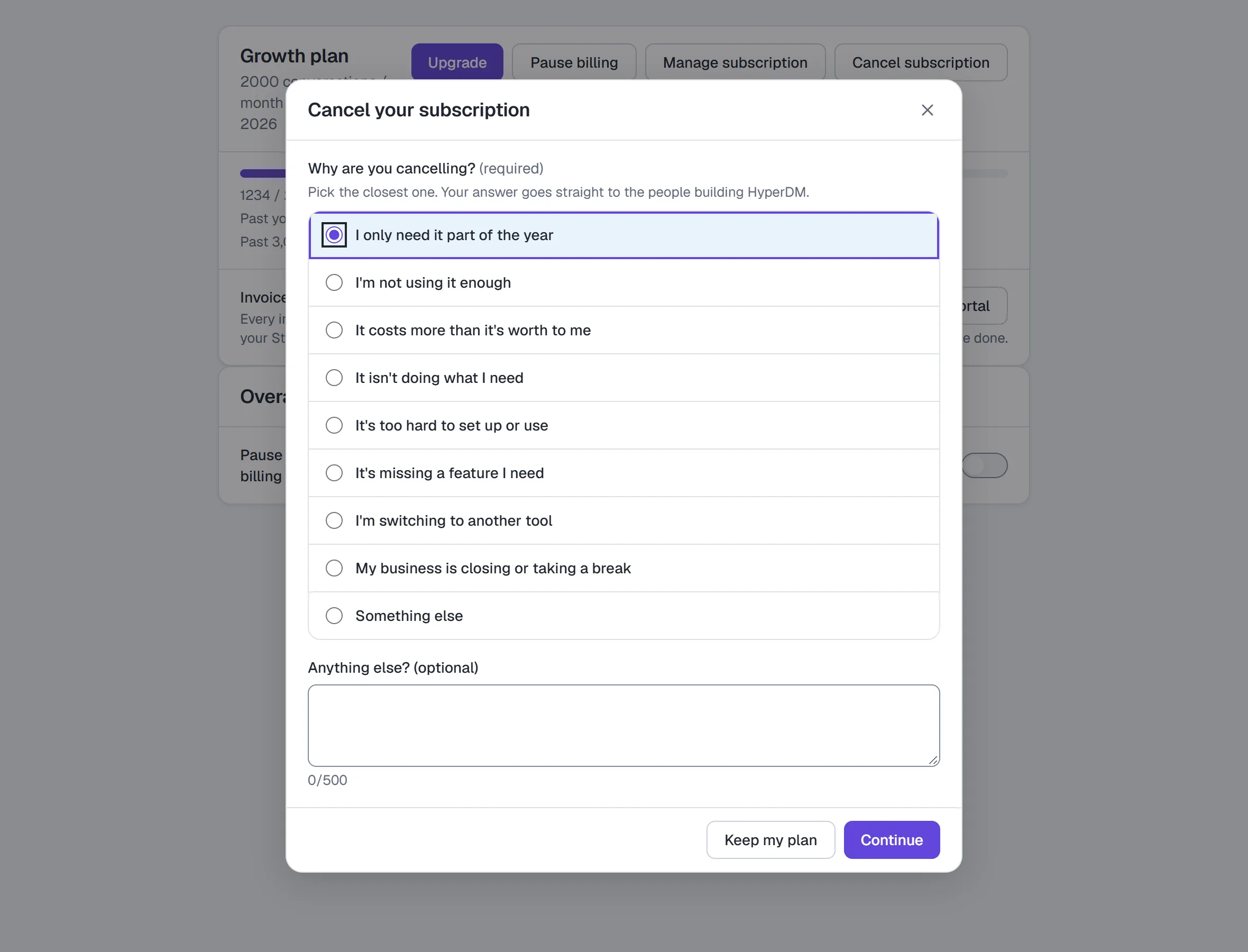
- Pick the reason that fits best. It's missing a feature I need and Something else ask for a few words; for the rest they're optional (up to 500 characters). Click Continue — or Keep my plan to change nothing.
- For some reasons you see one alternative first — never a discount:
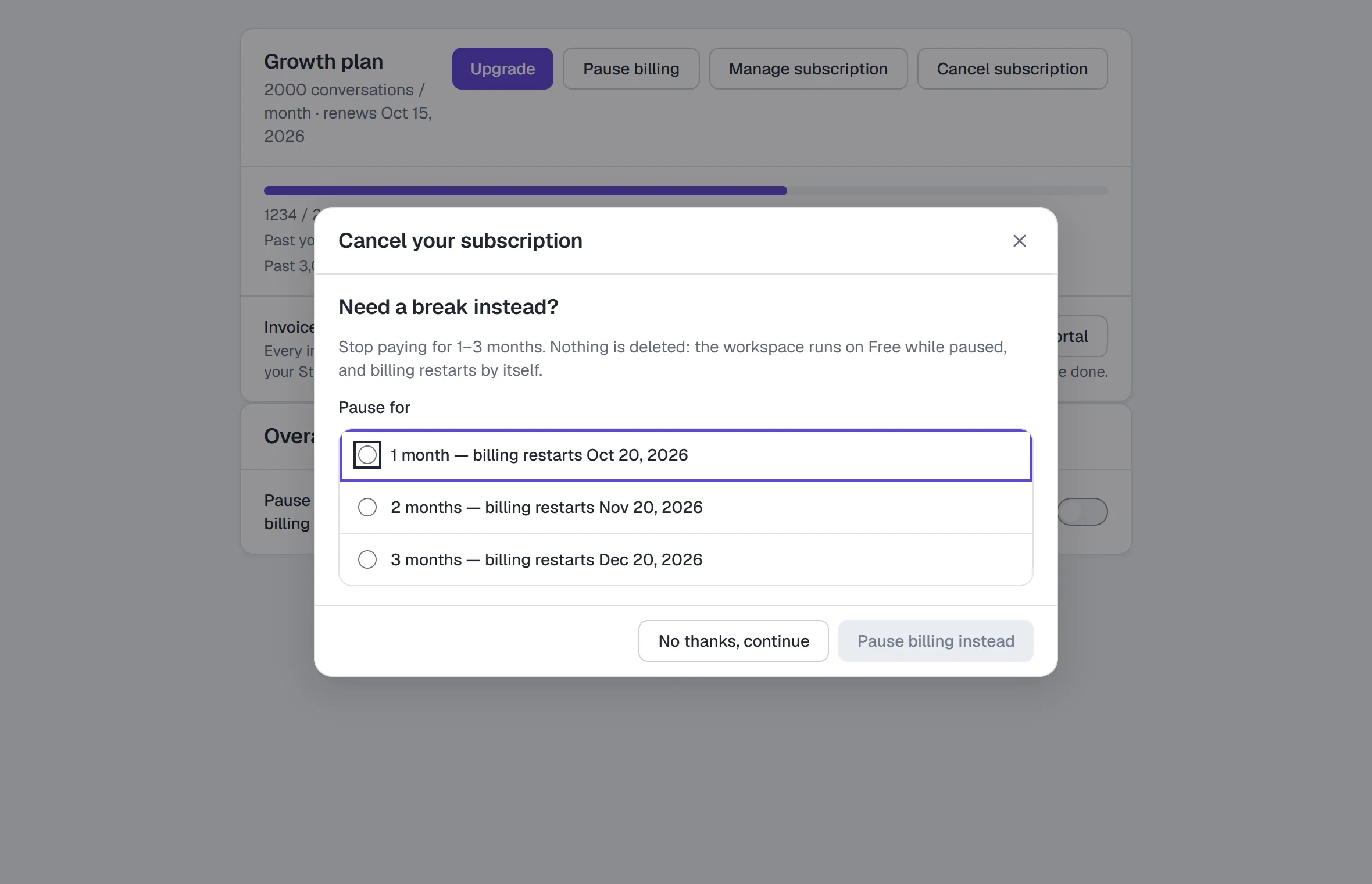
- Need a break instead? Pick 1, 2 or 3 months (each shows the date billing restarts) and click Pause billing instead. Nothing is cancelled; the workspace runs on Free until then.
- Would {plan} fit better? One plan down, starting when your current period ends — click Switch to {plan} instead. Nothing is charged today and nothing is cancelled.
- Want help getting it working? Read the guide, or Get help to tell us what's stuck.
- A connection needs fixing — Reconnect takes you to Settings → Channels.
Click No thanks, continue to go on with cancelling.
- The next screen names the date your plan ends, what you keep and what stops. Tick Don't email me offers if you don't want the one offer we may send after your plan ends, then click Cancel subscription.
- The dialog confirms "Cancels on {date} — you keep {plan} until then". Changed your mind? Click Undo there, or Undo cancellation on the Billing tab any time before that date.
An offer email after cancelling. About 30 days after a paid plan ends, the owner may get one email offering 30% off a monthly plan for the first 3 months; the link works for 14 days. It's sent once, ever. Tick Don't email me offers on the cancel screen to never get it, or use the Unsubscribe link in the email — that also ends the offer.
Refunds aren't issued in the app — to ask about a charge, contact support. On a workspace billed through an agency, the agency's subscription is the one to cancel. Where the tab has no Cancel subscription, cancel in the Stripe portal under Manage subscription; it works the same way. Where it has one, the portal may leave Cancel out: cancel on the Billing tab, and if the dialog says to use Manage subscription, the portal has Cancel for you. Either way the tab reads "Cancels on {date} — you keep {plan} until then", and only says Cancelled once the subscription has actually ended.
- When your plan goes down — a smaller plan, a cancelled subscription, a free Pro month ending, or a payment that couldn't be collected. Anything the new plan doesn't include is paused, never deleted: live rules, flows with an AI Step or A/B split, flows past Free's five (your five oldest keep running), live sequences, scheduled broadcasts, AI comment replies and product cards in DMs. Channels past the new plan's limit stay connected but stop answering (Free runs your oldest channel); teammates past its seats can't open the workspace until you upgrade (the owner never is) — their conversations and settings are kept. Each shows Paused — needs {plan} (click it to open Billing & usage), a banner at the top of the app counts them, and the owner gets one email listing them. On Free you can also swap which channel runs: disconnect the one that's running, then reconnect a paused one. Upgrading to that plan turns everything back on as it was (a channel whose login expired while paused asks you to Reconnect). Something you changed or switched on yourself while it was paused stays as you left it; a broadcast whose send time passed while paused stays a draft — open it and pick a new time.
- Pause billing — for when you don't need it right now: you aren't charged and nothing is deleted, but the workspace runs as if on the Free plan until Resume billing — the 50-conversation cap, one channel, the "Powered by HyperDM" note on replies, and every paid-only feature (broadcasts, sequences, media sends, extra seats) unavailable. Not offered during a Growth trial. On a monthly plan, if you start to cancel and pick a reason like "I only need it part of the year", you're offered a pause of 1, 2 or 3 months instead: billing then restarts by itself on the date shown, with no button to press.
- Failed payment — the tab says "Your last payment didn't go through" and offers Update payment method.
After the workspace changes hands
When an admin takes over a workspace (see Transfer ownership), billing control moves to them and billing emails go to their address. The plan, the subscription and the card on file stay as they are — the card is still the one the previous owner added. For 30 days, Billing & usage reminds the new owner: "The card on file was added by … Update it." (A workspace with no card on file — never paid for — shows no reminder.) Update card opens the billing portal, where they can replace it. The email the new owner gets when the handover is done opens this workspace's Billing & usage, even if they were working in another workspace. If the email change didn't go through, the owner sees Retry there.
The Free-plan watermark
Free replies carry a "Powered by HyperDM" note. It is appended by the compliance gate on the wire, and the Inbox shows the same marker under agent bubbles so what you see matches what was sent. Paid plans send nothing extra. Text messages (SMS) never carry it, on any plan.
SMS texts are billed by Twilio, not HyperDM
SMS is coming soon — it isn't switched on for workspaces yet. Where it is, you text from your own Twilio account, so:
- Twilio bills you for every text, carrier fees included, on your Twilio invoice. HyperDM adds no charge per text and nothing about SMS appears on your HyperDM invoice.
- HyperDM enforces a monthly SMS spend limit for you, because Twilio has no limit that stops a send. An owner sets it in Settings → Channels → SMS; until there is one, nothing is texted. Each text reserves its estimated maximum first — for a one-text message at standard prices about $0.0128, the price plus the highest carrier fee — and a text that would go past the limit isn't sent. The limit runs per calendar month (UTC). See Settings.
- The estimates use your number's own Twilio prices where HyperDM can read them, and standard US prices otherwise. The final figure on each text is Twilio's price plus the estimated carrier fee, so the limit can only err on the careful side; your Twilio invoice is the exact amount.
- On the Free plan, SMS uses the plan's one DM channel slot, like any channel.
Refer & earn
Give a free month, get a free month. Both sides qualify on the referred workspace's first paid invoice — the credit is valued at your plan price, with a floor of Starter ($19) and a cap of Growth ($49), so a Free-plan referrer still earns a Starter-month credit that applies when they upgrade. Recorded credit applies to your next invoice automatically; self-referrals (shared workspace members, same customer, card or billing email) don't qualify. Your link and your stats are in Settings → Refer & earn.
Your total banked invoice credit is capped at $588. A reward that would take it above that cap stays pending in full until there is room after an invoice draws credit down; it is never reduced to a smaller reward. Credit earned shows only recorded credit. The card separately explains qualified rewards waiting for capacity or reconciliation. If a request's provider outcome needs checking, contact support. Unavailable means HyperDM could not read that fact; refresh Settings rather than treating it as zero.
Partner program
Separate from refer-a-friend: partners on a paid plan share their own discount code and earn cash, 30% of what each customer who pays with it spends on their plan for 12 months. Commissions are held 30 days, then paid monthly by PayPal or Wise from $50. A customer who uses a partner's code gets that code's discount and doesn't also earn a refer-a-friend month. Details and the application: Settings → Refer & earn → Partner program; rules: Partner Program Terms.
If you received a Pro credit link
Some Free workspaces were sent a one-off email with a link to a Pro credit: 30 days of Pro, or 90 days if you join the beta. It isn't something you can request or buy — if you didn't get that email, there is nothing to claim.
Claiming it:
- Open the link from the email. Use the whole link: some mail apps split a long link in two, and then the page says "This link doesn't work". Opening the link changes nothing on its own.
- Sign in with the account you signed up with. The credit belongs to the workspace owner it was emailed to; signed in as anyone else, the page says so and offers Sign out and switch account. Forgot your password? Reset it, then open the link from the email again — the reset doesn't bring you back to it. The same goes if signing in takes you somewhere else, such as a shared flow you had started to add: open the link from the email again and it picks up where you left off.
- Choose 30 days of Pro, or 90 days of Pro — join the beta, and click Turn on Pro.
- You land on Settings → Billing & usage in the workspace the credit is for, with a Pro credit card showing the date and time it ends and how many days are left.
The page tells you how long the link stays open ("Open until …, 23:59 UTC") — always at least 7 days from the email. A credit can't go on a workspace that already pays for a plan, that is billed through an agency, or that isn't on Free.
While it runs you have everything in the Pro list above, including 6,000 conversations a month. There's no card on file and nothing to cancel, and no overage is billed on a credit.
The days-left count on the credit card goes down by one each day and always agrees with the end date above it: "29 days left" means the credit ends 29 days from today's date. The day before the end date it says what time it ends tomorrow ("Ends tomorrow at 5:00 PM"), and on the end date itself "Ends today at 5:00 PM". The bar under it shows how much of the credit you've used ("1 of 30 days used"; "Last day of 30" on the end date). The card's date, time and count are in your workspace's timezone (Settings → Workspace), and the card names that zone next to the time — so the count moves on at midnight there, even on a page you left open.
When it ends, the workspace goes back to Free by itself, within the hour. Nothing you built is deleted; Free's limits apply from then on:
- 50 conversations a month, starting fresh. The conversations you used on Pro don't count: Free's 50 start over from the moment the credit ends, until the 1st, when the normal monthly count resumes.
- Scheduled broadcasts don't send and sequence steps wait. AI comment replies, voice, video and document sends, and product cards sent by the agent stop.
- What Free doesn't include is paused, never deleted — live rules, flows with an AI Step or A/B split, flows past your five oldest, live sequences, scheduled broadcasts, channels past one and teammates past Free's seats are marked Paused — needs {plan}, and upgrading turns them back on (see When your plan goes down). An invite you sent during the credit can still be accepted afterwards.
- Your Instagram menu keeps showing all its items, but saving a change to it means trimming it to 3.
To keep a paid plan, the owner can pick one from the buttons on the credit card in Settings → Billing & usage. Choosing a plan starts your subscription that day, and the rest of the credit doesn't carry over. Billing starts that day too, unless choosing Growth started your 14-day trial — you come back to "Card saved — your 14-day Growth trial has started" — and then Growth is charged when the trial ends. A plan you pay for is never taken away when the credit's end date comes.
If you chose the beta (90 days): use HyperDM for real and tell us what breaks with the Feedback button. If it turns out you're not really using it, we may move you back to Free early — never without an email warning you at least 72 hours before.
Common questions
Does a contact who never replies cost me anything? Only if HyperDM sent them a DM. Any automated DM — from an automation, a flow or the AI agent — opens a conversation whether or not they answer, so a commenter who got your link DM and went quiet is one conversation; a public comment reply on its own doesn't. A contact who never gets an automated DM costs nothing: you are billed per conversation, not per contact.
Is a 10-message back-and-forth 10 conversations? No — one, inside one campaign. The next delivered automated reply counts again when it belongs to a different campaign (a second lead-magnet post, say), comes after more than 5 quiet days since the last delivered automated reply (exactly 5 days is still active), or falls in a new calendar month (UTC) — that's a second real engagement, and it counts as one.
Does the AI Playground use my conversation allowance? No — nor your AI-assisted conversations. It costs an AI call, not a conversation.
Does the Free cap reset? Yes, monthly. Usage is on Home's Usage this month card.
Can I have two channels on Free? No — one DM channel at a time. Reconnecting the same channel is allowed; that's a re-auth, not a second channel. The one exception is a passing fault: if we can't check what you have connected, we don't guess, so a reconnect can be turned away with "We couldn't check your plan's channel limit just now". Nothing changes when that happens — try again in a moment.
Who can change billing? Only the workspace owner.
What happens to Meta conversion reporting if I move to Free? Reporting to your Meta dataset is on the paid plans (Starter and up). On Free nothing more is sent: a conversion recorded meanwhile shows Not sent: reporting isn't on this workspace's plan. and can't be sent later. You can still switch events off and Disconnect — the off switch is never charged for. Back on a paid plan, conversions from then on are reported again. See Report conversions to Meta.
Understand several limits at once
When account explanations are available, Billing, Agent and Inbox describe the same observed reasons. A total/payment/owner/agency limit can remain after the AI count allowance changes. Monthly native-AI safety is per workspace; buying credits does not raise it. Credits remain non-expiring future-use conversation units under the existing owner/plan/payer purchase policy. Retry facts refreshes the observation after a change or Checkout/portal return. A paid event, rather than a success redirect, grants units. Unavailable facts are not a zero balance or a promise of headroom; unarmed checks are explicitly identified. Recovery links respect your role in the actual paying organization: the owner of the organization that pays gets View paying organization, which opens your Organization page (or says Agency isn't switched on yet for your account); anyone else sees Ask your paying agency owner.
My payment failed — did I lose access?
Not straight away. When a renewal doesn't go through, nothing changes for at least two days: your plan, your conversation allowance and every automation keep running while Stripe retries your card, and we email you with a link to Stripe's invoice page (no sign-in needed) — and, where the pause applies, the exact time the two days run out.
If a payment stays unpaid for more than two days, the workspace can be paused until the invoice is paid — the notice on every page says so when it applies:
- Nothing goes out — no DMs, emails or texts, from automations, the AI agent, broadcasts, sequences or scheduled replies.
- Everyone on the team sees a Payment needed notice instead of the app. Settings → Billing & usage still opens: that's where Pay the invoice and Update your card are.
- Nothing is deleted. Your contacts, automations, flows and plan are exactly where you left them, and messages people send you while paused are still recorded in your Inbox.
Paying the invoice lifts the pause straight away. Anything that was due while paused isn't sent afterwards — a broadcast scheduled for that window simply didn't go, so re-schedule it if you still want it.
If your workspace is billed through an agency, it isn't paused when the agency's payment fails — agency client workspaces keep running while the agency owner updates the card from their own Billing page. If Stripe gives up on the card entirely (usually after about two weeks), the subscription is cancelled and the workspace drops to the Free plan, as it always has.
More in Account & billing
- SettingsThe settings tabs: channels, main menu, commerce, integrations, billing, referrals, team, workspace & links, notifications, security, API & webhooks, Profile.Read
- Roles and permissionsThe six workspace roles, what each may do, what you see instead of a control you lack, inviting teammates, changing a role and how seats are counted.Read
- Give teammates the right rolePick a role for each teammate, change a role in place, and see who can do what — including the Editor and Viewer roles.Read
Try HyperDM for free
50 free conversations a month, no card. Connect Instagram and follow the guide you just read.