Automation rules
Event automations: when a tag is added, a field changes or a date arrives, run an action once per contact, with every rule visible in one list.
Sidebar: Automate → Automations → Rules. Event automations: when something happens to a contact, do something about it. Where an automation reacts to a message, a rule reacts to a change in your data.
Rules live as a section on the Automations page — on a brand-new workspace that page shows starter cards instead, and the Rules section appears once you've built your first automation (you can always open /rules/new directly). Editing a rule opens /rules/{id}/edit.
Starter and up. On Free you can build a rule but not set it live.
Triggers
| Trigger | Fires when |
|---|---|
| New contact | A contact is created |
| Tag added | A specific tag (or Any tag) is applied |
| Tag removed | A specific tag (or Any tag) is removed |
| Field changed | A specific field (or Any field) changes value |
| Date field reached | A date-type custom field arrives — on, before or after by N days; Every year (on by default) makes it repeat annually |
Date field reached needs a date-type custom field to exist first. If you have none, the form says so and points you at creating one in Contacts.
The Every year option is what turns a birthday field into a birthday campaign: it repeats every year rather than firing once.
Rules fire from automated events only. A flow adding a tag, a webhook creating a contact, an automation capturing an email — those fire rules. Hand-tagging a contact, bulk-tagging a segment, or editing a field yourself in Contacts deliberately does not — otherwise cleaning up your data would blast automated DMs at your audience.
Actions
A rule can do any number of these, in order:
| Action | Config |
|---|---|
| Add tag | tag name |
| Remove tag | tag name |
| Set field | field = value |
| Increment field (+/-) | lead_score = 10 — negative allowed |
| Update number field | a number field, then Replace with, Add, Take away, Multiply by, Divide by an amount, or Work it out with a calculation — the same as the flow step (see Flow builder). Saving checks that every field it names is one of your number fields. If it's ever turned off for your workspace, a rule that has it says so under the action and can be saved as a draft, but not set live |
| Subscribe to sequence | pick a sequence |
| Unsubscribe from sequence | pick a sequence |
| Start flow | pick a flow |
| Notify (Inbox note) | optional note text for the Inbox |
Start flow runs the flow only for someone on that flow's channel: an Instagram flow starts for an Instagram contact, and a rule that fires for a WhatsApp or SMS contact skips it. An email address is not a conversation, so for one Start flow and Notify are both skipped; the rule's other actions still apply.
Start flow can't start a Shopify checkout follow-up — only a Shopify checkout starts one. It isn't offered in the list, and saving a rule that still points at one is refused: "A rule can't start a checkout nudge — it needs a Shopify checkout to start from. Pick another flow."
Rules set off inside a checkout follow-up don't message anyone. When a Shopify checkout follow-up — or a flow it hands over to — adds or removes a tag, sets or changes a field, or saves someone's answer, any rule that sets off still tags, updates fields, unsubscribes and leaves Inbox notes, but skips Start flow and Subscribe to sequence: neither would know if the shopper has since paid. With Only once per contact on, a rule that skipped one of those isn't used up: it can still fire in full for that person later, from an ordinary event, and the skipped firing isn't added to the rule's fired count. The exception is a rule that also has Increment field (+/-), Update number field or Notify (Inbox note), because firing it again would count or note twice: that rule counts as fired, and won't fire for that person again.
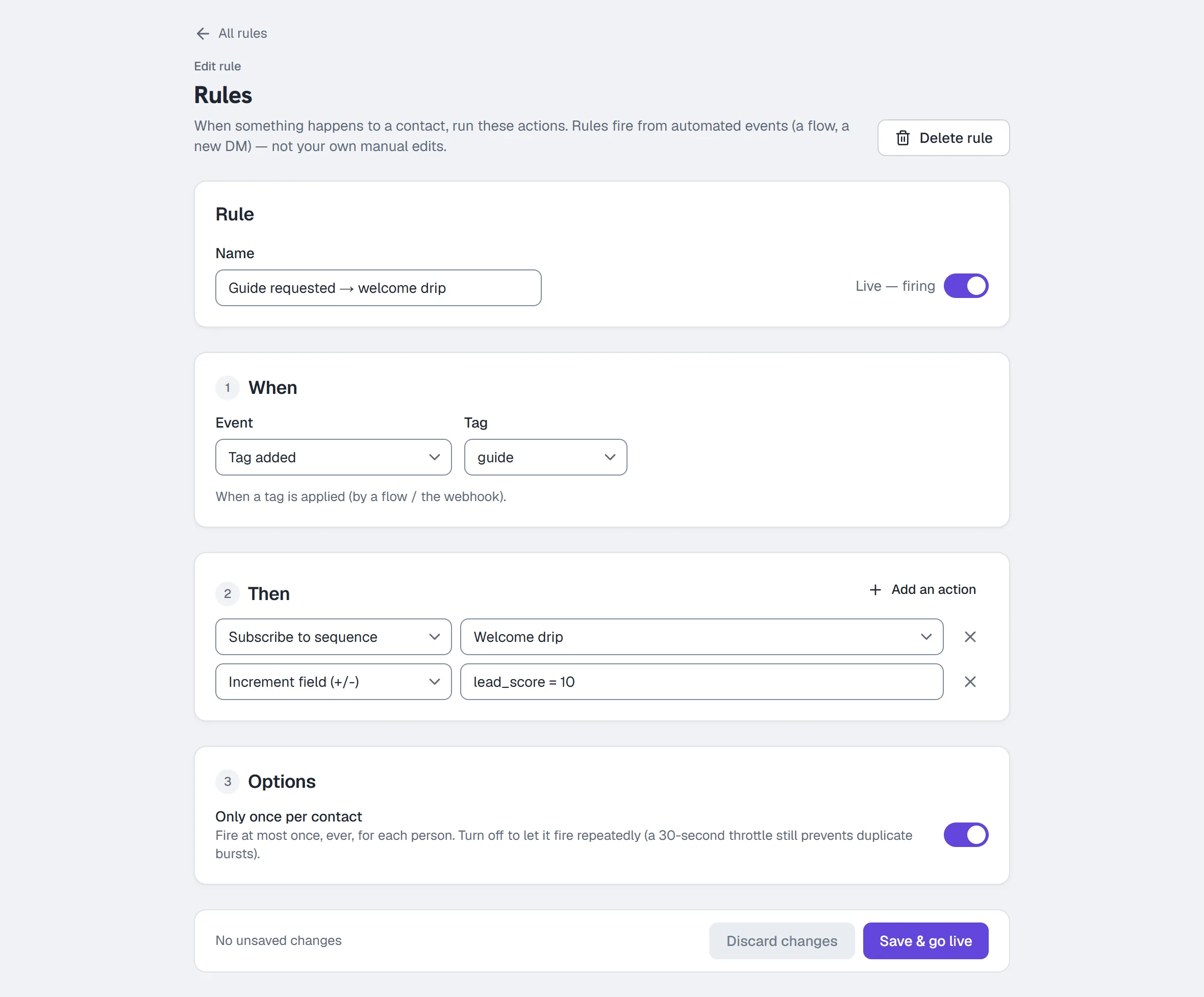
Build a rule
- Go to Automations and find the Rules section, or open
/rules/new. - Name it — e.g.
New contact → welcome. - Under When, pick the trigger and fill in its detail (which tag, which field, how many days before/after a date).
- Under Then, add actions with Add an action (beside the section's heading); each row is the action's type and what it uses. Remove one with its Remove action button at the end of the row (a rule always keeps at least one, so with a single action that button is switched off and says why).
- Leave Only once per contact on (the default), or turn it off for genuinely repeatable events.
- Flip the Live toggle at the top of the editor, then save with the button in the bar at the bottom: with Live off it reads Save draft (saved, not running); with it on it reads Save & go live. The bar says Unsaved changes as soon as you change something — Save stays off until you do — Saving… while it saves, and you are taken back to Automations once the save goes through. If a save is refused, the bar says why and keeps everything you typed; Try again sends it again.
To delete, use Delete rule at the top of the editor, beside the title.
Next to New rule there is also Add lead scoring starter rules — one click seeds two draft rules (email captured +30, new contact +10) and creates the lead_score field if needed. They arrive as drafts to review; clicking again never duplicates them.
Only once per contact
On by default — a new rule catches each contact at most once, ever. Turn it off for genuinely repeatable events (a renewal reminder, a repeat-purchase tag).
Three footnotes that answer real "why did/didn't it fire twice" questions:
- Even with the toggle off, a 30-second throttle applies per rule per contact — a burst of identical events inside 30 seconds fires the rule once.
- Date field reached rules ignore this toggle entirely: their repeat behaviour is the Every year option (once ever without it, once per year with it).
- A firing inside a Shopify checkout follow-up that had to skip Start flow or Subscribe to sequence doesn't use up the rule, so it can fire again for that person later — unless the rule also increments a field or leaves a note (see Actions).
What you see in the list
Each rule row shows its name, a Live or Draft badge, a plain-English summary of its trigger, how many actions it has, and how many times it has fired.
Common questions
Rule vs automation vs sequence — which do I want?
- An automation reacts to a message (a comment, a DM, a story reply).
- A rule reacts to a change in your contact data (a tag, a field, a date).
- A sequence is a timed series of messages someone gets after joining.
They compose: a rule can subscribe someone to a sequence or start a flow.
Can a rule send a DM directly? Not on its own — its send actions are Subscribe to sequence and Start flow. Point it at a one-step sequence or a small flow when you want it to message somebody.
Why can't I set my rule live? The rules engine needs Starter or above. See Plans and billing.
My rule fired more than once for the same person. Tick Only once per contact.
More in Campaigns
- Track link taps and see what convertsThe links HyperDM adds are tracked by default: where the taps show up, how to read them honestly, and how to send links exactly as typed where offered.Read
- Build a drip sequenceBuild a drip sequence step by step: write or reuse each message, run a flow, set waits and send windows, check the timeline, go live and read Results.Read
- BroadcastsSend a one-off message to opted-in contacts in four steps: compose, choose the audience, decide on the 24-hour window and schedule it.Read
Try HyperDM for free
50 free conversations a month, no card. Connect Instagram and follow the guide you just read.