How to track link taps and see what converts
The links HyperDM adds are tracked by default: where the taps show up, how to read them honestly, and how to send links exactly as typed where offered.

By default, HyperDM tracks the links it adds for you — automation links, flow and broadcast link buttons, product buy links and email buttons. These go out as written: a link typed into a message, an automation or email link with a variable in it, a WhatsApp template's link button, a main-menu link, and a buy link quoted by a flow's AI step or the Playground. So the tracked ones are the up to three links in an automation DM, a flow's or broadcast's link buttons, a conversation goal's Share a link nudge, a product's buy link, and an email's buttons and linked pictures. Tracking is on unless your workspace chooses otherwise — see Send links exactly as typed instead. This guide is about where to read the result.
Where the taps show up
The Automations list
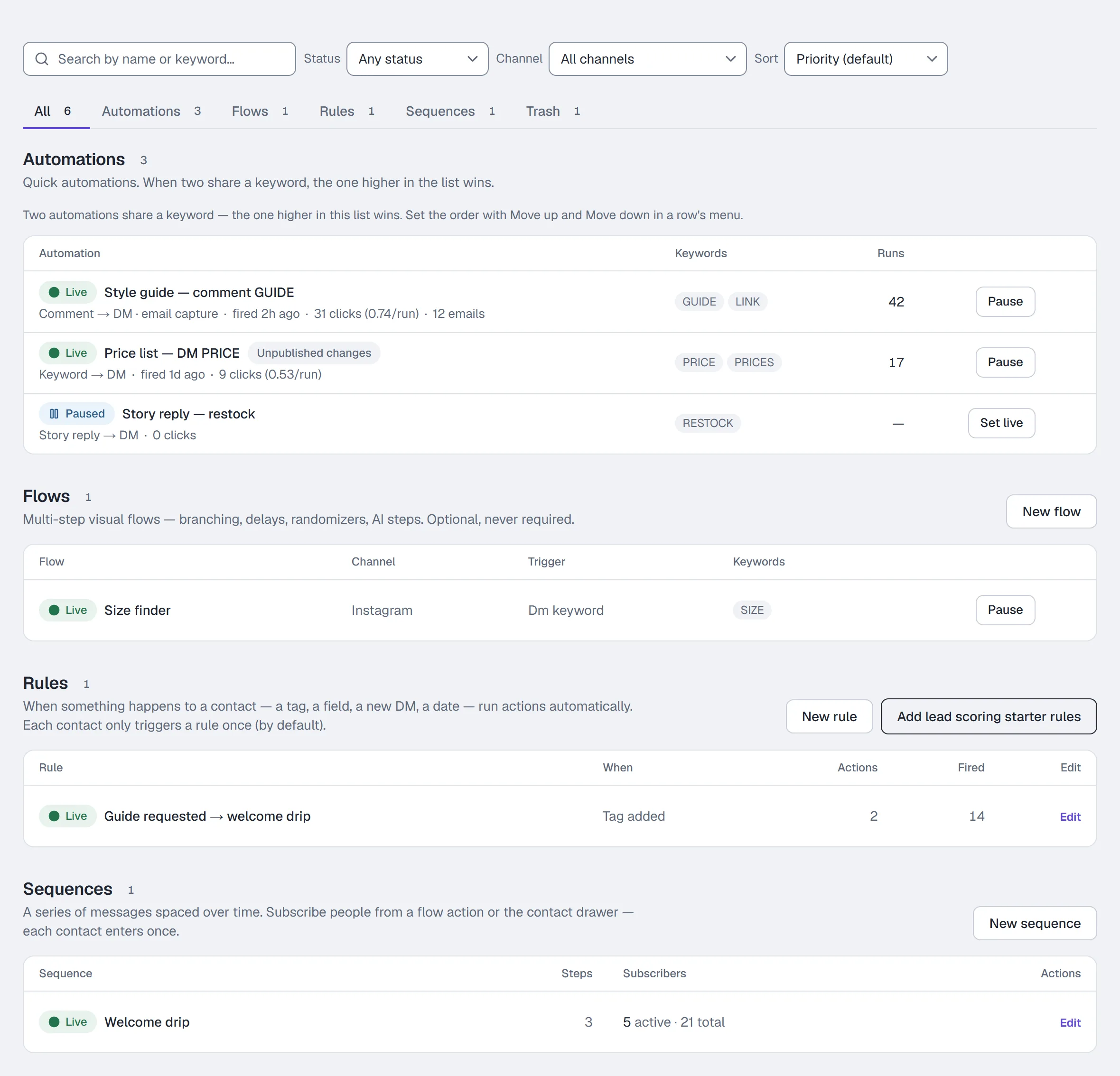
Each row on Automations shows its funnel on the line under its name: clicked (with clicks per run when the DM carries a link) → emails when it captures them, after its trigger and when it last fired; the runs are the Runs column. The Sort dropdown adds Most triggered, Most clicks per run, Most leads and Newest on top of the default Priority view — the non-priority sorts are view-only.
A live automation that hasn't fired for a week or more gets a warning mark on its row, and the list counts them once above the lists — check their keywords or post binding.
Sent broadcasts
A Sent row on Broadcasts shows sent → skipped → clicked. Clicked appears when the message carried a tracked link or buttons. See Broadcasts.
An email campaign's page shows Clicked a link — the people who tapped a button or a linked image in that email, each counted once. A link with a variable in its address goes out exactly as you wrote it and isn't counted. See Write and send an email.
Analytics
Analytics → Overview shows, on every plan, Link clicks (taps on your tracked links, repeat taps included) and Click-through (taps on your automations' links per DM sent) for the range you pick, each against the period before, plus Top automations (the top 5 by DMs sent, with their clicks). Analytics → Automations lists every automation's clicks and click-through for the same range, and Analytics → Activity has a row for each tap on an automation's link. On Starter and up, Trends charts link clicks by day or by hour. On Growth and up, Revenue by automation shows which automation the money came from, and the Revenue tile appears once you have a paid order. See Analytics. On Pro and Agency, Where your link taps come from (on the Audience tab) shows the countries and cities those taps came from; see Analytics.
The contact
Open a contact in Contacts or the Inbox context pane to see what they tapped, the tags and fields set on them, and any email captured.
Turn taps into revenue attribution
- Connect Stripe under Settings → Commerce and set up the Revenue webhook the card describes. Until that is done the Revenue tiles stay empty.
- Give products a buy link — a Stripe payment link on a hand-typed product, or the link a Shopify-synced product arrives with. See Add knowledge and sync your catalog.
- Send products from a flow's Send product action, from the Inbox, or let the agent send product cards on its own (a guardrail on paid plans).
Follow up on people who didn't tap
On a comment or keyword automation, switch on Nudge if they don't tap and set Wait N hours. It sends one more DM later if they never opened the link. It needs a link in the DM above that isn't already a HyperDM tracked link (hyperdm.app/l/… — paste the page's own address instead), and it needs link tracking on: where your workspace sends links exactly as typed, the nudge can't see a tap, so it isn't scheduled.
Send links exactly as typed instead
Link tracking controls are being turned on one workspace at a time. Where they're offered, the Workspace tab in Settings has a Links section. Where they aren't offered yet, there's nothing to switch: the links HyperDM adds are tracked, apart from the ones listed at the top of this guide.
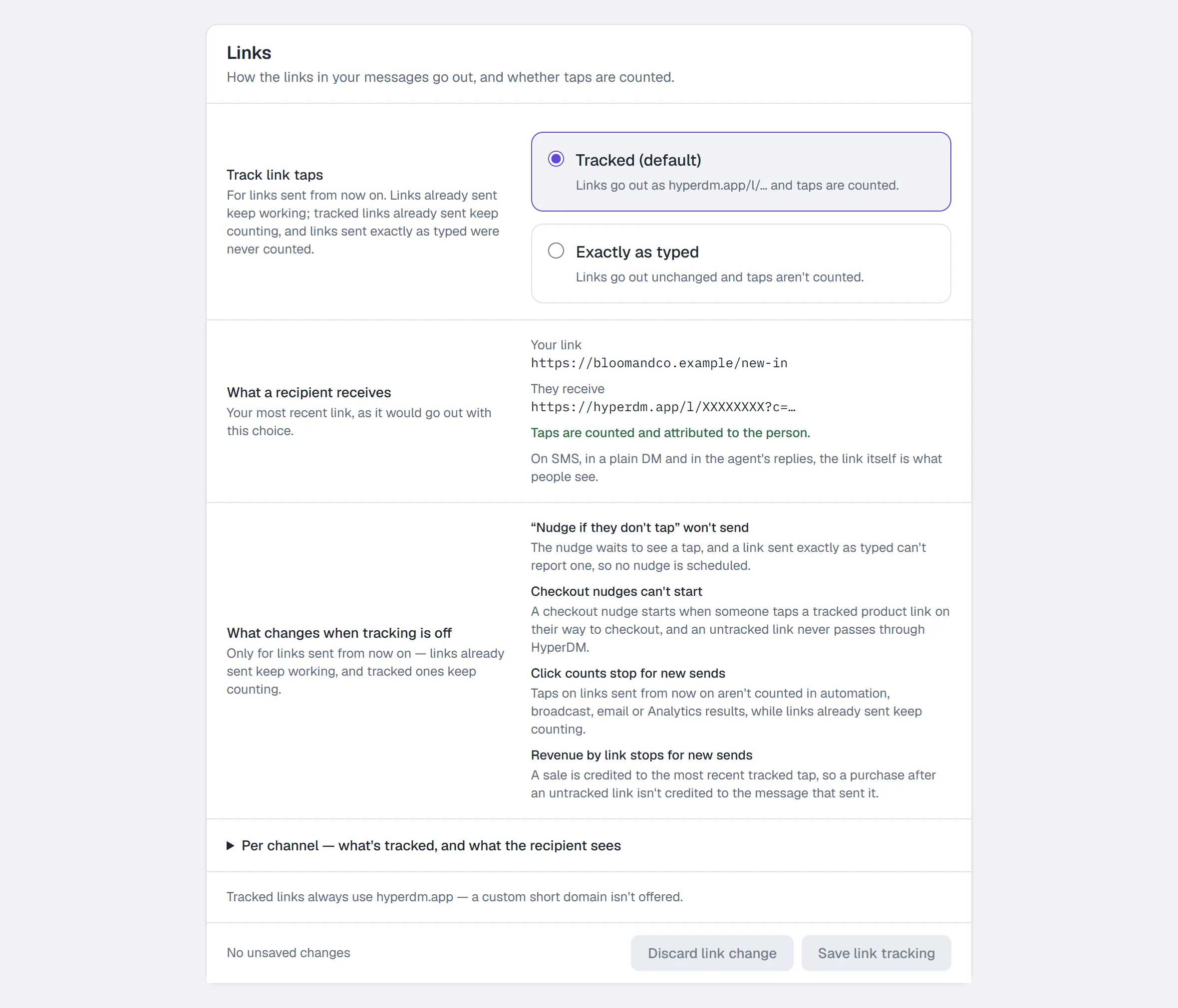
- Open Settings → Workspace and scroll to Links.
- Under Track link taps, choose Exactly as typed — links go out unchanged and taps aren't counted. Tracked (default) puts them back to
hyperdm.app/l/…links that count. - Read What a recipient receives: your most recent link, as it would go out with the choice you've made. It changes the moment you move the choice, before anything is saved.
- Read What changes when tracking is off, then click Save link tracking in the bar at the bottom of the Links section (it has its own bar, apart from the workspace details above it). It says Saved only once the choice is stored; if the save is refused, your choice stays selected and the bar says why, next to Try again. Discard link change puts the saved choice back.
Only owners and admins can change it; everyone else sees the current choice greyed out, with "Only owners and admins can change workspace settings." under it and no Save bar. The change shows in the Activity log — filter by Link tracking changes.
What Exactly as typed changes, for links sent from then on:
- "Nudge if they don't tap" won't send — the nudge waits to see a tap, and a link sent exactly as typed can't report one.
- Checkout nudges can't start — a checkout nudge starts when someone taps a tracked product link on their way to checkout. So Set live refuses a checkout follow-up and says why; one that's already live stays live, but new product links can't start it.
- Click counts stop for new sends — an automation's Link taps, a broadcast's clicked, an email's Clicked a link and Analytics. Each of those screens says so rather than showing a zero: Link taps is Not available with the reason (or keeps taps counted earlier under From an earlier version), a broadcast with no tracked link reads taps not counted, and an email campaign's note says clicks count only on emails sent while tracking was on.
- Revenue by link stops for new sends — a sale is credited to the most recent tracked tap; Revenue by automation in Analytics says new sales can't be credited.
The automation editor's preview also shows "No nudge — link tracking is off for this workspace" on an automation with Nudge if they don't tap on.
Links you've already sent keep working, whichever you choose. They still open the right page. Taps on tracked links already sent still count; links sent exactly as typed were never counted and won't be, even after you switch back. Nothing already sent is changed.
There is no separate link shortener and no custom short domain: the short hyperdm.app/l/… link exists only because it counts the tap. Per channel — what's tracked, and what the recipient sees at the foot of the section lists every place a link can go and what happens to it.
Read the numbers honestly
- Link clicks are events, including repeat taps. Clicks per run can exceed one, and it is not a unique-person conversion rate.
- Link previews aren't clicks. Instagram, WhatsApp, Telegram and other apps open your link once, the moment the message is sent, to draw its preview. Since 26 October 2026 (21:03 UTC) HyperDM doesn't count that as a click, so a "didn't tap" follow-up still goes out. The previews recorded before then have been removed too, both the one at the moment a message was sent and the repeat fetches that came later, so older click counts and click-through rates went down.
- Sent counts messages sent; Instagram doesn't report delivery.
- Exclude your own test conversations when you compare automations.
Common problems
Clicks are zero on an automation that fires. The DM carries no link, the link was typed into the message text instead of the link fields (sent as written, so not counted), the link has a variable in it (such as {{first_name}} — sent as written, so not counted), or people are reading the message without tapping. Where link tracking controls are offered, check Settings → Workspace → Links: under Exactly as typed, new links aren't counted. Then try After they reply link delivery, or a shorter DM with one link.
Revenue is empty. The Stripe revenue webhook is not set up, or you are below the Growth plan.
Full reference: Automations and Analytics.
More in Campaigns
- Build a drip sequenceBuild a drip sequence step by step: write or reuse each message, run a flow, set waits and send windows, check the timeline, go live and read Results.Read
- BroadcastsSend a one-off message to opted-in contacts in four steps: compose, choose the audience, decide on the 24-hour window and schedule it.Read
- SequencesBuild a drip campaign: steps and waits, the send window, reusing a message or running a flow, the timeline, step results, and how people join and leave.Read
Try HyperDM for free
50 free conversations a month, no card. Connect Instagram and follow the guide you just read.