How to set up follow-to-DM
Prepare a welcome DM for new followers now: it saves as a draft until Instagram grants follow events. Gate on following today with a flow's Follow gate.

Welcome new followers sends a one-time hello the moment someone follows you. The trigger exists and the form works, but Instagram has not yet granted HyperDM follow events — only Meta's Follow-to-DM beta partners get them. So today you can build and save it; it cannot be set live until access lands, and the form says so honestly rather than letting you build something that will never fire.
Build it now, so it is ready
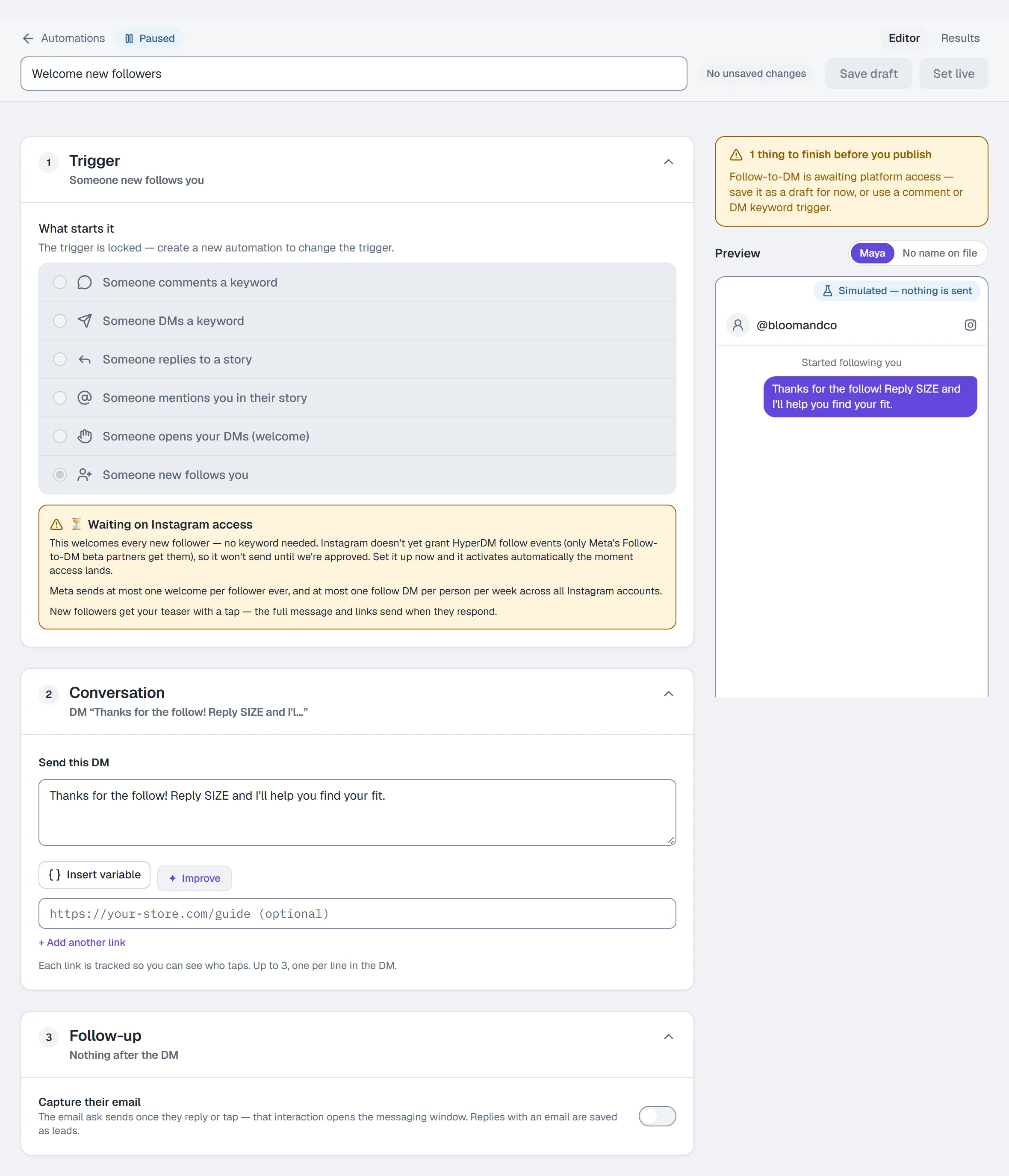
- Go to Automations and click the Welcome new followers starter card (it carries an Awaiting access badge), or New automation → Someone new follows you.
- The Trigger section shows the Waiting on Instagram access notice instead of a keyword box. There is nothing to match on: every new follower gets the same DM.
- Under Send this DM, write the welcome and add a link if you want one. New followers get your welcome text, including any code you type into it. If the welcome has a link, it arrives with a Say hi 👋 button and the link sends when they tap it; a welcome with no link sends in full.
- Name it and click Save draft. Publish is disabled while access is pending.
When access lands, the automation activates the moment you publish it. Two Meta limits apply then: at most one welcome per follower, ever, and at most one follow DM per person per week across all Instagram accounts.
Gate on following today
Two things work right now for "only if they follow me":
- A Follow gate in a flow. Open the flow builder, add a Follow gate step mid-conversation — it continues only if the person follows you, with a no-response timeout (24 hours by default) and a Timeout branch you can wire. See Build your first flow.
- Only for followers on the automation builder is shown as Coming soon and cannot be switched on: Instagram does not tell apps whether a fresh commenter follows you, so the gate has to run once someone has replied.
Test it
There is nothing to test yet — the Test on Instagram table says so for this trigger. Once access lands, follow the account from a second Instagram account and check your Inbox.
Common problems
Publish is greyed out. Expected while access is pending. Save the draft and choose a comment or DM keyword trigger for anything that has to run today.
I need a welcome for new followers right now. The nearest thing that works today is a story reply or comment-to-DM automation on the post you point new followers at.
Full reference: Automations.
More in Instagram automations
- Set up comment-to-DMReply to a keyword in your comments with a public reply and a DM that carries the link, step by step in the builder, then test it from a second account.Read
- Set up keyword triggersAnswer a DM that contains a keyword with the right reply and link, straight from the builder, with the matching rules and the priority order explained.Read
- Set up intent recognitionSend a saved DM when a message is worded close to a description you write, instead of a keyword, and test it from a second account before you rely on it.Read
Try HyperDM for free
50 free conversations a month, no card. Connect Instagram and follow the guide you just read.