How to set up the Instagram main menu
Build the persistent menu inside every Instagram DM thread — up to 20 items pointing at a link, a flow or an automation — save it and push it to Instagram.
The main menu is the tappable list Instagram shows inside every DM thread with your account. Each item opens a link, starts a flow, or runs an automation. It is built in Settings and pushed to Instagram when you save.
Before you start
- Instagram is connected — the card tells you, and without a connection there is nowhere to push.
- You are an owner or admin (the card's controls need
manage_connections). - Free shows 3 items; paid plans show 20. The counter on the card reads N of 20 (N of 3 on Free).
Build the menu
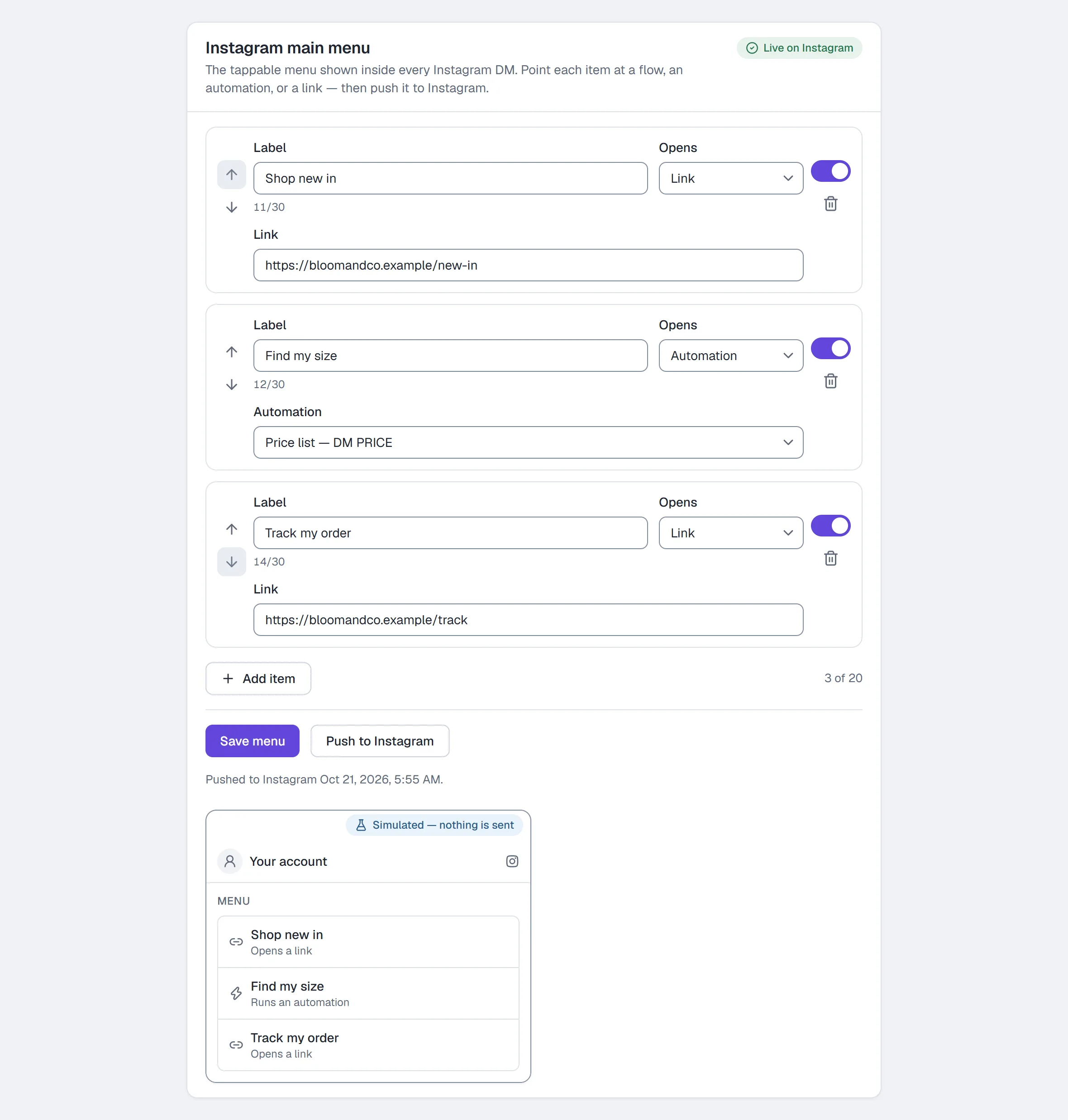
- Go to Settings → Main menu.
- Click Add item.
- Give it a Label, e.g.
Shop now(30 characters at most — the field counts them). - Choose what it Opens: Link (paste a URL), Flow (pick one of your live flows), or Automation (pick one of your live automations).
- Add the other items the same way. Reorder with the item's up and down arrows; switch one off with its Show switch; remove one with its bin button.
- Watch the preview beside the editor (under it on a smaller screen): it shows the menu a customer sees — your handle, each switched-on item and what tapping it does — as you edit. It is simulated; nothing in it sends.
- Click Save menu. Saving also pushes the menu to Instagram, and the card shows Pushed to Instagram with the time, in your workspace timezone — or the push error. The chip in the card's header reads Live on Instagram once it lands.
Push to Instagram re-sends the saved menu. Use it after a failed push. While you have unsaved changes it waits and says Save first, then push.
Test it
Open a DM thread with your account from a different Instagram account. The menu shows in the thread; tap an item and check the link opens, or the flow or automation's first message arrives in that account's inbox.
Common problems
The push failed. Read the error on the card, fix the item it names (most often a label over the limit or a target that no longer exists), Save menu, then Push to Instagram.
Settings → Channels says Profile drift. Instagram may have changed how your menu appears. Click Re-sync to push yours back; the warning clears only when the push reaches Instagram.
I can only add three items. You are on the Free plan — the counter reads 3 of 3 and Add item says why. Paid plans show 20.
The tappable questions that appear before someone's first message are a different feature — Set up welcome prompts.
Full reference: Settings.
More in Instagram automations
- Set up comment-to-DMReply to a keyword in your comments with a public reply and a DM that carries the link, step by step in the builder, then test it from a second account.Read
- Set up keyword triggersAnswer a DM that contains a keyword with the right reply and link, straight from the builder, with the matching rules and the priority order explained.Read
- Set up intent recognitionSend a saved DM when a message is worded close to a description you write, instead of a keyword, and test it from a second account before you rely on it.Read
Try HyperDM for free
50 free conversations a month, no card. Connect Instagram and follow the guide you just read.