How to build your first flow
Open the canvas, start from a template or a description, add and connect steps, run the design checks and the preview, and set the flow live.
A flow is for anything with branches, waits, conditions or an AI step. The simple automation form covers the common shape — trigger, public reply, DM, optional email ask — and nothing requires the canvas. When you do want one, this is the path.
Before you start
- Instagram is connected — Connect Instagram.
- You are an owner, admin or agent on the workspace.
- Free is capped at 5 flows. Every paid plan is unlimited. The canvas itself is free; the cap is on how many flows you keep.
Open the canvas
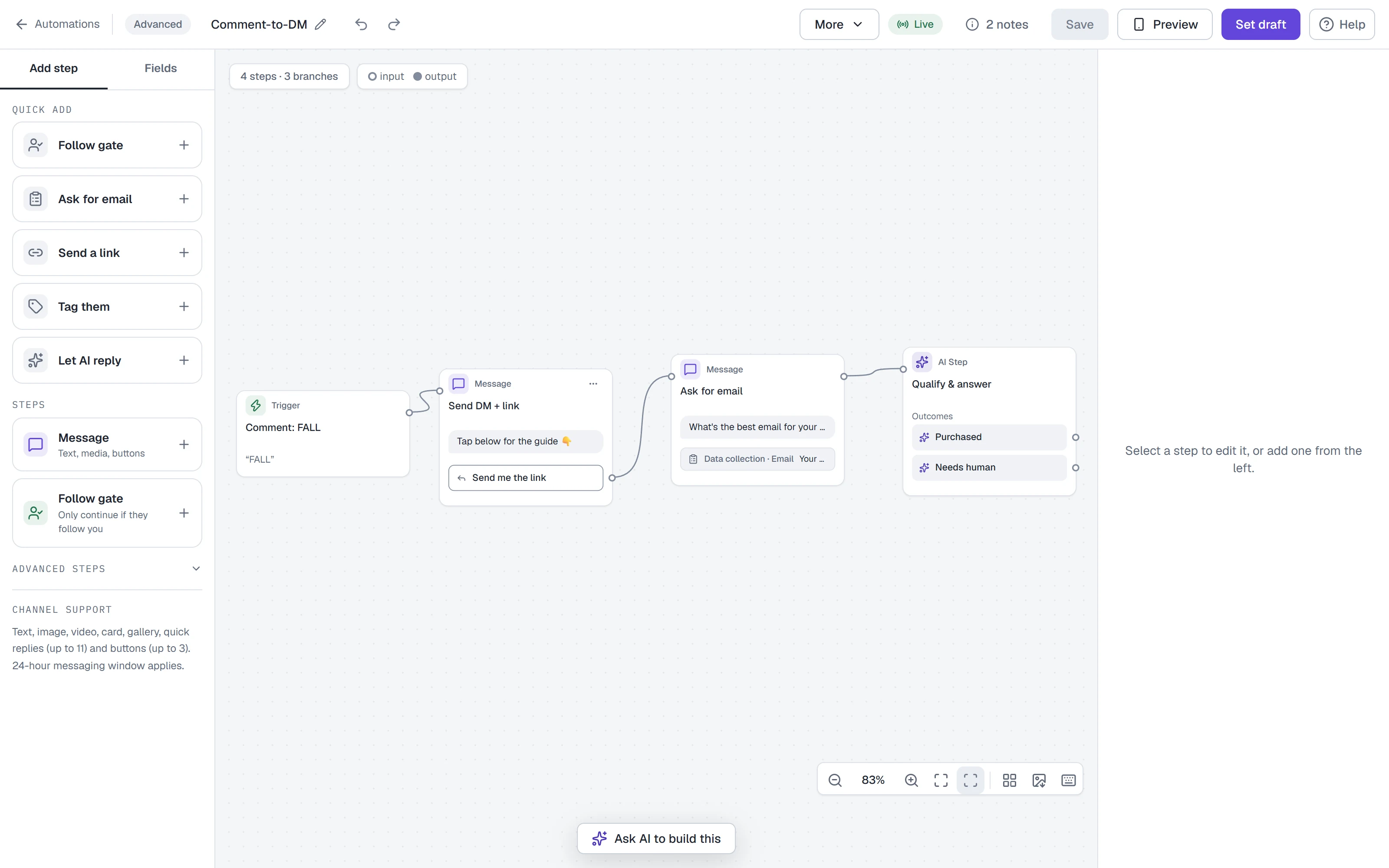
- Go to Automations and scroll to the Flows section, then click New flow (or Open the canvas on a workspace with no flows yet).
- With nothing loaded, the canvas offers three ways in:
- Start from a template — pick a recipe, or import a flow file. Templates can be searched, filtered by trigger, or browsed by category; each card says its steps, its trigger and what it sets up. You review it before saving.
- Create with AI — describe what you want and have the graph drafted.
- Start from scratch (badged Advanced) — a blank canvas called Untitled flow with one step, Choose a trigger. Nothing is pre-filled for you.
Already have an automation? Open as flow in its row's ⋯ menu rebuilds it as an editable flow. Your automation keeps running.
Build it
- Every flow starts with one Trigger. Click it, then use Trigger type to choose what starts the flow — on Instagram: Comment-to-DM, DM keyword, Story reply, Story mention, Manual and more. A keyword trigger also needs its keyword. Set live stays off until you have picked one ("Pick what starts this flow."). Name the flow in the box at the top left.
- Add steps from the Add step panel on the left, or double-click empty canvas to add one right there:
| Step | Does |
|---|---|
| Message | Text, media, buttons |
| Follow gate | Only continue if they follow you |
| Action | Tags, fields, requests |
| Condition | Send people different ways |
| Randomizer | Randomly split your audience (A/B) |
| Smart delay | Wait, then continue |
| AI Step | Hand this turn to the agent |
| Start flow | Jump to another flow |
| End this flow | Stops the flow here. Nobody is paused (under Advanced steps) |
AI Step and Randomizer need Growth or above. To pause someone, add an Action step and choose Pause automations, then Pick a duration… — a pause has no default length.
- In a Message step, Add block adds blocks — Image, Voice message, Video, Document (PDF) and Data collection — and Add button / Add quick reply add up to 3 buttons (labels up to 20 characters) or 11 quick replies. Don't mix buttons and quick replies in one message.
- A Data collection block makes the step a question. It starts with Separate exit for skips on, so the step has two exits: Answered (they replied with a valid answer just now) and Skipped (they typed the skip word or ran out of re-asks). Put opt-ins, tags, sequences and CRM steps on a path only Answered leads to; leave Skipped empty to end the flow for people who skip, or connect it to a step everyone should still get.
- Drag a port onto another step to connect them, or click the port, then the step. Alt + drag duplicates a step. To finish a branch on purpose, connect it to an End this flow step.
- Use Arrange steps (in the canvas controls at the bottom-right) to tidy the layout. Scroll pans; Ctrl/⌘ + scroll zooms; Fit all (key 1) brings every step on screen.
- No mouse? Tab moves between steps, Enter selects one, the arrow keys move it, and Enter on a branch dot starts a connection. Press ? for every shortcut.
On a comment trigger, the first private reply may hold one text or one image block only — buttons are fine — and the richer content goes in the step after the tap. On Instagram, the trigger's Reply publicly under the comment adds up to 3 public replies, one picked at random and posted under the comment after that first DM is delivered — see Flow builder.
Check it before you publish
- Click 1 issue beside the flow's status in the top bar (it reads 1 note or Ready otherwise) to open Design checks. Red issues disable Set live (Publish once the flow is saved; hover it to read the first) — no trigger picked, a button going nowhere, missing media, an Action with nothing set, a step wired after a Pause automations. Branches are named by their own labels. Click Fix it → and the canvas selects the step and puts the cursor in the exact box the problem is about. For a branch that goes nowhere, click End this flow to cap it: it adds one End step and says "nobody is paused". Undo takes it back.
- Click Preview in the top bar: a phone that plays your flow with nothing sent. (Where there is no room beside the canvas — your phone, or a 1280px window with the step editor open — it opens as a dialog; Esc closes it.) Tap the choices to follow each branch — at a question with separate exits, Reply with a sample … follows Answered and Say “Skip” to skip follows Skipped. The canvas outlines the step the preview is on, and the preview says how it ended — a green "Flow ended here", or an amber "This branch has nowhere to go". A Follow gate says Simulated follow check — no network request and labels its choices (simulated): try Following, Not following, Unknown and Timeout. Unknown never grants its reward.
- If the flow came from a template, open Finish setup and swap every placeholder for your own.
Save and set live
- Save writes the flow. The header reads All changes saved. If you close the tab with changes unsaved, the browser asks first, and the next time you open the flow a strip offers Restore or Discard for the copy kept on your device.
- Set live saves and publishes a flow you haven't saved yet. Once it's saved, the same button reads Publish until the flow has been live, and Set live again on a paused flow. On a live flow Save keeps your edits as a draft, the people getting the flow keep the version that was live, and Publish changes puts your edits live. Set draft (under More) returns a live flow to draft; it saves no edits.
- A flow you Create with AI is not yours until you click Use this flow in Review your flow; Save and Set live stay off until then. If it asks you to choose Switch to … or Keep … anyway, that is the draft's trigger differing from what you asked.
If Save identifies a path needing more than fifty synchronous steps, add an actual reply, tap or Smart delay wait before that path reaches the limit. The trigger counts as a step. Large flows can pass when each activation is bounded.
For a saved Follow gate, select the step and click Observed live follow checks to read retained executions. This makes no follow request. Details unavailable means no retained facts; Refresh observed details rechecks current permission. If the settings identify an old default, read Preview replacement, click Use neutral default, then Save. Custom confirmed-false copy is preserved.
Test it on Instagram
Fire the trigger from a different Instagram account — comment the keyword, DM the word, reply to the story. The first message lands in that account's inbox and the conversation appears in your Inbox. Once the flow has real traffic, toggle Drop-offs to shade steps by where people are lost.
Common problems
Set live (or Publish) is disabled. A red design check is open, or a Create with AI draft hasn't been used yet. Hover the button to read why; open Design checks, where each issue has a Fix it → button.
It says "Flow not found". The link points at a flow that was deleted or belongs to another workspace. Click Back to Automations.
I can open the flow but not change it. Your role can read flows but not edit them. Ask an owner, admin or agent.
I hit the flow cap. Free keeps 5 flows. Ask an owner or admin to delete one (restorable for 30 days from the Trash tab) or upgrade.
It says it couldn't check how many flows I have. That is not the cap — the count itself failed, so we stopped rather than risk saving a flow your plan does not include. Nothing was saved; try again in a moment. See Troubleshooting.
A button tap ends the conversation. An Open URL button leaves the DM, so that path of the conversation ends there. Use Go to step to continue inside the flow.
Full reference: Flow builder.
More in Flows
- Flow builderThe visual canvas end to end: every node and block type, connecting, design checks, preview, publishing, templates, sharing and the keyboard shortcuts.Read
- Add or find rows in Google SheetsConnect a Google account, then use a Google Sheets step in a flow to add a row for each person or look them up — with a test before anything is written.Read
- Start flows from Hotmart purchasesConnect Hotmart, verify its webhook with a test event, then start an Instagram flow when a contact's purchase is approved or their checkout is abandoned.Read
Try HyperDM for free
50 free conversations a month, no card. Connect Instagram and follow the guide you just read.