AI Playground
Dry-run the answers your draft configuration would give, read the four diagnostics under each one, close a knowledge gap and retest the same question.
Sidebar: AI agent → Agent → AI Playground (or ← Agent above the title to go back). Dry-run your agent's answers before a real customer ever asks. Same knowledge, same voice, same guardrails as a live reply.
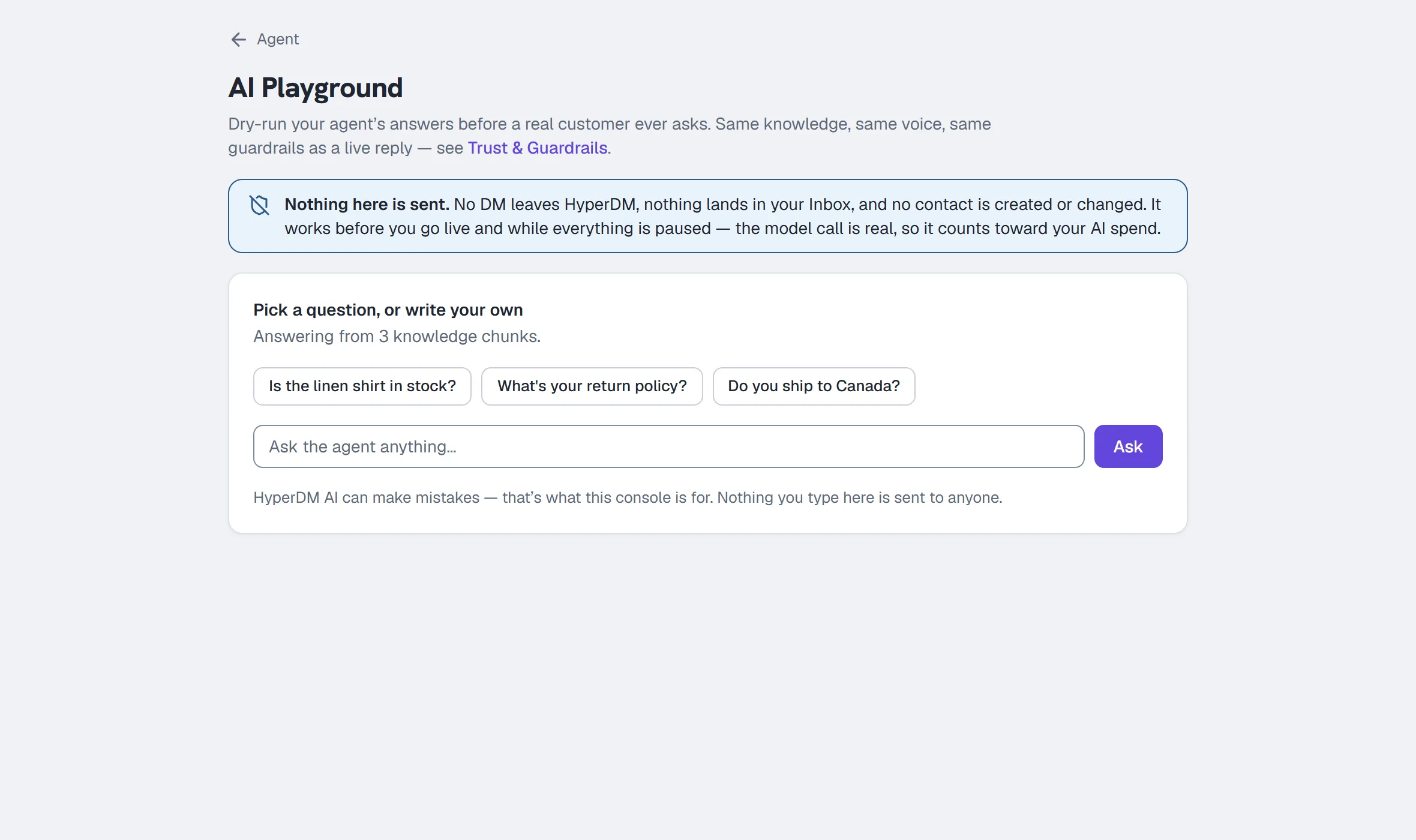
Nothing here is sent
The page says it on its face, and it means it precisely:
- No DM leaves HyperDM.
- Nothing lands in your Inbox.
- No contact is created or changed.
- It works before you go live, and while everything is paused.
- The model call is real, so it does count toward your AI spend — and the AI spend limits are the only things that can stop the Playground: past the daily ceiling it answers "You've hit today's AI spend ceiling (it resets at midnight UTC)", and while AI replies are paused for the month, "This plan's included AI usage for the month is used up, so AI replies are paused until the 1st (00:00 UTC)".
If your workspace is paused, a banner says so and adds: "Live replies are standing down. The Playground still answers — that's the point of it."
Ask a question
- Go to Agent → AI Playground.
- Click one of the starter questions, or type your own in the Ask the agent anything… box.
- Click Ask (it reads Thinking… while the answer is in flight).
The answer appears as a chat bubble signed HyperDM AI underneath, worded exactly as a customer would receive it. (A live reply can additionally deliver a product card or tracked link — the Playground never sends those.)
Before you've asked anything, the page tells you what it is answering from:
- With knowledge: "Answering from N knowledge chunks."
- Without: "You haven't added any knowledge yet — ask anyway, and the Playground will offer to teach the agent the answer."
Which configuration is answering
If you have unactivated edits on Agent → Voice, the Playground answers with that draft — dry-running what you are about to publish is the point of it. With nothing pending, it answers with the activated revision. Either way the answer names the revision it used, and asking a question here counts as the test that Agent → Overview requires before you can activate.
Read the result
Every answer carries the same four diagnostics as the Preview tab on the Agent page — one panel, one wording, so a before-and-after is a comparison of answers rather than of screens:
| Diagnostic | What it tells you |
|---|---|
| Grounding | Sourced from your knowledge / Not sourced — the agent hedged / Nothing retrieved. Retrieval is not proof the answer is right; check it against the sources listed. |
| Sources | The source labels behind the answer, and the knowledge revision at the moment it was produced. The revision is what makes a retest's "7 → 9" mean something. |
| Draft support check | Supported, Unsupported, Conflicting or Not run — a second model matching the draft to exact quotes. It never establishes that a source is TRUE, and "Not run" is not a pass. When the reply looks like it might mention a price, a discount or availability and the stricter price check ran, the verdict reads … · stricter check (for example Supported · stricter check) and the note says so in plain words; if the stricter check was unavailable, the note says the standard check decided instead. Either way the answer was checked once. The stricter check is picked by wording, so a reply such as "Feel free to ask" can go to it too. |
| Spend | The model and the exact cost. A preview is a real model call and counts toward your daily AI spend; nothing is sent to a customer. When the stricter price check ran, the row shows the total, then the reply's share and the stricter check's share, each beside its own model. A stricter check that did not finish is marked (estimate): its model may still have done the work, so the most it could have cost is counted. |
When the agent stands itself down — a refusal, a knowledge gap it declined to guess at, or two sources that disagree — a note above the diagnostics says which, in its own words. That is the agent working, not the console failing.
Close a knowledge gap without leaving the page
When an answer fails to ground, the Playground offers to fix it there and then:
- A shortcut appears under the answer offering to add knowledge for that question.
- Write the real answer (Add text), or point it at the page that holds it (Add link).
- Click Import for review. The import is not live yet: open Agent → Knowledge, read the passage and approve it.
- Come back and click Retest this question on the turn. The question was kept for you, and the new turn is labelled Retested with the knowledge revision before and after — "Knowledge revision 7 → 9. Nothing retrieved → sourced from your knowledge."
There is deliberately no automatic re-answer: an import that has not been reviewed is not retrievable, and a console that re-answered on its own would show you a repair that has not happened.
Saving knowledge needs an owner or admin. Agent- and client-role teammates can ask questions and will see the shortcut, but the save is refused with "Only owners and admins can change what the AI says or knows."
The old turn stays on screen. Seeing the same question answered differently, before and after, is the proof the loop closed — which is why the new answer is appended rather than replacing the old one.
Start over
Click Start over in the header to clear the transcript. It clears the screen only — nothing was saved anywhere.
Common questions
Is this the same as the Preview tab on the Agent page? Same engine, same diagnostics panel, same draft configuration. The difference is the transcript: the Playground keeps every turn, so a before-and-after stays on screen, while Preview also lets you file a correction against an answer.
Does it obey my guardrails? Yes — same knowledge, same voice, same guardrails as a live reply. That is the point of testing here rather than by DMing yourself.
Does it cost me a conversation? No. It costs an AI call, not a conversation against your plan cap.
Can my whole team use it? Yes. Read-only previews stay open to every role deliberately — they write nothing, and seeing the agent work is often the first useful thing a new teammate does.
Inspect the execution that ran
Run your question, then expand Execution details beside its diagnostics. Look at actual included passages and source count, labelled character/context-token estimates, and the embedding/generation/check stage rows. Provider-reported usage, estimates and unavailable facts are named separately. A logical model invocation is not proof of one HTTP request, and computed cost is not an invoice. The inventory observation can differ from the passages included if knowledge changed or expired during the test. Opening this panel does not run another question or contact a customer.
More in AI agent
- Set up the AI sales agentTeach the agent, draft its voice, check its sample replies, set its guardrails, test it, activate the revision you tested, then let it answer DMs.Read
- Add knowledge and sync your catalogGive the agent something true to answer from: paste FAQs, crawl your site or sync Shopify, review the passages, and add the products it can quote.Read
- Set up conversation goalsGive the agent one nudge to add after it answers — a link, an email ask or a follow invite — at most once per person in any 24 hours. On all plans.Read
Try HyperDM for free
50 free conversations a month, no card. Connect Instagram and follow the guide you just read.