How to set up conversation goals
Give the agent one nudge to add after it answers — a link, an email ask or a follow invite — at most once per person in any 24 hours. On all plans.
After the agent answers a question it can append one nudge toward a goal — at most once per person in any 24 hours. It sends the copy you configure here; it never composes a new one at send time.
Business objectives are separate from What the agent handles on the Voice tab (those conversational rules shape the answer; these add a nudge after it has been given).
Before you start
- Conversation goals are available on all plans with an active AI assistant.
- Only an owner or admin can save goals.
- The agent has to be answering for a nudge to be sent — see Set up the AI sales agent.
The three goals
| Goal | What it does | What you configure |
|---|---|---|
| Share a link | Nudges the customer to a page you want seen. The link is tracked, so you see the taps — unless your workspace sends links exactly as typed (Settings → Workspace → Links, where it's offered). | The URL |
| Capture a lead | Asks for their email and saves it onto the contact. | The field to save under (default email), and what happens next |
| Grow followers | Invites them to follow. For eligible contacts who have messaged you, Instagram can share whether they follow you; HyperDM saves that and refreshes it on their next message. Anyone saved as already following is skipped; an unknown status may still get the ask. | Just the nudge copy |
Set one up
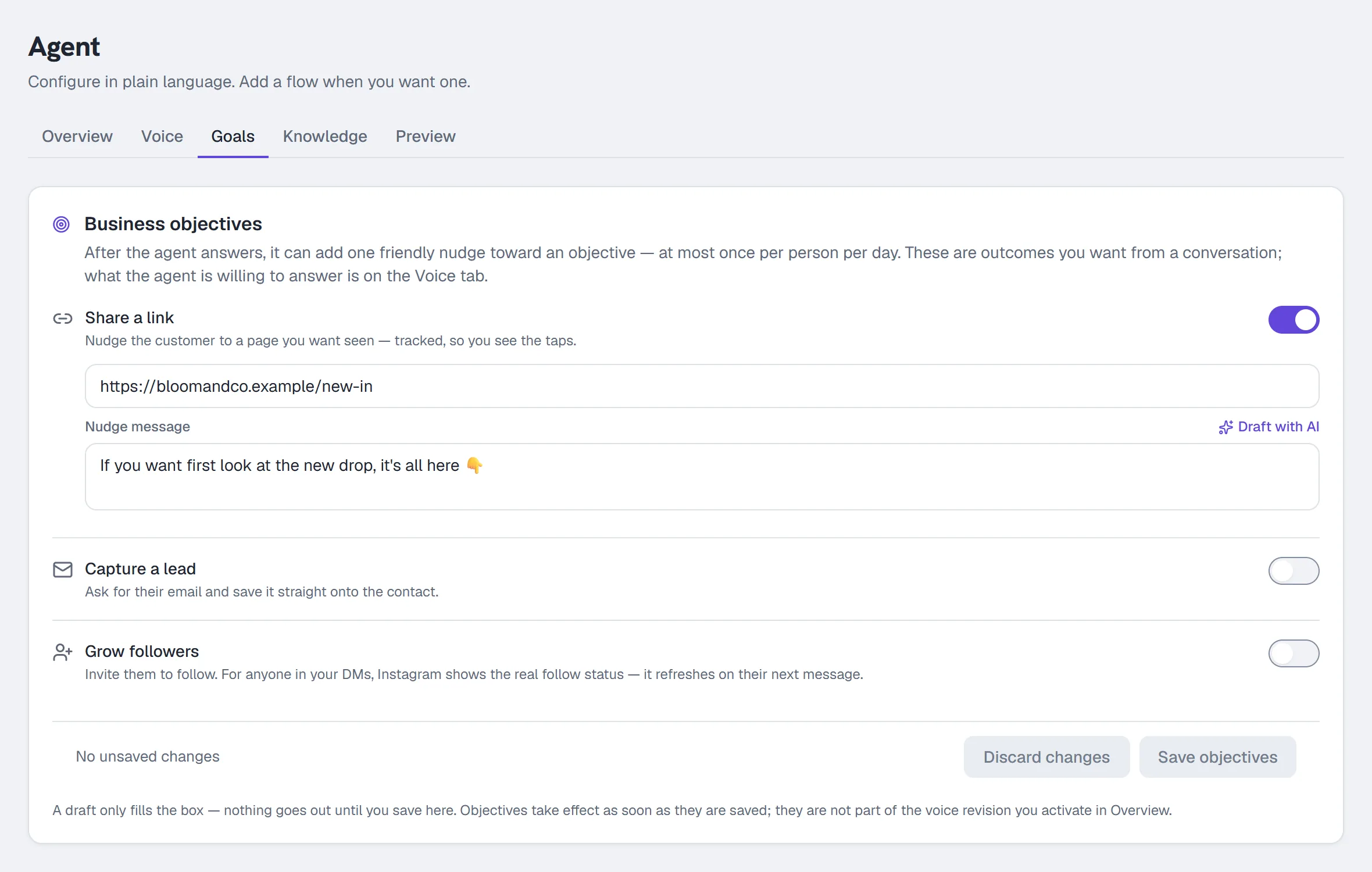
- Go to Agent → Goals.
- Toggle the objective on.
- Fill in its field — the URL for Share a link, the field key for Capture a lead.
- Write the Nudge message, or click Draft with AI to have one written for you. The draft lands in the box; it is not saved and nothing is sent until you review it and click Save.
- For Capture a lead, choose When the email lands, then…:
- Nothing more (just save it)
- Send a follow-up message — and write it
- Hand the thread to a human
- Click Save objectives. They take effect as soon as they are saved — unlike the voice, objectives are not part of the revision you activate in Overview.
The confirmation the agent sends after an email lands is the Lead-capture confirmation field on the Voice tab — blank uses the built-in default.
Check it
In Agent → AI Playground the nudge is not appended (the Playground never sends links or cards). To see it for real, DM your connected account from a second Instagram account with a question the agent can answer; the nudge follows the answer in that thread and in your Inbox.
Common problems
The nudge did not appear. It sends at most once per person in any 24 hours, only after the agent answered, and only when that goal is on and saved.
I want the nudge on every message. That is not offered: one per person in 24 hours keeps it from reading as spam.
The email was captured but I want it in a custom field. Change the field key on Capture a lead; create the field first under Contacts → Custom fields.
Full reference: The AI agent.
When a capture ask or save needs recovery
A capture ask owns the next reply only after its own confirmed send. HyperDM keeps that ask's exact field and identity across retries; changing a configured goal does not silently reinterpret an already delivered ask. A captured confirmation follows real typed storage, not an attempted save. If storage is temporarily unavailable, the same inbound can recover without declaring it captured or asking again under a new identity. An optional ask that could not be delivered does not consume a customer's real question, and a confirmed promised link remains delivered even if that optional ask fails. Goal end actions keep their existing best-effort behavior.
More in AI agent
- Set up the AI sales agentTeach the agent, draft its voice, check its sample replies, set its guardrails, test it, activate the revision you tested, then let it answer DMs.Read
- Add knowledge and sync your catalogGive the agent something true to answer from: paste FAQs, crawl your site or sync Shopify, review the passages, and add the products it can quote.Read
- Set up AI comment repliesLet the agent reply publicly to clearly positive comments under your posts, in your voice, from a tone note and a few example replies. The rest stays yours.Read
Try HyperDM for free
50 free conversations a month, no card. Connect Instagram and follow the guide you just read.