Trust & Guardrails
Set the checks every AI reply goes through: a discount cap, forbidden claims, refund escalation, hand-off when stuck, and proactive product cards.
Sidebar: AI agent → Agent → Trust & Guardrails. The hard rules every AI-written reply is checked against.
These are checked on every reply the AI writes. A reply the check finds breaking a hard rule is never sent — HyperDM pauses that conversation and hands it to you, with a note in the Inbox explaining why. The checks match supported patterns, so test the wording that matters to you.
Guardrails are on every plan, including Free. Safety is not sold as a feature.
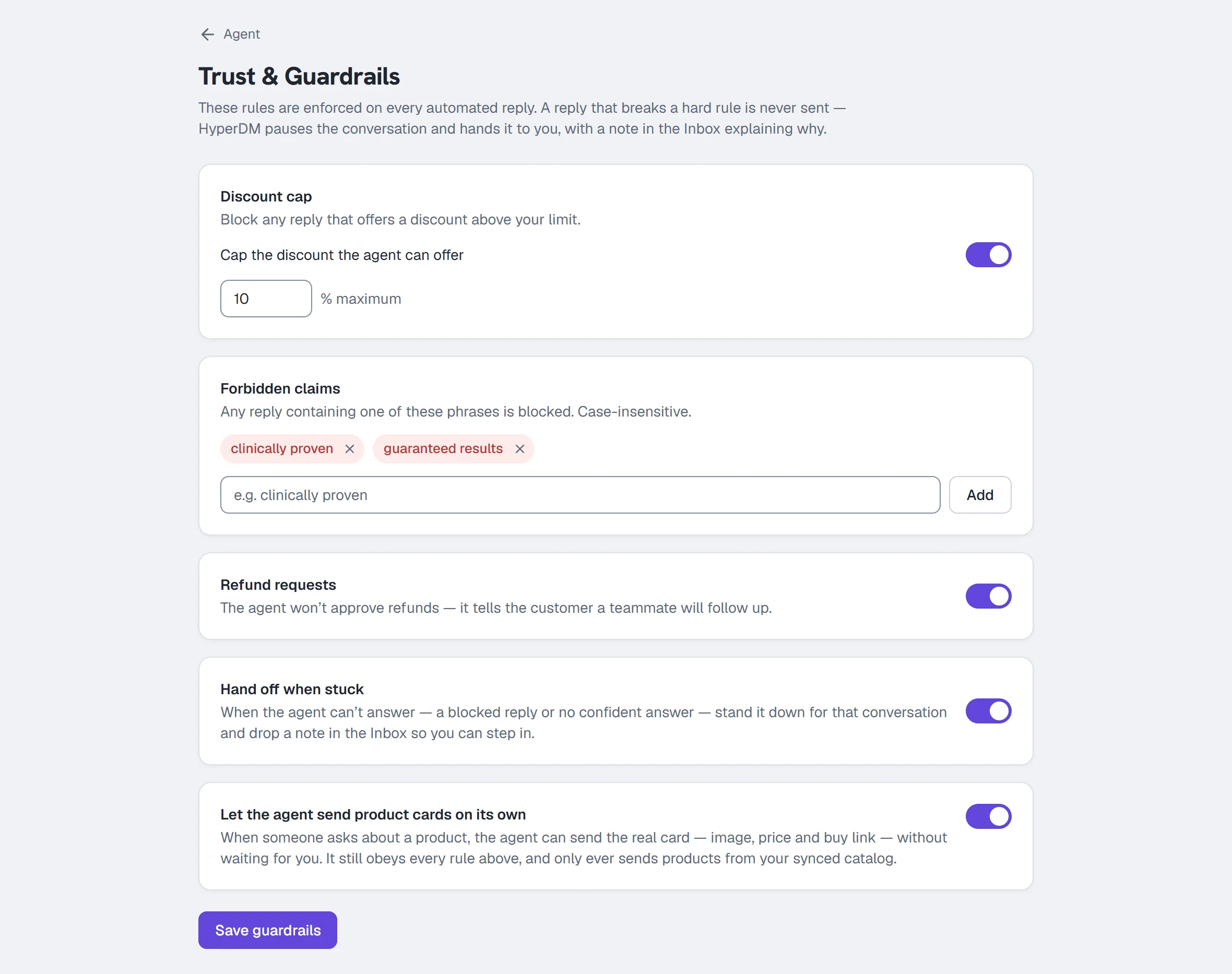
Discount cap
Blocks a reply offering a discount above your limit when it's written as a percentage (40% off, 40 percent off, 40 pct) or as half off / quarter off near a discount word. Test the phrasings your customers see.
- Toggle Cap the discount the agent can offer on.
- Enter a percentage (0–100).
- Click Save guardrails.
Leave it off and there is no cap — the Agent Overview summary will read "No discount cap".
Forbidden claims
Any reply containing one of these phrases is blocked. Matching is case-insensitive and exact: a reworded version isn't matched, so add the variants you care about.
- Type the phrase — e.g.
clinically proven. - Press Enter, or click Add.
- Repeat for each phrase — up to 30 phrases of 120 characters each (entries beyond those limits are dropped on save).
- Click Save guardrails.
To remove one, click the × on its chip.
Use this for regulated claims, competitor comparisons you never want made, or any promise your legal position can't support.
Refund requests
A toggle, on by default. When on, a clear refund or chargeback request pauses the agent for that conversation and flags it in the Inbox before any reply is sent — you answer the customer from the Inbox. Softer refund-adjacent questions still get an answer.
Leave this on unless you have a very deliberate reason not to.
Hand off when stuck
A toggle, off by default — turn it on. When on and the agent can't answer confidently, it stands down for that conversation and drops a note in your Inbox so you can step in. With it off, the agent tells the customer it can't confirm the answer. (A hard guardrail block pauses the thread and leaves a note whether or not this is on — the toggle governs the no-confident-answer case.)
This is what turns "the AI got it wrong" into "the AI knew it was out of its depth". Turn it on.
Let the agent send product cards on its own
Paid plans (Starter and up). Saves on flip — it does not wait for the Save guardrails button, because it writes a different setting through a different path.
When on: if someone asks about a product, the agent sends the real card — image, price and buy link — without waiting for you. It still obeys every rule above, and only ever sends products from your synced catalogue.
On the Free plan the toggle is disabled and the card says "On the paid plans."
Saving
Click Save guardrails. The confirmation reads "Saved — enforced on every agent reply now", which is literally true: there is no publish step and no delay.
Only owners and admins can save here. Agent- and client-role teammates can read the page, but saving is refused with "Only owners and admins can change what the AI says or knows."
What happens when a guardrail fires
- The reply is composed.
- The guardrail check fails.
- Nothing is sent.
- The conversation is always paused and flagged in the Inbox with a ⚠ note saying why — whether or not Hand off when stuck is on.
The Inbox note IS the record of a blocked reply. Blocked replies do not appear in the Analytics trust cards or the Activity log — those count sends the compliance gate held (window, consent, rate caps), and a guardrail block stops the reply before it ever reaches the gate.
Common questions
Do guardrails apply to my own hand-typed replies? No. Guardrails constrain what the agent says. Your own replies still go through the compliance gate (window, consent, rate caps) but not through the discount cap or the forbidden-claims list.
Do they apply to flow messages and broadcasts? Those are copy you wrote, so the discount cap and claims list don't rewrite them. Everything still passes the compliance gate.
Why is the product-card toggle greyed out? It needs Starter or above. See Plans and billing.
Can I see what was blocked? In the conversation itself: the block leaves a ⚠ note in that thread in the Inbox, and the thread is paused for you. Guardrail blocks don't appear in the Analytics trust row or the Activity log — those cover sends held by the compliance gate.
More in AI agent
- Set up the AI sales agentTeach the agent, draft its voice, check its sample replies, set its guardrails, test it, activate the revision you tested, then let it answer DMs.Read
- Add knowledge and sync your catalogGive the agent something true to answer from: paste FAQs, crawl your site or sync Shopify, review the passages, and add the products it can quote.Read
- Set up conversation goalsGive the agent one nudge to add after it answers — a link, an email ask or a follow invite — at most once per person in any 24 hours. On all plans.Read
Try HyperDM for free
50 free conversations a month, no card. Connect Instagram and follow the guide you just read.