Giveaway picker
Draw a random giveaway winner from the comments on your own Instagram posts, film the reveal, and share a proof link anyone can check.
Sidebar: Automate → Growth tools → Giveaway picker. Draw a random winner from the comments on up to 10 of your own Instagram posts, play a full-screen reveal made for your phone's screen recorder, and pin a public proof link under your giveaway post. For the steps in order, see how to pick a giveaway winner.
Where it's on: every workspace, on every plan. Free draws one winner from up to 5,000 comments; Starter and up add more winners, the paid rules and themes (the limits are in the tables below).
Who can use it
- Your Instagram has to be connected, and it has to be a Creator or Business account. Instagram only shares a post's comments with the professional account that posted it. On a personal account, switch it first: switch to a professional account.
- Not connected yet? New draw shows Connect Instagram. After Instagram's own login screen you come back to the giveaway picker, which says "Instagram connected as @yourhandle. Choose your giveaway posts to start."
- If the connection doesn't go through, you still come back to the giveaway picker, and it says why above the screen: for example that the connection was cancelled, that you're in the Instagram app's own browser (open HyperDM in Chrome or Safari instead), or that the account is already connected to another workspace. Only owners and admins can connect Instagram.
- If you connected but declined one of the permissions Instagram asked for, the giveaway picker says so instead of "Instagram connected": loading comments needs the comments permission, so reconnect and approve everything.
- Your role needs to be able to change automations (owners, admins, editors and agents can; viewers can't).
- Only your own posts. Instagram won't share the comments on someone else's post, a giveaway partner's included.
The draws list
Giveaway picker lists your workspace's draws, newest first, each with its status: Loading entries, Ready to draw, Drawn, Didn't finish loading or Entries expired. Open goes to a draw; New draw starts one.
Choosing the posts
One giveaway can use 1 to 10 posts. Two ways in, and you can use both:
- Pick from your posts: tick posts in the grid. Load more posts shows older ones. Stories and lives aren't offered: they have no comments we can load.
- Paste links: one post link per line, then Find these posts. Each line says what happened to it, and a line we can't use never stops the others:
- a share link (
instagram.com/share/…), a profile link or text that isn't a post link: open the post, tap Share, then Copy link, or pick the post from the grid; - a post on another account: Instagram won't share its comments with us;
- a post we can't find on your account (archived, deleted, or older than your newest 960 or so posts): pick it from the grid instead;
- the same post twice is kept once.
- a share link (
Load comments starts loading.
If you typed a prize in the sample reveal on HyperDM's giveaway picker page before you signed up, your first draw starts with that prize already filled in. Your handle is never sent.
Loading the entries
Posts load one after another: "Post 2 of 3 · 1,850 comments loaded". You can leave the page; loading picks up where it stopped when you come back. When every post is loaded, you see the snapshot time ("Entries as of …"). Comments posted after it are not in the draw. Refresh entries reloads every comment from the start.
What can stop loading, and what to do:
| You see | What to do |
|---|---|
| Instagram needs you to reconnect | Reconnect. After Instagram you come back to this draw, and loading carries on. Your progress is saved. |
| Instagram didn't answer | It tries again three times on its own, then shows Resume. |
| Instagram asked us to slow down | Nothing. It counts down and carries on by itself. |
| We need to reload this post's comments from the start | Reload comments. |
| A post didn't finish | Retry this post reloads just that post; the others keep their progress. Or Remove it from the giveaway. On a draw you started more than a day ago the button is Refresh entries instead, which reloads every post. Nothing is drawn until every post has loaded. |
| This post is no longer on Instagram | Remove it, and draw from the others. |
| More than 5,000 comments (free plan) | Upgrade to draw from up to 25,000. Above 25,000, contact us. |
A post that loaded 0 comments says "No comments on this post yet." Instagram's own comment count on a post can be higher than what loads, because it includes replies, which never count as entries; the post then says, for example, "Loaded 2,214 comments. Instagram's total of 2,431 includes replies, which don't count as entries." Comments from accounts you've restricted, and on age-restricted posts, aren't shared by Instagram at all: a post Instagram says has comments but that loaded none says so, with Read why linking here. Instagram's count is read when you choose the post, so comments posted after that can make what loads higher, and then nothing extra is shown.
The rules
Each rule shows what it leaves, as a line: "2,214 comments → 1,902 people → 1,140 with 2+ tags", and the eligible entries under it. Every change saves straight away.
| Rule | Plans | What it does |
|---|---|---|
| One entry per person | All | Each person's earliest comment counts. Off: every comment is an entry. |
| With several posts | All | One entry per person across every post, one per person on each post, or only people who commented on every post. |
| Friends tagged | All | How many different @handles the comment must tag. Your handle and the commenter's don't count. |
| Entry deadline | All | Only comments posted before this time count. |
| Comment must include | Starter and up | A word or hashtag. |
| Exclude accounts | Starter and up | Usernames that never count, one per line or separated by commas. |
| Count hidden comments | Starter and up | Comments you or comment moderation hid are left out unless this is on. |
| Number of winners | 1 on Free, up to 20 on Starter and up |
Never counted, whatever the rules: replies to comments, and comments from your own account. We can't check who follows you, so check the winner's profile before you announce.
Someone with several entries (one per post, or every comment counting) has more chances to come up first, but wins only once: nobody is two of the winners, or a winner and one of the people kept behind them.
If a change can't be saved, the rules go back to what was last saved and the message names what to fix, for example an excluded account that isn't a valid Instagram username.
Go to the stage waits while a change is saving. It stays off when no entry is left, or when fewer people are eligible than winners wanted (then Draw 2 winners instead, or however many there are). If your deadline is still in the future you're asked Draw anyway or Wait.
The stage
A full-screen 9:16 reveal with no app around it, so nothing else ends up in your recording. The four styles are Reel spin, Comment storm, Spotlight wall and Countdown (Countdown is always used when your device asks for less motion). The free look carries "Picked with HyperDM · hyperdm.app".
- Before you film: start your phone's screen recording, turn on Do Not Disturb, and turn the ringer on if you want the sound. I'm recording closes the list.
- Rehearse plays the whole reveal on made-up names only, never your real entries, stamped Rehearsal; a screen reader announces it as a rehearsal too. Nothing is saved.
- Draw picks the winner on our server and saves it before the reveal starts. A second tap, or a reload, shows the same winner: it can never draw twice.
- Replay plays the same reveal with the same winner. Done goes to the result.
- After the reveal lands, Next winner, Replay and Done fade out of the picture after 2 seconds so your recording ends on a clean card. Tap the screen or press a key to bring them back; they stay reachable by keyboard and screen reader the whole time.
The result
- The winner (or winners), their comment, Open profile, and Open the comment on Instagram on every winner, which opens the post that winner commented on (on a giveaway with several posts too). If we couldn't re-check that the comment still existed when you drew, it says so; the winner stands.
- Copy proof link: pin it under your giveaway post.
- Save Story image (1080 × 1920) and Save post image (1080 × 1350). Share opens your phone's share sheet where there is one.
- Replace winner picks the next person in the draw order and asks why: Didn't reply in time, Didn't meet the rules, Declined or Other. There's no new random pick. Every draw keeps up to 10 people in order behind the winners (fewer when the entries run out); when they're used up the result says "No alternates are left", and a draw that never had any says so. Then start a new draw.
- Download entry list (CSV), for 24 hours after loading: comment id, username and time for every eligible entry. The same list and the same seed always give the same winner. Anyone removed at their request is left out of the file, and then it no longer matches the proof page's fingerprint.
- Rules line for your caption, on every plan: the two statements Instagram's Promotion Guidelines ask every giveaway to include, in a box you can't edit, with Copy rules line ("Copied. Paste it into your giveaway caption.") and Read Instagram's Promotion Guidelines. You still need your own rules, such as who can enter, the closing date and the prize.
- An email to you with the proof link and both images.
Themes (Starter and up)
Themes, beside New draw on the draws list, keeps up to 10 saved looks for the reveal and the winner images. One of them is your Default: it dresses the stage and the winner images of every draw, past draws included, and new draws start with its reveal style. The proof page always keeps HyperDM's layout.
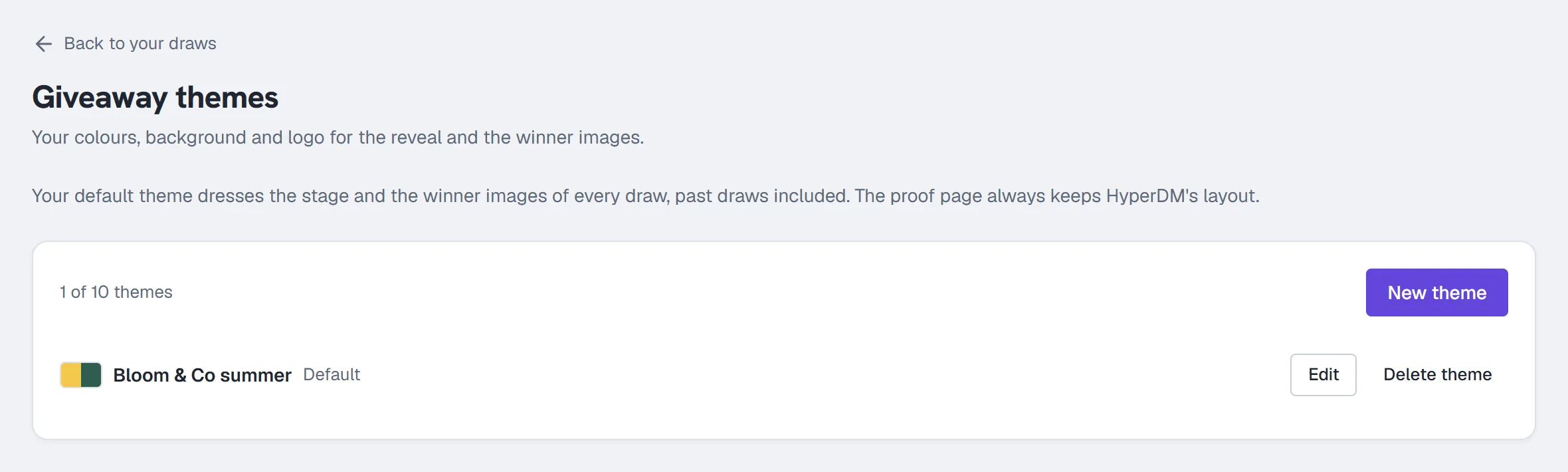
- Theme name: up to 60 characters, only you and your team see it.
- Accent colour and Second accent colour, as hex colours. Text is set to ink or white, whichever reads better.
- Background: a Solid colour, one of eight built-in Gradients, or Your image (PNG, JPEG or WebP, under 5 MB, dimmed behind the text).
- Logo on the title card and the winner card, with Put the logo on a light pill for a dark or busy logo.
- Title line, up to 40 characters, replaces "@yourhandle giveaway" on the title card.
- Default reveal style and Sound on by default.
- Show "Picked with HyperDM": turn it off to remove the HyperDM lockup. A draw run with it off ends its proof page with one quiet line, "Draw run on HyperDM".
Live preview shows your changes on made-up names as you make them; Play a rehearsal runs the reveal. Save theme, Make default and Delete theme do what they say. While an image is still uploading, Save theme shows Uploading… and waits. Uploads are checked on our server: an SVG, a GIF, an animated image or a file over 5 MB is refused, and if an upload fails your previous image stays in place. If you upload a lot of images in a short time, the editor asks you to wait a few minutes. An image you upload but never save in a theme is deleted after a day; if a theme is saved after its image was deleted, the save is refused and the editor asks you to choose the image again.
On Free, Themes shows Themes come with Starter and every draw uses HyperDM's look. If your plan drops to Free, your saved themes are kept, and your stages and winner images use HyperDM's look until you're on Starter or above again. A proof page never changes after the draw.
The proof page
The proof link opens a public page anyone can read, without signing in. It shows your account, the posts, when the entries were loaded and the draw ran, how many comments loaded, the eligible entries, the rules, the winners with their comment, every replaced winner with your reason, every other draw run on the same posts (from any HyperDM workspace the account was connected to), the entry list's fingerprint, the random seed, and how the draw works, including that someone with several entries can win only once. It doesn't list the other entrants. Search engines are asked not to show it.
What it keeps
The loaded comments are deleted about 24 hours after the draw's last post finishes loading. The winners, the people kept behind them and the draw's rules (including the accounts you excluded) stay with the draw for 13 months. If a winner asks to be removed, their name and comment are deleted and the proof page says "Winner removed at their request".
More in Instagram automations
- Set up comment-to-DMReply to a keyword in your comments with a public reply and a DM that carries the link, step by step in the builder, then test it from a second account.Read
- Set up keyword triggersAnswer a DM that contains a keyword with the right reply and link, straight from the builder, with the matching rules and the priority order explained.Read
- Set up intent recognitionSend a saved DM when a message is worded close to a description you write, instead of a keyword, and test it from a second account before you rely on it.Read
Try HyperDM for free
50 free conversations a month, no card. Connect Instagram and follow the guide you just read.