


WEBSITE CHAT AUTOMATION

Your AI agent, now on your website.

Website chat is available now. Paste one line of code and the same AI agent as your DMs answers visitors from your catalog, then hands over to your team in the Inbox. No Facebook, no login.

Set up website chatRead the install guide →
Website chat automation

Website chat: available now

  • STATUS

    Available now

    Website chat is on for every workspace. Sign up, then add it from Settings → Channels → Website chat.

  • NO ACCOUNT

    No Facebook, no login

    Visitors type and get an answer. No Messenger, no Instagram, no app to install.

  • GROUNDED

    Answers from your catalog

    The agent you already set up answers from your synced products and reviewed policies, says it's an AI, and the Inbox lists the sources each reply used.

  • SAME AUTOMATIONS

    Build once, run on both

    Coming in a later phase: add your website to an Instagram automation. Steps only Instagram can run, like a follow check, will be skipped or swapped. You choose which.

  • TAKE OVER

    A person is a tap away

    When the agent can't decide, it hands over and pauses. Your reply lands in the visitor's chat window, from the Inbox you already use.

  • AFTER THEY LEAVE

    Email or Instagram, their choice

    Coming in a later phase: a visitor who has to go will be able to get the reply by email, or tap through to your Instagram DMs and carry on there.

  • PRIVACY

    Nothing stored until they open it

    The chat sets nothing in a visitor's browser until they open it. Strict mode waits for consent first, or your cookie banner can switch it on.

  • PRICE

    Counted apart from your DMs

    Website chats run on their own monthly allowance, so a busy site never uses up the conversations your Instagram relies on. Your Website chat settings show this month's count.

Answer the questions that never reach your DMs

A skincare founder packing orders at a studio table, laughing.
  • WHEN A VISITOR…asks on your product page
  • THENan answer from your catalog, or your team

Visitors on your product page ask what your comments ask: does it fit, when does it ship, is it in stock. Most won't leave your site to message you on Instagram. Website chat answers them where they are, from the same catalog and policies as your DMs, and passes the ones that need a person to your team.

Set up website chat

EXPLORE WEBSITE CHAT

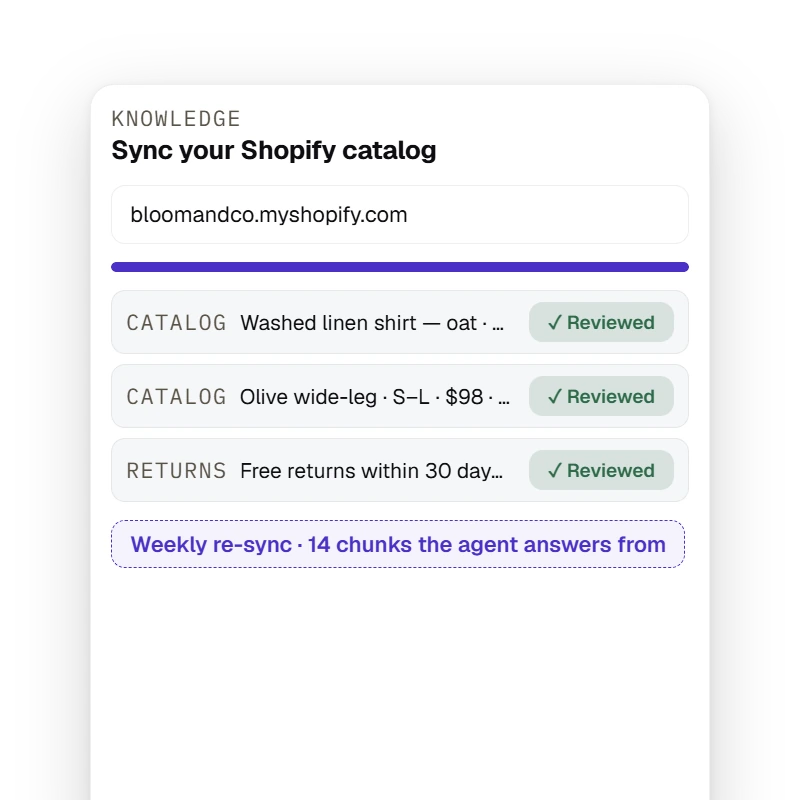
The Knowledge tab imports a Shopify storefront's published products (price, stock state, buy link — drafts and live inventory excluded) and crawls policy pages into passages that wait for owner/admin review before the agent answers from them, re-syncing manually, daily or weekly.

Catalog

Answers from the catalog you already sync

Website chat answers from the products and policies you sync and review for your DMs, so a visitor gets the same answer your Instagram would give.

Set up website chat

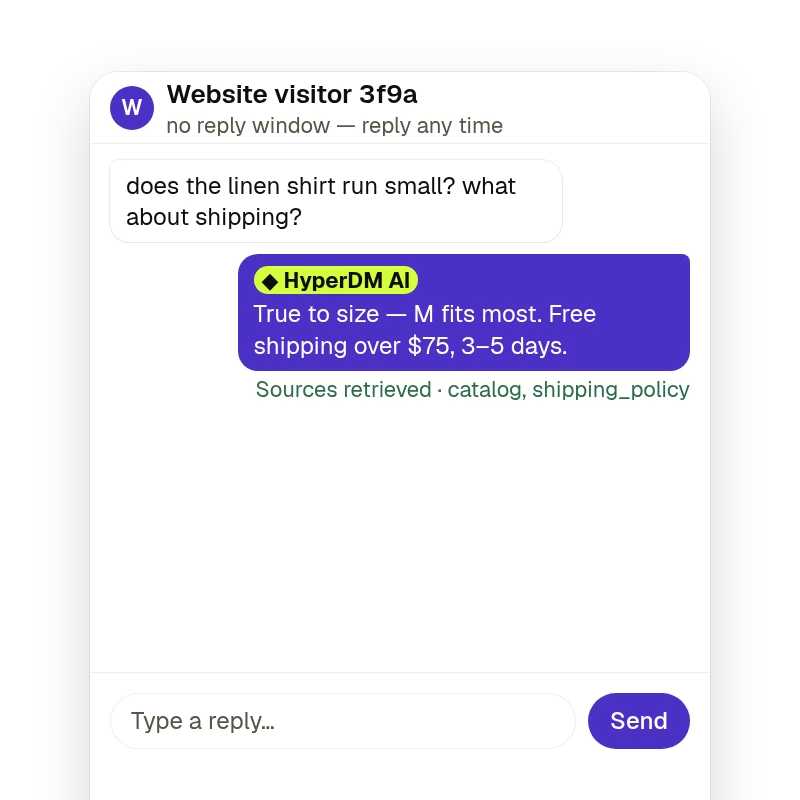
A website visitor's question is answered by the agent from the workspace's knowledge and catalog, and the Inbox shows the receipt under the reply — `Sources retrieved · <sources>` when retrieval found chunks. Website threads have no reply window.

The reply

‘Does it run small?’ — answered with its sources

The agent answers from your catalog and policies, and the Inbox shows the sources under each AI reply, so you can check what a visitor was told.

Set up website chat

A busy website never switches off your Instagram

A creator on a sunny rooftop filming a video on her phone, grinning.
  • WEBSITEits own monthly allowance
  • INSTAGRAMkeeps running, untouched

Website chats are counted apart from your DM conversations, with their own monthly allowance. If your site has a huge week and uses it up, the agent stops answering on the website and new chats wait in your Inbox. Your Instagram automations keep running.

Set up website chat

How website chat works

Three moves. Paste one line, choose who answers first, and reply from the Inbox you already use.

  1. Step 1: Paste one line on your site

    Add the script to every page, or follow the Shopify, WordPress, Wix, Squarespace or Google Tag Manager steps. Pick your colour, name and the domains it may run on.

  2. Step 2: Choose who answers first

    Your AI agent or your team. Your agent's knowledge and guardrails come with it. Automations on your website come in a later phase.

  3. Step 3: Answer from one Inbox

    Website chats arrive beside your DMs with the page the visitor is on and whether they're still there. Take over any time, and your reply lands in their chat.

Website chat, answered.

Answered everything?

Set up website chat

No card · Cancel anytime

Put your AI agent on your website.

Set up website chat

NO CARD · 14 DAYS OF PRO, THEN 50 CONVERSATIONS A MONTH FREE · TEST BEFORE YOU GO LIVE