Section 3: Gates, captures and follow-ups
Capture emails in the DM
Someone who just commented for your free guide is the easiest person to ask for an email. HyperDM gives you two ways to ask. The automation form's Capture their email asks after the DM. A question in a flow can hold the link until an address arrives. Both store what people send, and neither adds it to an email tool for you.
Screenshots show the real HyperDM app with a demo workspace. Names and numbers are examples.
Turn on Capture their email
- Open the automation, or click New automation, and go to step 3, Follow-up.
- Switch on Capture their email.
- Write The ask, for example
Want the guide in your inbox too? Reply with your email.Leave it blank and HyperDM sends its own ask, which also says they can unsubscribe. - Write the Confirmation after they send it, for example
Got it, you're on the list.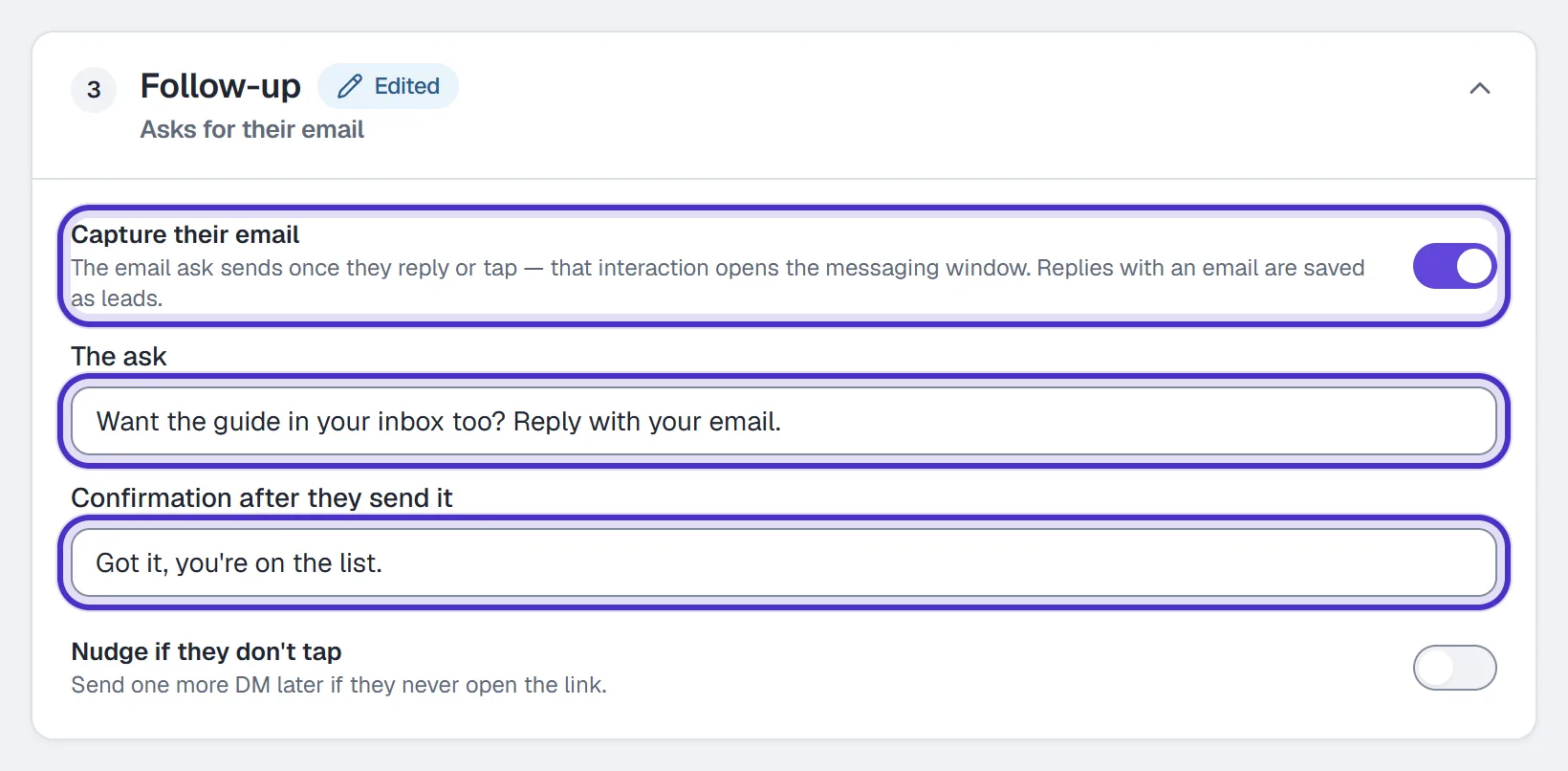
Follow-up with Capture their email on, the ask and the confirmation written - Click Publish.

The new automation's top bar with Save draft and Publish
The ask needs an open DM window, so it goes out once the person has replied or tapped. On a comment automation set to After they reply (the default, see the opening message), it follows the link after their reply. On a DM keyword automation they messaged you first, so it goes right after your DM.
Instagram's rule. A comment's private reply doesn't open the DM window. If a comment automation sends the link In the first message, the email ask goes out before they've replied, and unless they messaged you in the last 24 hours Instagram's window stops it. Keep After they reply when the email matters.
What HyperDM saves, and what it doesn't check
When their next message contains something shaped like an email address, such as name@example.com, HyperDM takes the first one, saves it as a lead for that automation and sends your confirmation. Words around the address are fine.
A reply with no address isn't chased. Nothing is saved, no second ask goes out, and the message carries on to your other automations or the AI agent. The ask stays open, so an address they send in a later message is still saved.
HyperDM checks the shape of an address, not the inbox behind it. It sends no confirmation email and doesn't test whether the address exists, so a typo like gmial.com or a made-up address is saved as typed. Expect a few bad addresses when you move the list into your email tool.
Where the emails show up
- The automation's row on Automations counts emails in the funnel line under its name, and the Most leads sort ranks your automations by them.
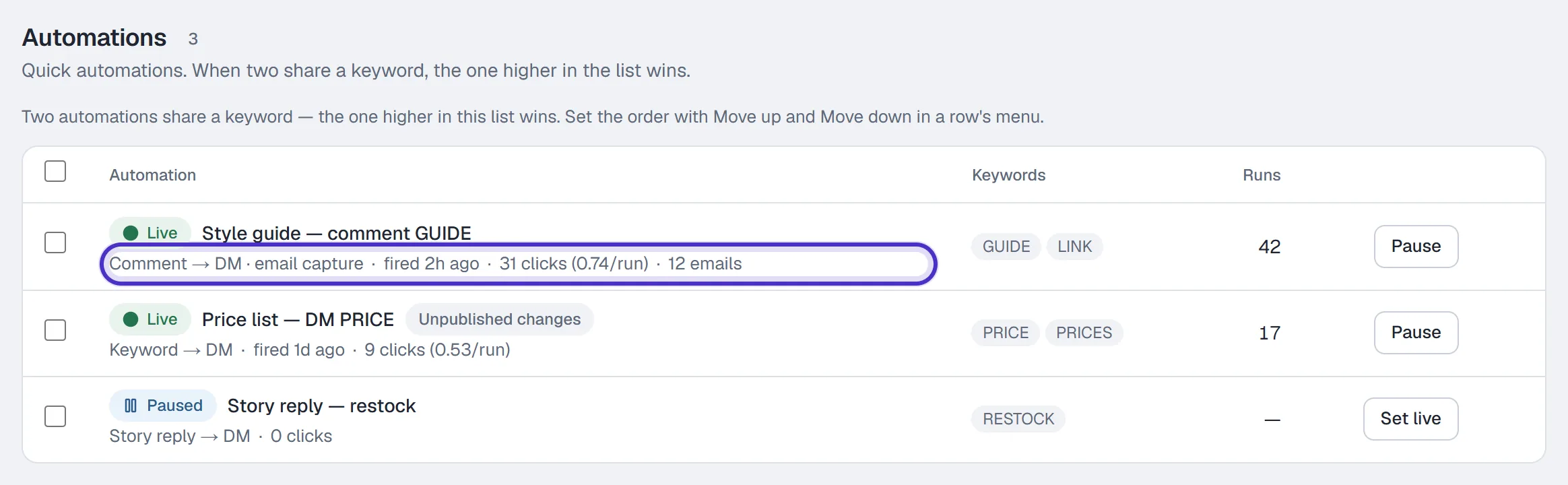
An automation's row on Automations counting 12 emails in its funnel line - The automation's Results page shows Emails, with emails per person reached, and lists each Shared an email event under Who it reached. It never shows the address itself.
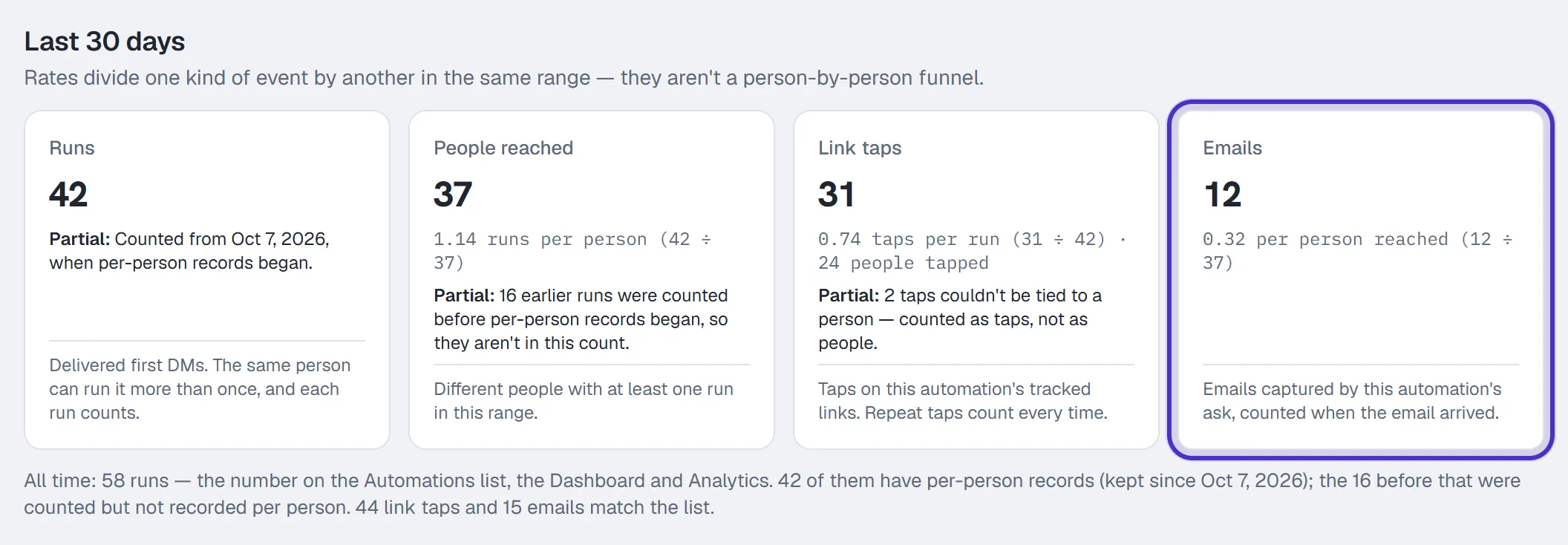
An automation's Results with Emails and emails per person reached - Analytics shows Leads captured on every plan.
If you want the addresses in a file you can download, build the capture as a flow question. Its answers save onto a contact field you can see on the contact, and the flow's Responses button lists every answer and exports them as CSV. Neither way of asking syncs addresses to another tool, so you import that CSV into your email tool yourself.
Hold the link until they send an email
The form always sends the link first. To make the email the price of the link, use a question in a flow. A Message step with a Data collection block set to Email waits for a typed answer and saves it to the field named in Save to field (email for a new question).
- On a comment trigger, keep the first step a short message with one quick reply button. The first private reply can't carry a question, and Design checks blocks it.
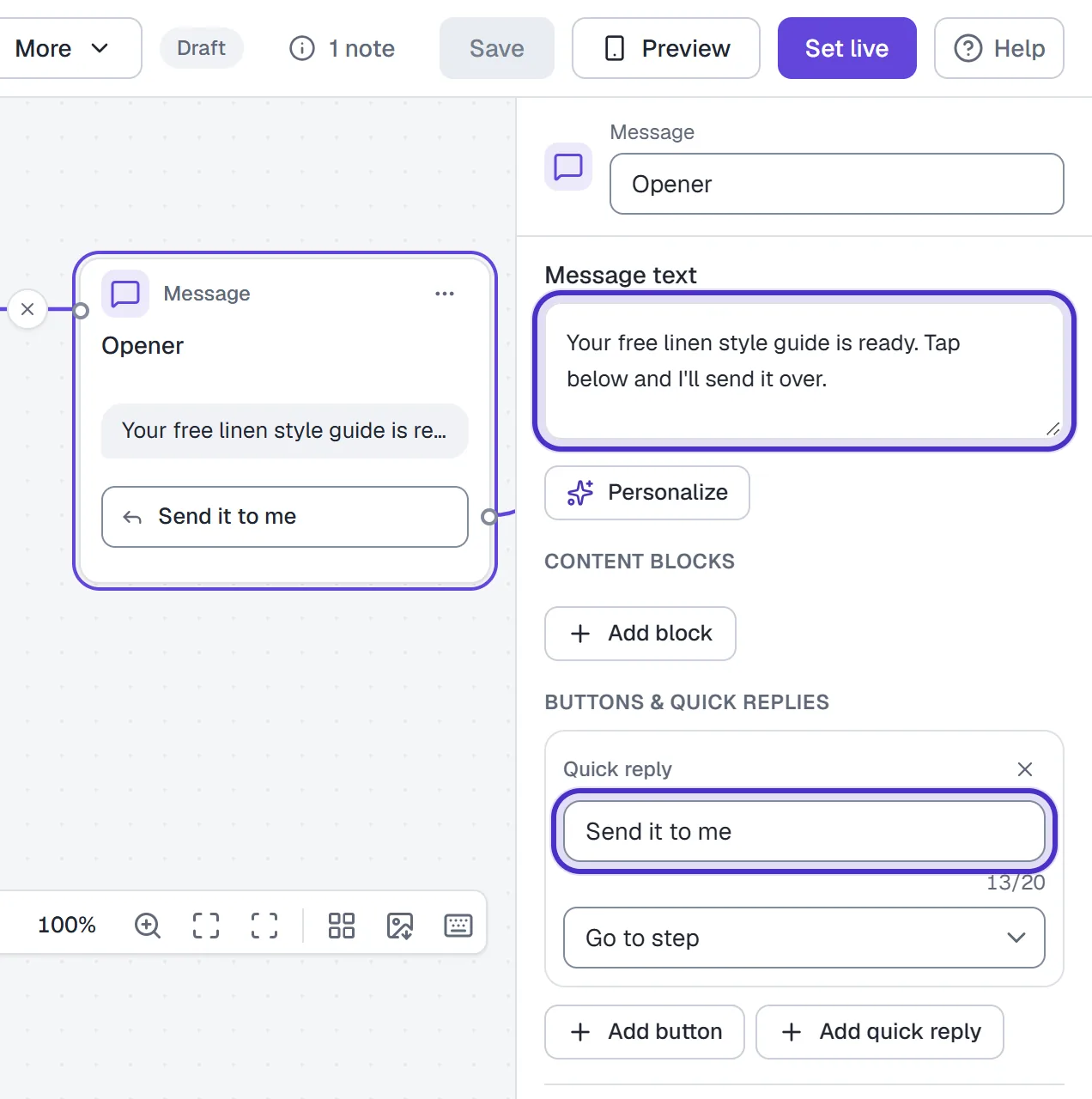
The first step on a comment trigger, a short message with one quick reply - In the next Message step, use Add block to add Data collection, set it to Email and write the question, for example
What's the best email to send the guide to? - Leave Separate exit for skips on. The step gets two exits: Answered, for a valid email in this conversation, and Skipped, for the skip word (
Skipby default) or running out of re-asks.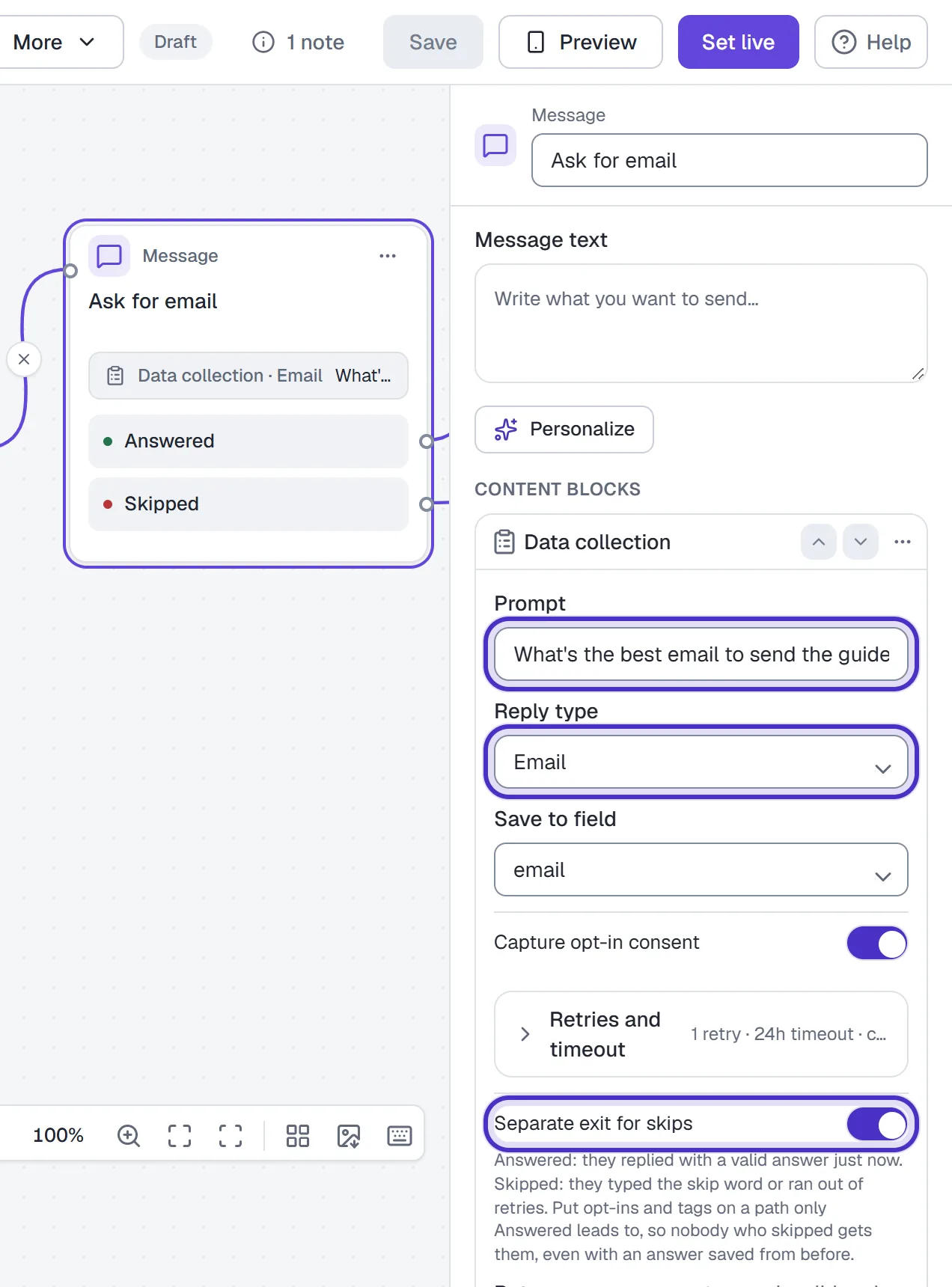
A Data collection block set to Email with its question and Separate exit for skips on - Put the message with your link after Answered. Connect Skipped to a short goodbye, or leave it empty to end the flow there.
- Read Design checks, then click Set live.
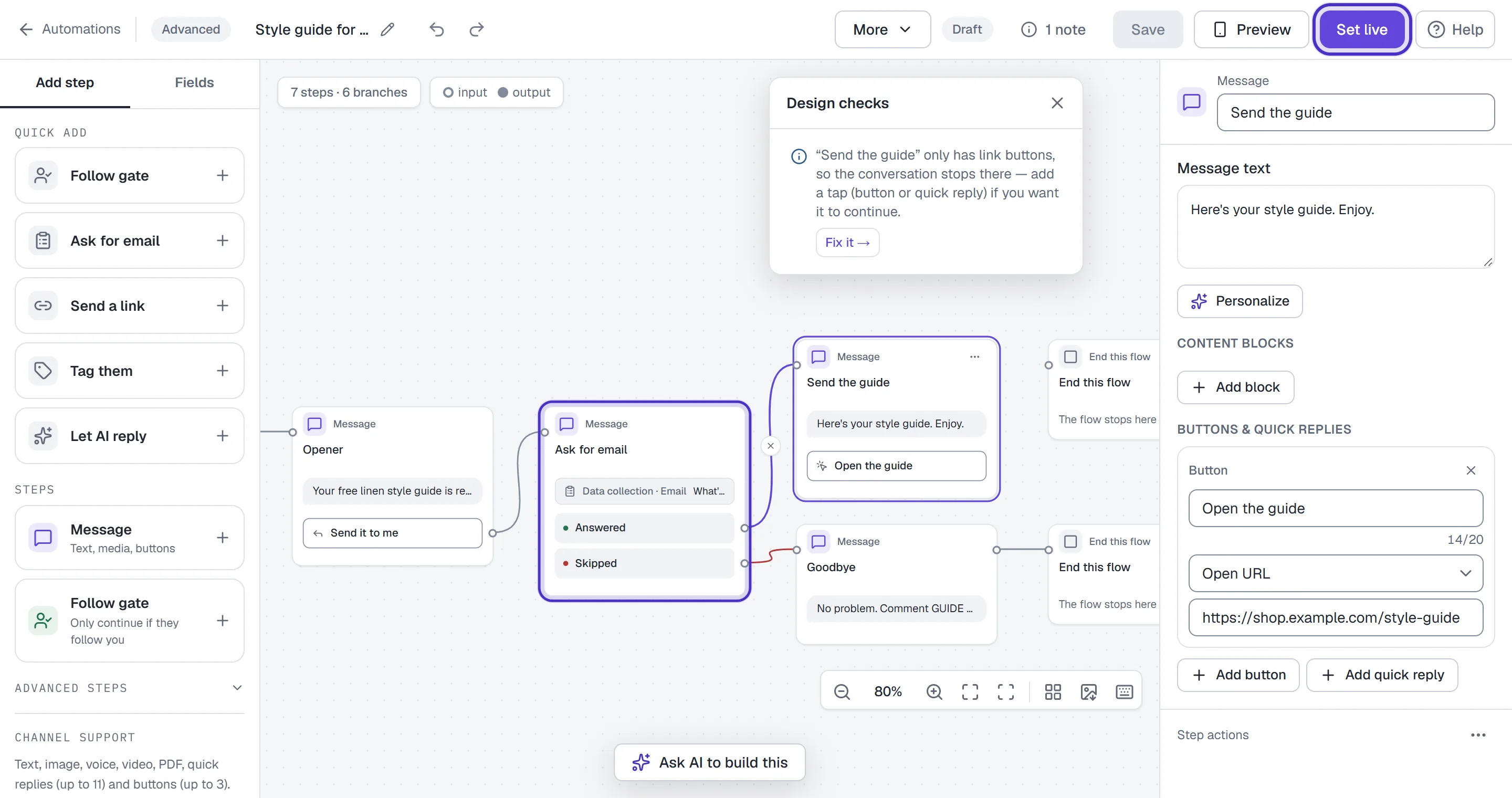
Answered leads to the link and Skipped to a goodbye, with Design checks open and Set live on
An email answer has to fit the format, so a reply that doesn't is asked again. With the default Retry limit of 1, their second reply that doesn't fit takes Skipped. If they don't answer within the step's No-response timeout, the flow ends there.
Which way to ask
| Ask after the link (automation form) | Hold the link (flow question) |
|---|---|
| Everyone who replies gets what you promised in the post | Only people who send an address get the link |
| Fits a freebie you promised with no strings | Fits a newsletter list or a giveaway entry |
| Emails are counted on the row, Results and Analytics | Addresses land on a contact field and in Responses |
A held link costs you the people who won't share an address, and they get nothing. HyperDM doesn't publish a typical answer rate, so compare your own: Results for the form, Drop-offs on the canvas for the flow.
FAQ
Does HyperDM check that an email address is real?
No. It checks that the reply contains something shaped like an email address and saves it as typed. It sends no confirmation email and doesn't test whether the inbox exists.
What happens if someone types a fake email?
A made-up address that looks like an email is saved like any other. In a flow question, a reply that doesn't look like an email at all is asked again, then takes the Skipped exit.
Can HyperDM add these emails to my email tool?
Not automatically. Build the capture as a flow question, export its Responses as CSV, and import the file into your email tool yourself.
Where do I see the email addresses?
With a flow question, on the contact field it saves to and in the flow's Responses list. The automation form's capture counts emails on the automation's row, its Results page and Analytics, but Results never shows the address itself.
Can I gate on following and ask for an email?
Yes, in a flow. The Follower-gated link template checks the follow first, sends the link, then asks for the address.