Analytics gives each question its own tab: is it working, which automation to copy or stop, which post to automate next, and whether a DM went out. Every plan gets the key metrics, the automation table and an activity log, and each plan up adds more.
Screenshots show the real HyperDM app with a demo workspace. Names and numbers are examples.
The header: tabs, range and export
Open Daily → Analytics. Seven tabs sit under the title, each named by the question it answers:
| Tab | Answers |
|---|---|
| Overview | Is it working, and is it getting better? The page opens here. |
| Automations | Which automation should I copy, fix or stop? |
| Content | Which posts get comments, and which should I automate next? |
| Audience | Who are my contacts, who comments, and where do they come from? |
| AI agent | How is the AI agent doing? |
| Activity | Did my DM send, and if not, why? |
| Team | What did my team get done in the Inbox? |

To change the window:
- Click the date-range button beside the title. It names the window you're looking at, and the page opens on Last 14 days.
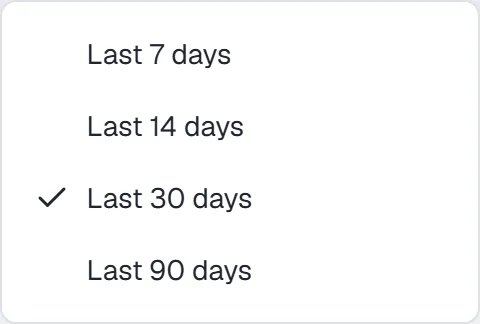
The date-range menu, from the last 7 days to the last 90 - Pick Last 7 days, Last 14 days, Last 30 days or Last 90 days. Pro and Agency also get Last 6 months, Last 12 months and Custom start date….
The window lives in the page address, so a bookmark or a shared link opens the same one, and picking a range keeps you on your tab. Days are counted in your workspace's timezone. Activity has no date-range button, and Team stops at Last 90 days.
Export CSV is on Overview, Automations, Audience and AI agent. The file holds the daily counters on every plan, plus inbound messages per day, first-response times and new contacts by source on Growth and up. Below Growth those sections are absent from the file, not zeroed. It covers 7, 14, 30 or 90 days, whichever is the shortest that covers your window, so a longer window exports the last 90 days. Customer questions and contact identities are never exported.
Overview: is it working?
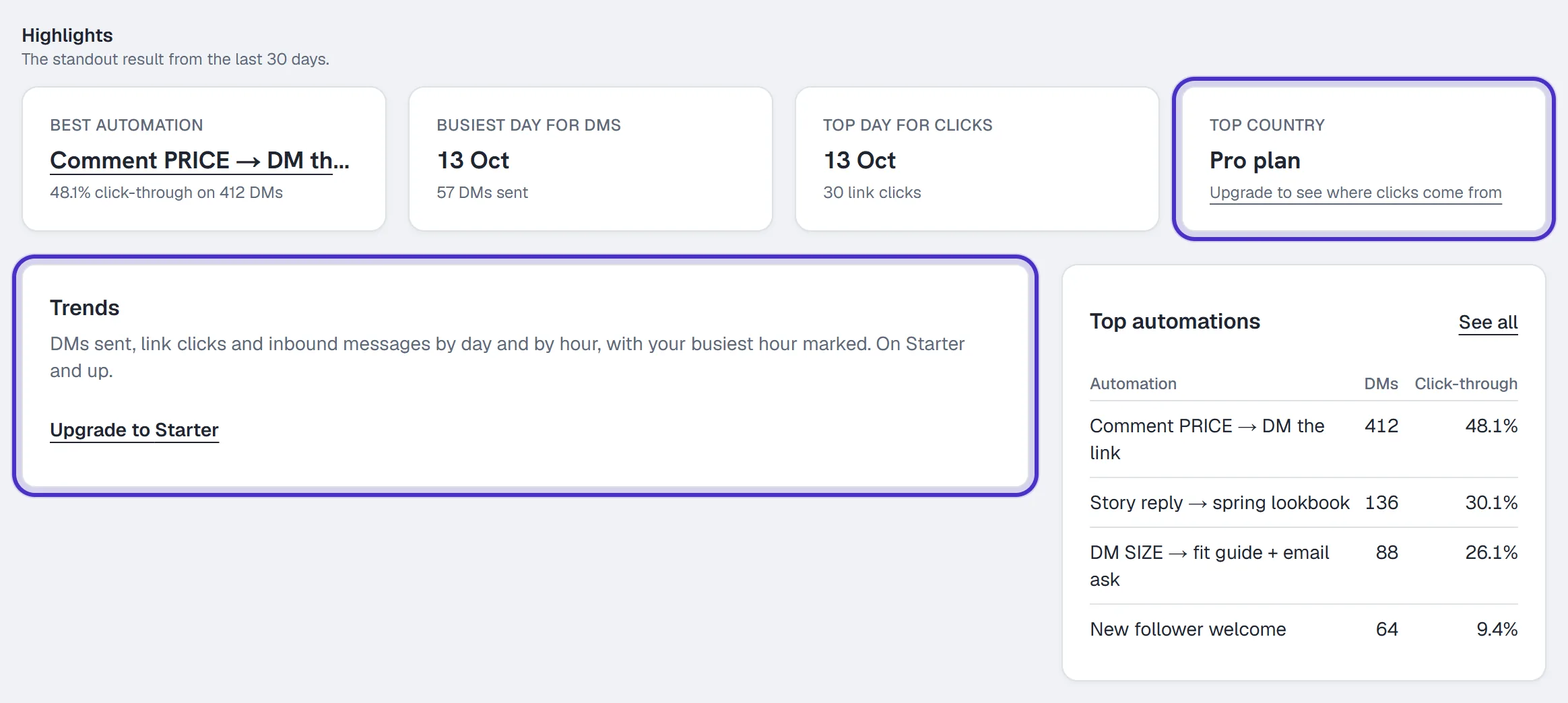
Highlights are the standout results from your window: Best automation, Busiest day for DMs, Top day for clicks and Top country. Best automation needs at least 5 DMs in the window, and says so when it doesn't have them. Top country is on Pro and Agency.

Key metrics show each number against the window of the same length just before it. With no earlier window to compare, the tile says so.
| Tile | Counts |
|---|---|
| DMs sent | DMs your automations delivered. |
| Link clicks | Taps on your tracked links, repeat taps included. |
| Click-through | Taps on your automations' links per DM sent. Its change is in percentage points. |
| Leads captured | Emails your automations captured, with the share of email asks answered. |
| Revenue | Paid order value in the last 14 days. |
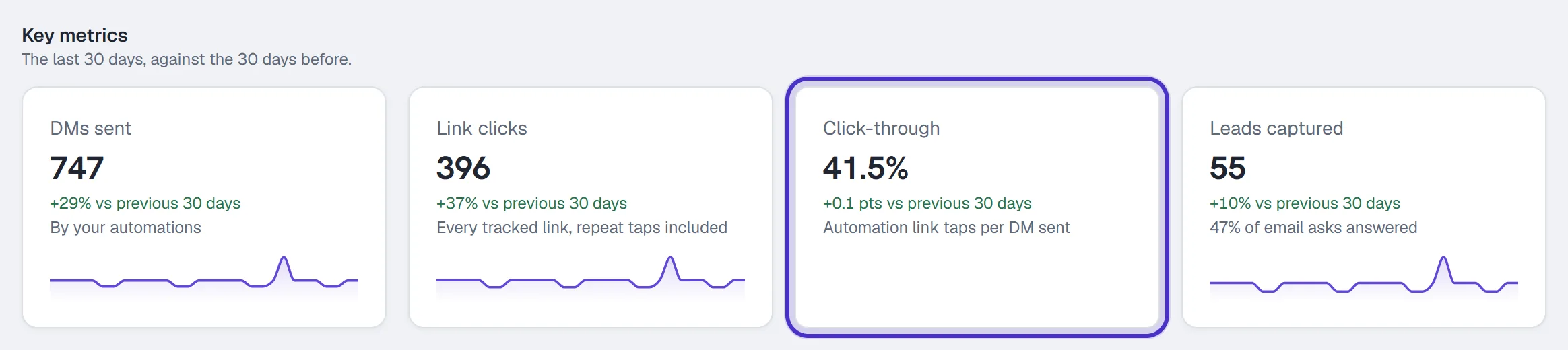
Revenue appears only once you have a paid order and are on Growth or above. A number HyperDM couldn't read says Not available yet, and a rate with nothing under it shows a dash, so neither passes for a real zero.
Below the tiles, Trends (Starter and up) charts DMs sent, Link clicks or Inbound messages, Daily or By hour. Top automations lists your top 5 by DMs sent, and Delivery this week gives the DMs sent and held in your workspace's week.
Automations: which to copy, fix or stop
Automation performance lists every automation over your window, sorted by DMs sent. Click a column heading to sort by it. Click-through is its link taps per DM sent, and Capture rate is emails captured per email ask. On Growth and up there's a Revenue column as well.
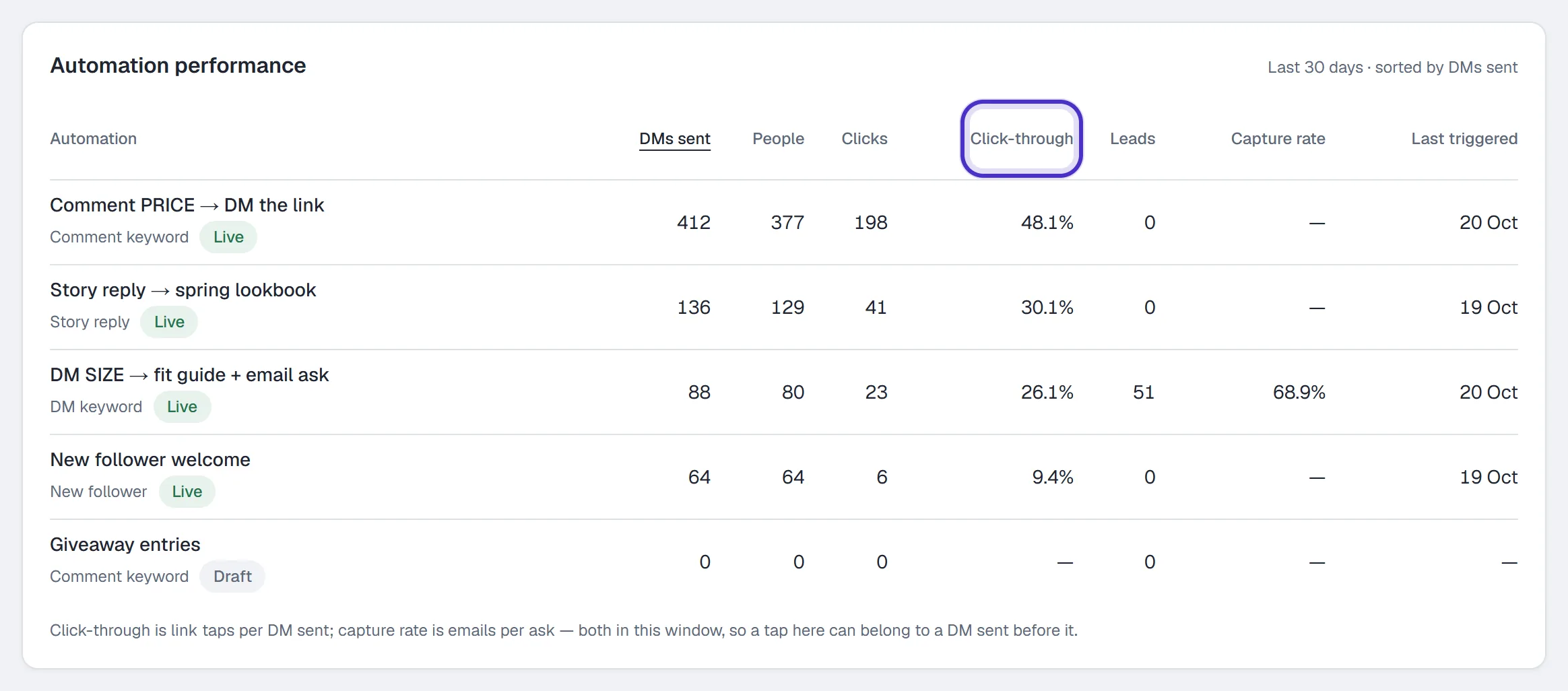
To look at one automation:
- Click its name in the table. A panel opens above the table with its numbers for the window. On Starter and up it also charts its DMs sent by day.
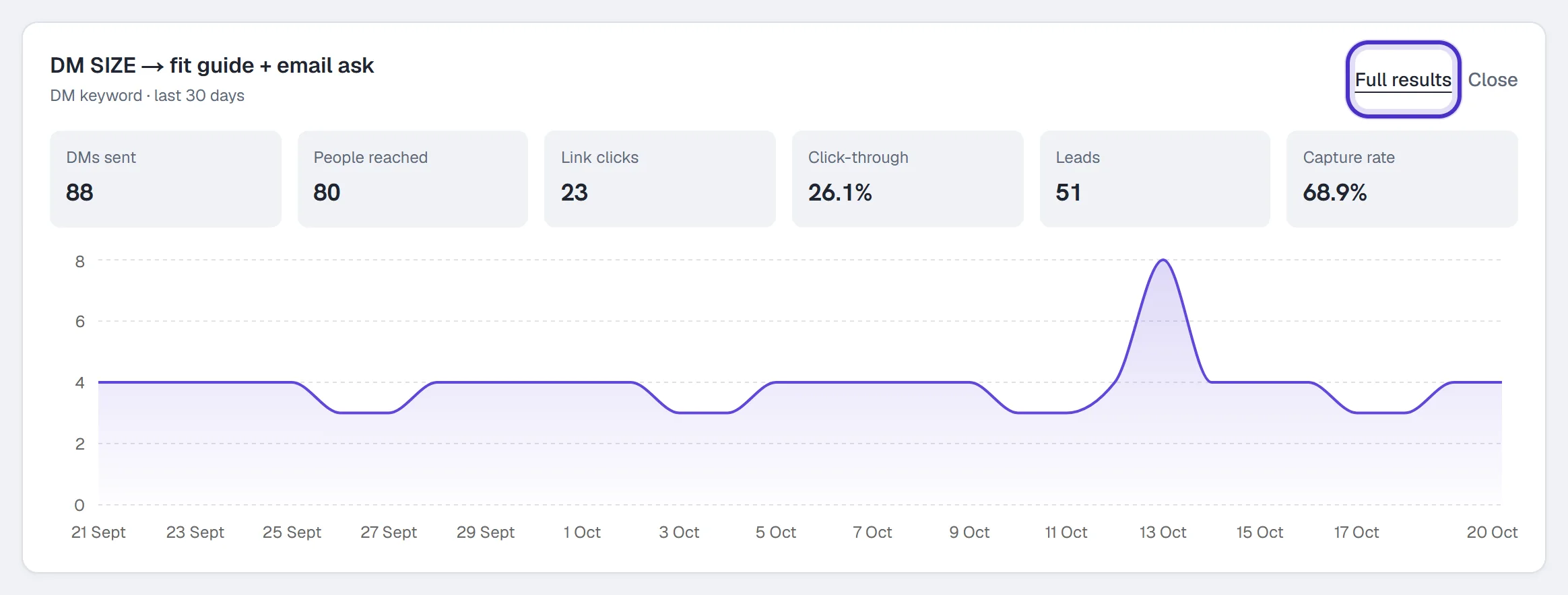
One automation opened above the table, with Full results - Click Full results for its own Results page, then choose 7d, 30d, 90d or All time.
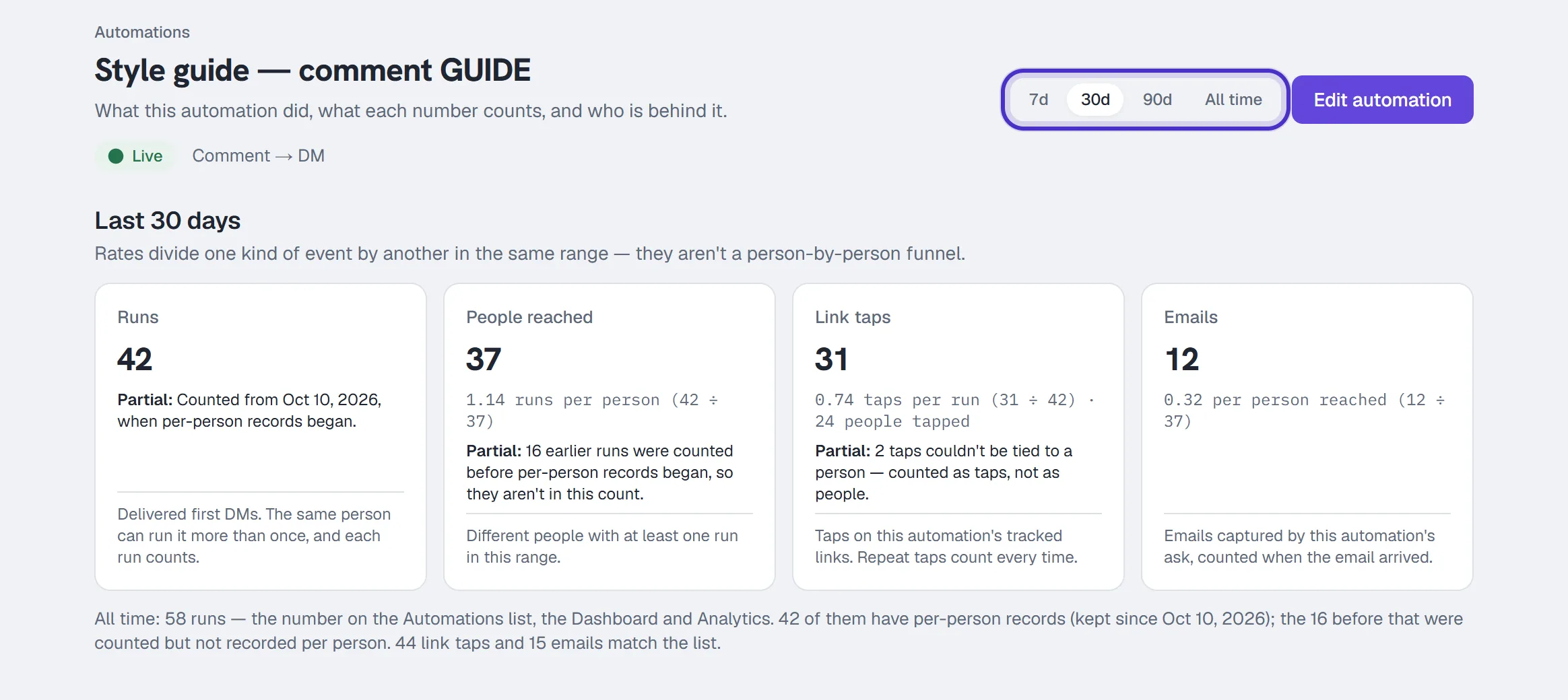
An automation's Results over 30 days with Runs, People reached, Link taps and Emails
| Number on Results | Counts |
|---|---|
| Runs | Delivered first DMs. One person can run it more than once, and each run counts. |
| People reached | Different people with at least one run in the range. |
| Link taps | Taps on its tracked links, every repeat included. |
| Emails | Emails its ask captured, counted when they arrived. |
The Automations page itself gives a quicker read. The line under each name shows its trigger, when it last fired, then clicks and emails.
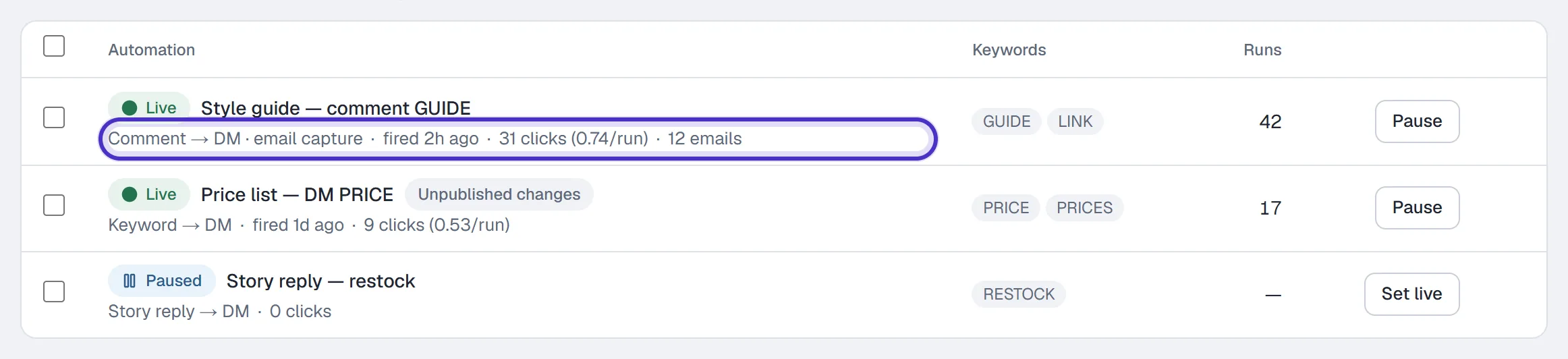
Growth and up adds By folder, Revenue by automation and Conversions, which counts your conversion events by people and value. A sent broadcast has its own sent → skipped → clicked line on Broadcasts. Which links are tracked is covered in Link tracking.
Content and Audience: which post next, and who comments
Content performance (Growth and up) lists the posts and reels that got comments in your window, most comments first. Keyword comments are the ones an automation or flow matched, and Trigger rate is keyword comments per comment.
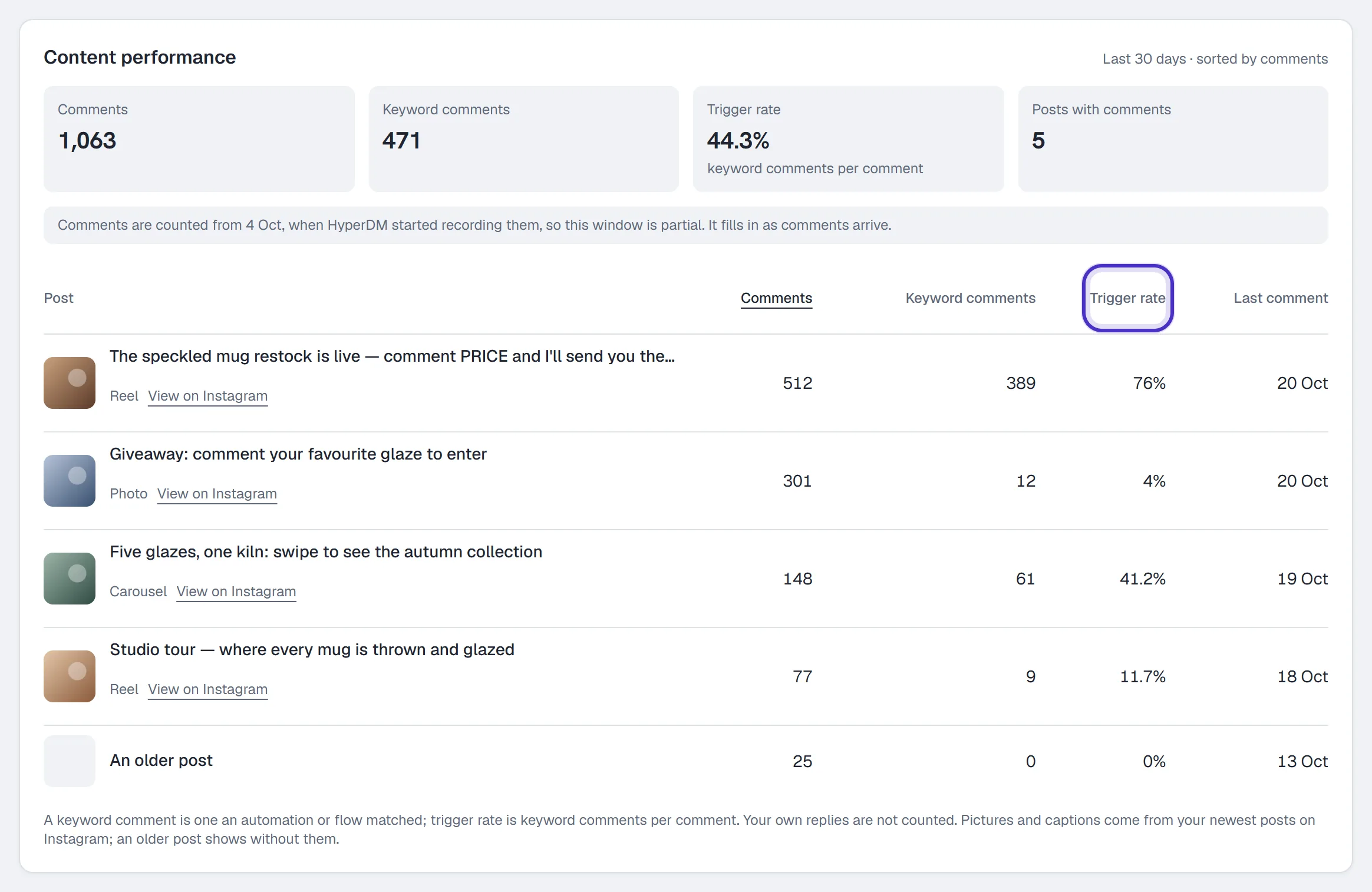
A post with plenty of comments and a low trigger rate is the one to automate next, because people are talking and nothing answers them. A high trigger rate means your keyword is doing its job.
Audience shows your Contacts on every plan. Growth and up adds Where your contacts came from, When your customers message and Do your contacts come back?. Pro and Agency add Where your link taps come from and Who comments, which shows your Top commenters and Superfans: people who commented at least twice a week in at least two weeks of your window.
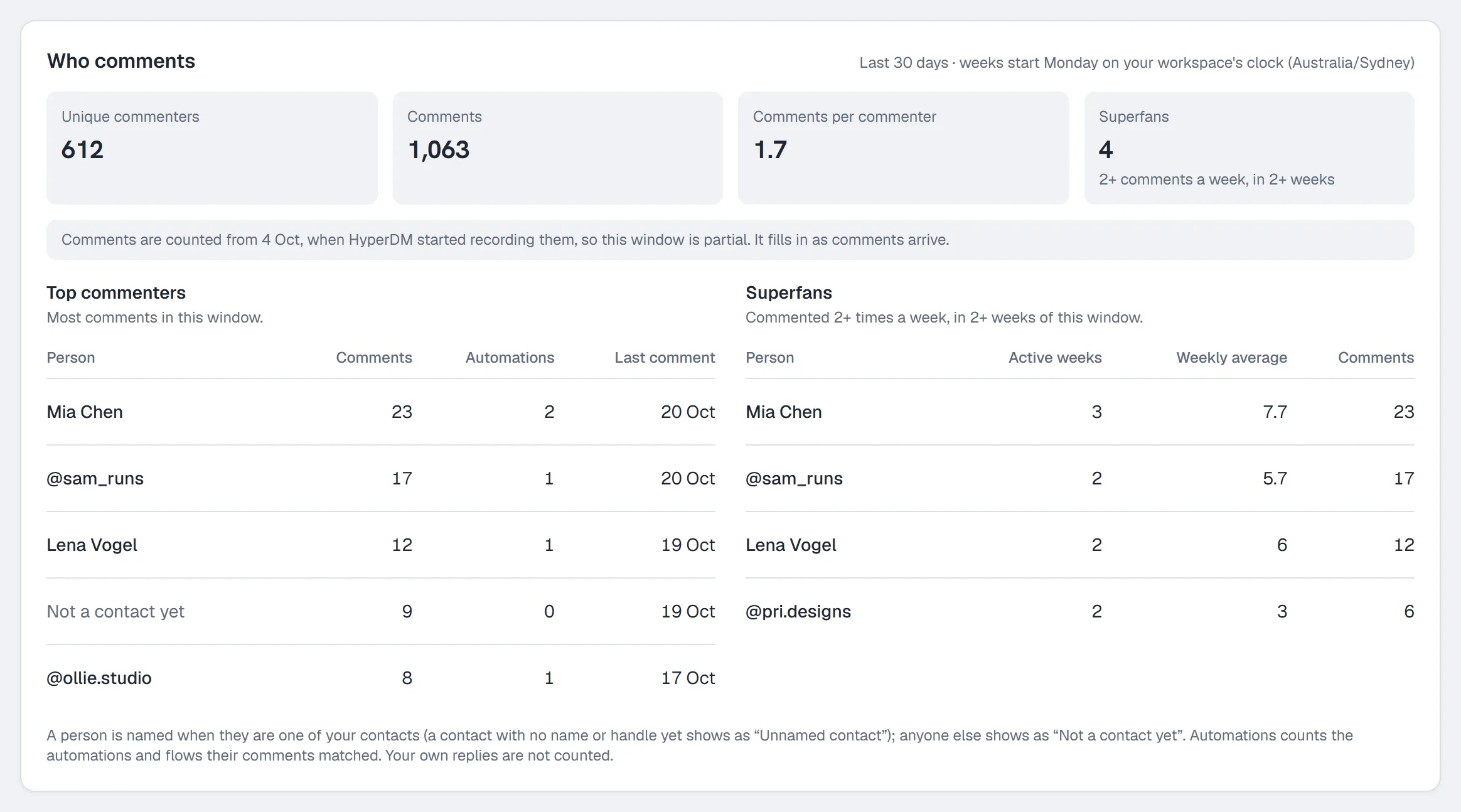
Comments are recorded on every plan, so moving up shows your history straight away. HyperDM keeps which post, which comment, the commenter's Instagram ID, any match and the time, and never the words. When your window starts before counting began, a note names the first day counted.
AI agent, Activity and Team
The AI agent tab keeps What your agent couldn't answer on every plan: the questions the agent couldn't answer, ready for you to add in Agent → Knowledge. How the AI agent is doing needs Starter, and How fast you reply needs Growth.
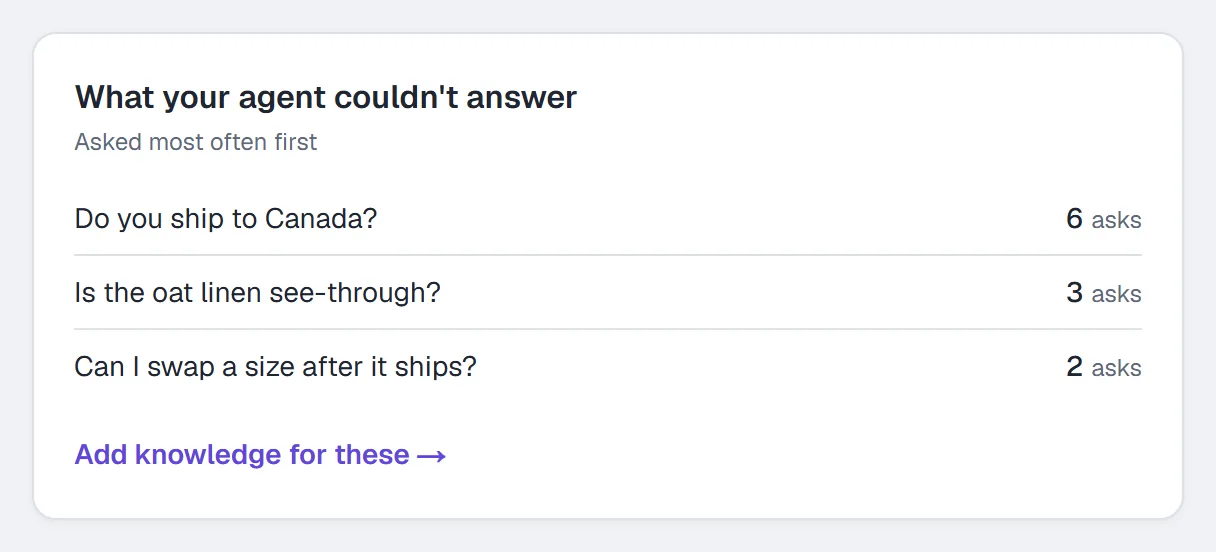
Activity answers "did my DM send?". Automation activity logs every DM, public reply, email ask and click, newest first, with what happened to each.
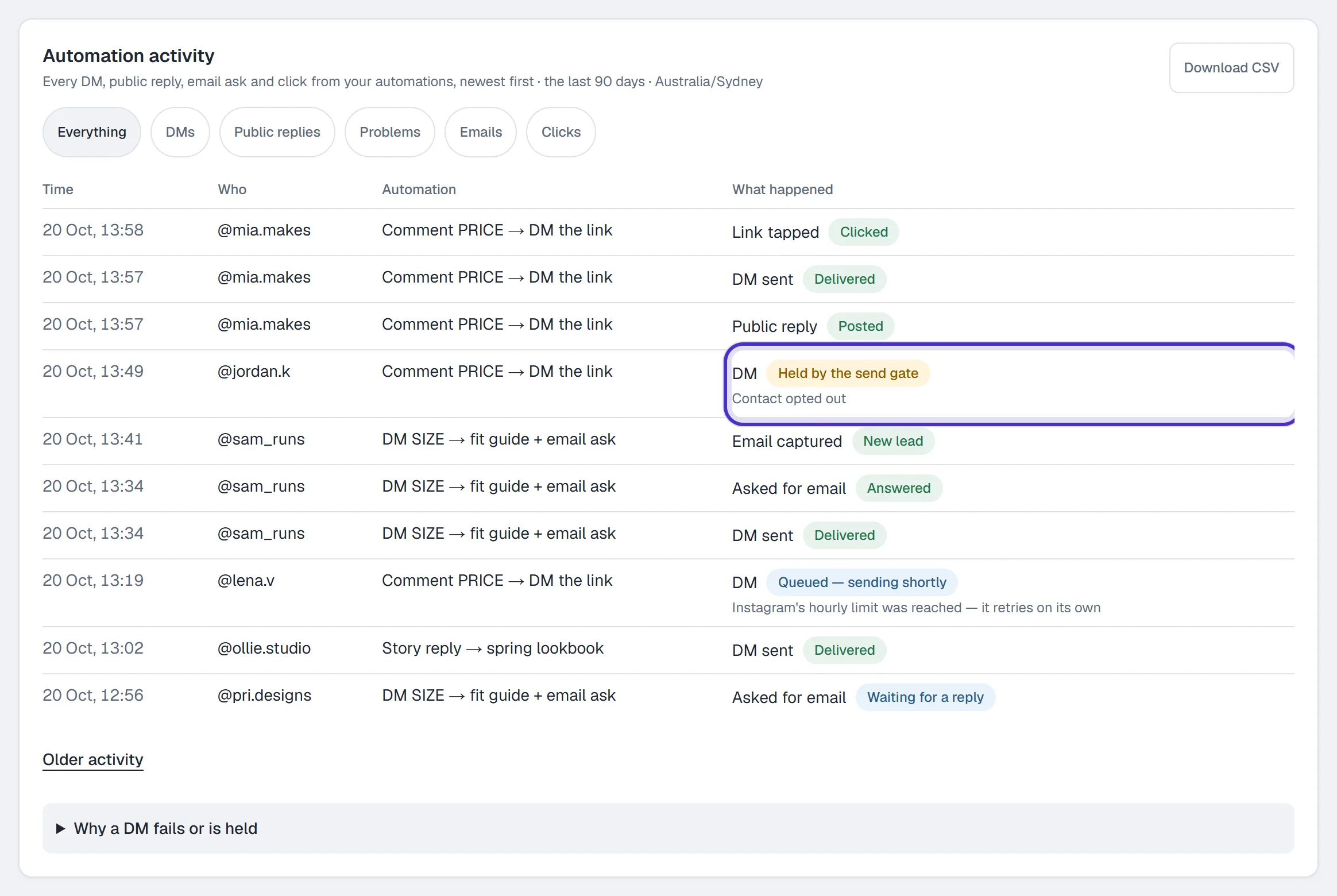
Pick Everything, DMs, Public replies, Problems, Emails or Clicks to narrow it, and Older activity to go further back. A held DM shows as held, with the reason, because holding it is the send gate doing its job. It isn't a failure. Download CSV is on Growth and up, and leaves out message text and email addresses.
Below the log, Answered vs. held and Compliance activity ignore any range on purpose: they use your workspace's timezone week and print that week on their face. Both are on every plan.
Team shows your team's own work in the Inbox on Growth and up, and it needs the team inbox on. First teammate reply counts teammates only, so AI and automation replies never count there. Below Growth the tab says its report is on Growth and up.
What each plan unlocks
| Plan | Adds |
|---|---|
| Free | Highlights except top country, key metrics, top automations, the automation table, delivery this week, contacts, what your agent couldn't answer, the trust cards and a 7-day activity log |
| Starter | Trends, the daily chart in an automation's panel, how the AI agent is doing and a 30-day activity log |
| Growth | How fast you reply, where your contacts came from, when your customers message, do your contacts come back, revenue, folder totals, Content performance, the Team report, Conversions and a 90-day activity log with Download CSV |
| Pro | Where your link taps come from, Who comments, top country, 6- and 12-month ranges and a custom start date |
| Agency | Everything Pro shows on this page |
A card your plan doesn't include says which plan it needs, with a link to upgrade.
Reading the numbers honestly
- DMs sent, clicks and captured emails are separate event totals. Click-through is taps per DM sent in the same window, so it isn't the share of people who tapped, and it isn't proof of a sale.
- Click-through can run high. One person tapping three times is three taps, and a tap in your window can belong to a DM sent before it.
- Only tracked links count. A link typed into a message's text goes out as written, and an automation link with a variable in it isn't tracked, so neither adds to clicks.
- Leave your own test conversations out when you compare one automation with another.
- Revenue counts paid orders recorded from your connected store or checkout in the last 14 days, one currency at a time, so it won't always match your Shopify or Stripe dashboard. Revenue by automation credits a sale to the most recent tracked tap.
FAQ
Why is an Analytics card replaced with an explanation?
It needs a higher plan, and the card says which. Your key metrics, the automation table, the trust cards and the questions your agent couldn't answer stay on every plan.
Where did the Reports tab go?
Its cards moved. Where your contacts came from, When your customers message and Do your contacts come back? are on Audience, and How fast you reply is on AI agent. A saved link to Reports opens Audience.
Why doesn't the Revenue tile match my Shopify or Stripe dashboard?
It counts paid orders recorded from your connected store or checkout over the last 14 days, one currency at a time, with other currencies counted separately.
Is click-through the share of people who tapped?
No. It divides taps by DMs sent in the same window, repeat taps included, and a tap can come from a DM sent earlier, so treat it as a rate of activity rather than a rate per person.
Why do the delivery cards ignore my date range?
They use your workspace's timezone week on purpose, and each card prints its own window so the two can't be confused.
What is in the Analytics CSV export?
The daily counters for the window on every plan, plus inbound messages per day, first-response times and new contacts by source on Growth and up. Customer questions and contact identities are never included.