See your invoices, card and next payment
Where your invoices, the card on file, your billing details and your next payment are in HyperDM, and what each one shows.
Everything about what you pay lives in Settings → Billing & usage. Only the workspace owner can see and manage it. Other roles see "Only the workspace owner can manage billing."
We're moving your invoices and card into HyperDM itself, workspace by workspace. Depending on your workspace, the Billing & usage tab shows them in one of two ways:
- In HyperDM: a Next payment line on your plan, then Payment method, Billing details and Invoices. This page describes that view.
- In Stripe's billing portal: an Invoices & payment method row with Open billing portal. Click it to see invoices and change your card on Stripe's page. You come back here when you're done.
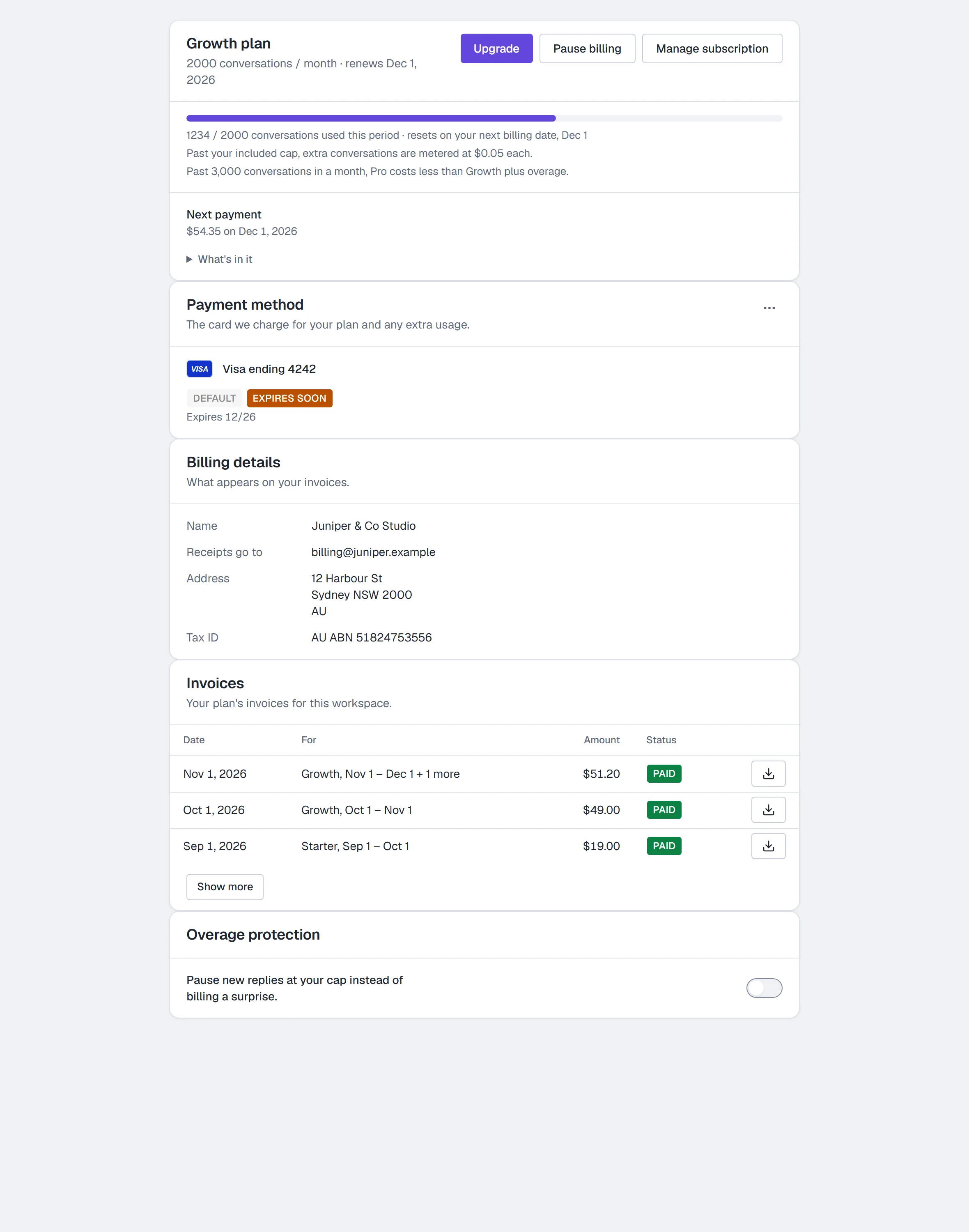
Your next payment
On your plan, Next payment says how much and when: for example "$49.00 on Dec 1, 2026". Dates are in your workspace's time zone.
- Click What's in it to see the lines: your plan, any extra conversations, and any discount, account credit and tax. AI credit packs aren't part of it: they're paid when you buy them.
- On a free trial it reads "$0 today · first payment {amount} on {date}".
- When your plan is cancelling it reads "No more payments. Your plan ends {date}."
- There's no Next payment line on Free, while billing is paused, or while a payment is overdue (the notice at the top of the tab says what to do then).
Your card
Payment method shows the card your plan is charged to: the brand, the last four digits, when it expires, and Default.
- Expires soon means the card expires within 30 days. Expired means it already has. Update it before your next payment so the charge goes through.
- To change the card for now, click the ⋯ button on Payment method and choose Open Stripe billing portal. Changing the card inside HyperDM is coming next.
We never see or store your full card number. Stripe, our payment provider, keeps it.
Your billing details
Billing details shows what appears on your invoices: your name or business name, the email receipts go to, your address and any tax ID (for example "AU ABN 51824753556"). A detail you haven't added reads "Not added". To change them for now, click the ⋯ button on Payment method and choose Open Stripe billing portal.
Your invoices
Invoices lists your plan's invoices for this workspace, newest first. AI credit packs are one-time payments with their own email receipt, so they don't appear here.
- Each row shows the date, what it was for (for example "Growth, Nov 1 – Dec 1"), the amount, and a status: Paid, Unpaid, Voided (cancelled before it was due) or Written off (we stopped asking for it).
- Click the download button on a row to open its invoice PDF in a new tab.
- Click Show more at the bottom to load older invoices.
On a phone, each invoice is a card: the date and amount, what it was for, then the status and the download button.
Unpaid invoice? If your last payment didn't go through, the tab says so at the top, with Update payment method (and Pay the invoice, where it's shown). See My payment failed.
Why does the invoice say CobraCorp?
HyperDM's payments are processed by Stripe under our company's name, CobraCorp. So the invoice PDF, Stripe's receipt emails, the card check your bank may show, and the Stripe billing portal show that name. It's the same business. Your bank statement may show a different short name.
If something doesn't load
If a section says "We couldn't reach our payment provider. Try again in a minute.", click Try again. Your plan and usage above still show, and the ⋯ button's Open Stripe billing portal is always there.
Workspaces billed through an agency
If an agency pays for your workspace, the tab says "Your agency pays for this workspace. Its owner manages invoices and the card." The agency owner sees the invoices and card on their own Billing page.
More in Account & billing
- SettingsThe settings tabs: channels, main menu, commerce, integrations, billing, referrals, team, workspace & links, notifications, security, API & webhooks, Profile.Read
- Plans and billingEvery plan and what it includes, each gate, overage protection, a monthly ceiling, AI credits, what stopped your replies, and how to upgrade, pause or cancel.Read
- Roles and permissionsThe six workspace roles, what each may do, what you see instead of a control you lack, inviting teammates, changing a role and how seats are counted.Read
Try HyperDM for free
50 free conversations a month, no card. Connect Instagram and follow the guide you just read.